zerohertzLib.vision
Vision
다양한 image들을 handling하고 시각화하는 함수 및 class들
Important
Bbox의 types
cwh:[cx, cy, w, h]로 구성된 bbox ([4]or[N, 4])xyxy:[x0, y0, x1, y1]로 구성된 bbox ([4]or[N, 4])poly:[[x0, y0], [x1, y1], [x2, y2], [x3, y3]]로 구성된 bbox ([4, 2]or[N, 4, 2])
- class zerohertzLib.vision.CocoLoader(data_path, vis_path=None, class_color=None)[source]
Bases:
objectCOCO format의 dataset을 읽고 시각화하는 class
- Parameters:
- __call__()[source]
Index에 따른 image와 annotation에 대한 정보 return (
vis_path와class_color입력 시 시각화 imagevis_path에 저장)- Parameters:
idx (
int) – 입력 indexread (
Optional[bool]) – Image 읽음 여부int_class (
Optional[bool]) – 출력될 class의 type 지정
- Returns:
Image 경로 혹은 읽어온 image와 그에 따른
classes및bboxes- Return type:
Tuple[Union[str, NDArray[np.uint8]], List[Union[int, str]], NDArray[DTypeLike]]
- __getitem__()[source]
Index에 따른 image와 annotation에 대한 정보 return (
vis_path와class_color입력 시 시각화 imagevis_path에 저장)- Parameters:
idx (
int) – 입력 index- Returns:
읽어온 image와 그에 따른
classes및bboxes- Return type:
Tuple[NDArray[np.uint8], List[str], NDArray[DTypeLike]]
Examples
>>> data_path = "train"
>>> class_color = {"label1": (0, 255, 0), "label2": (255, 0, 0)}
>>> coco = zz.vision.CocoLoader(data_path, vis_path="tmp", class_color=class_color)
>>> image, class_list, bboxes = coco(0, False, True)
>>> type(image)
<class 'str'>
>>> image
'{IMAGE_PATH}.jpg'
>>> class_list
[0, 1]
>>> type(bboxes)
<class 'numpy.ndarray'>
>>> bboxes.shape
(2, 4)
>>> image, class_list, bboxes = coco[0]
>>> type(image)
<class 'numpy.ndarray'>
>>> class_list
['label1', 'label2']
>>> type(bboxes)
<class 'numpy.ndarray'>
>>> bboxes.shape
(2, 4)
- yolo(target_path, label=None)[source]
COCO format을 YOLO format으로 변환
- Parameters:
- Returns:
{target_path}/images및{target_path}/labels에 image와 .txt file 저장- Return type:
None
Examples
>>> coco = zz.vision.CocoLoader(data_path)
>>> coco.yolo(target_path)
100%|█████████████| 476/476 [00:00<00:00, 78794.25it/s]
>>> label = ["label1", "label2"]
>>> cooc.yolo(target_path, label)
100%|█████████████| 476/476 [00:00<00:00, 78794.25it/s]
- class zerohertzLib.vision.ImageLoader(path='./', cnt=1)[source]
Bases:
object경로와 image의 수를 지정하여 경로 내 image를 return하는 class
- image_paths
지정한 경로 내 image들의 경로
- Type:
List[str]
- __getitem__()[source]
- Parameters:
idx (
int) – 입력 index- Returns:
cnt에 따른 file 경로 및 image 값- Return type:
Union[Tuple[str, NDArray[np.uint8]], Tuple[List[str], List[NDArray[np.uint8]]]
Examples
>>> il = zz.vision.ImageLoader()
>>> len(il)
510
>>> il[0][0]
'./1.2.410.200001.1.9999.1.20220513101953581.1.1.jpg'
>>> il[0][1].shape
(480, 640, 3)
>>> il = zz.vision.ImageLoader(cnt=4)
>>> len(il)
128
>>> il[0][0]
['./1.2.410.200001.1.9999.1.20220513101953581.1.1.jpg', '...', '...', '...']
>>> il[0][1][0].shape
(480, 640, 3)
>>> len(il[0][0])
4
>>> len(il[0][1])
4
- class zerohertzLib.vision.JsonImageLoader(data_path, json_path, json_key)[source]
Bases:
objectJSON file을 통해 image와 JSON file 내 정보를 불러오는 class
- Parameters:
- json
JSON file들을 읽어 data 구축 시 활용
- Type:
zerohertzLib.util.JsonDir
- __getitem__()[source]
읽어온 JSON file들을 list와 같이 indexing 후 해당하는 image return
- Parameters:
idx (
int) – 입력 index- Returns:
Image와 JSON 내 정보
- Return type:
Tuple[NDArray[np.uint8], zerohertzLib.util.Json]
Examples
>>> jil = zz.vision.JsonImageLoader(data_path, json_path, json_key)
100%|█████████████| 17248/17248 [00:04<00:00, 3581.22it/s]
>>> img, js = jil[10]
>>> img.shape
(600, 800, 3)
>>> js.tree()
└─ info
    └─ name
    └─ date_created
...
- class zerohertzLib.vision.LabelStudio(data_path, json_path=None)[source]
Bases:
objectLabel Studio 관련 data를 handling하는 class
- Parameters:
- __getitem__()[source]
- Parameters:
idx (
int) – 입력 index- Returns:
Index에 따른 image file 이름 또는 경로와 JSON file에 포함될 dictionary 또는 annotation 정보
- Return type:
Union[Tuple[str, Dict[str, Dict[str, str]]], Tuple[str, Dict[str, List[Any]]]]
Examples
- Without
json_path: >>> ls = zz.vision.LabelStudio(data_path) >>> ls[0] ('0000007864.png', {'data': {'image': 'data/local-files/?d=image/0000007864.png'}}) >>> ls[1] ('0000008658.png', {'data': {'image': 'data/local-files/?d=image/0000008658.png'}})
- With
json_path: - Bbox:
>>> ls = zz.vision.LabelStudio(data_path, json_path)
>>> ls[0]
>>> ls[0]
('/PATH/TO/IMAGE', {'labels': ['label1', ...], 'polys': [array([0.39471694, 0.30683403, 0.03749811, 0.0167364 ]), ...], 'whs': [(1660, 2349), ...]})
>>> ls[1]
('/PATH/TO/IMAGE', {'labels': ['label2', ...], 'polys': [array([0.29239837, 0.30149896, 0.04013469, 0.02736506]), ...], 'whs': [(1655, 2324), ...]})
>>> ls.labels
{'label1', 'label2'}
>>> ls.type
'rectanglelabels'
- Poly:
>>> ls = zz.vision.LabelStudio(data_path, json_path)
>>> ls[0]
('/PATH/TO/IMAGE', {'labels': ['label1', ...], 'polys': [array([[0.4531892 , 0.32880674], ..., [0.46119428, 0.32580483]]), ...], 'whs': [(3024, 4032), ...]})
>>> ls[1]
('/PATH/TO/IMAGE', {'labels': ['label2', ...], 'polys': [array([[0.31973699, 0.14660367], ..., [0.29032053, 0.1484422 ]]), ...], 'whs': [(3024, 4032), ...]})
>>> ls.labels
{'label1', 'label2'}
>>> ls.type
'polygonlabels'
- classification(target_path, label=None, rand=0, shrink=True, aug=1)[source]
Label Studio로 annotation한 JSON data를 classification format으로 변환
- Parameters:
- Returns:
{target_path}/{label}/{img_file_name}_{idx}_{i}.{img_file_ext}에 image 저장 (idx: annotation의 index,i:rand의 index)- Return type:
None
Examples
>>> ls = zz.vision.LabelStudio(data_path, json_path)
>>> ls.classification(target_path)
100%|█████████████| 476/476 [00:00<00:00, 78794.25it/s]
>>> label = {"label1": "lab1", "label2": "lab2"}
>>> ls.classification(target_path, label, rand=10, aug=10, shrink=False)
100%|█████████████| 476/476 [00:00<00:00, 78794.25it/s]
- json(data_function=None)[source]
Label Studio에 mount된 data를 불러오기 위한 JSON file 생성
Note
아래와 같이 환경 변수가 설정된 Label Studio image를 사용하고
/home/user에imagedirectory가 mount 되어야LabelStudioclass로 생성된 JSON file을 적용할 수 있다.FROM heartexlabs/label-studio ENV LABEL_STUDIO_LOCAL_FILES_SERVING_ENABLED=true ENV LABEL_STUDIO_LOCAL_FILES_DOCUMENT_ROOT=/home/user
docker run --name label-studio -p 8080:8080 -v ${PWD}/files:/home/user label-studio
Projects→{PROJECT_NAME}→Settings→Cloud Storage→Add Source Storage클릭 후 아래와 같이 정보를 기재하고Sync Storage를 누른다.Storage Type:
Local filesAbsolute local path:
/home/user/image(data_path:${PWD}/files/image)File Filter Regex:
^.*\.(jpe?g|JPE?G|png|PNG|tiff?|TIFF?)$Treat every bucket object as a source file:
True
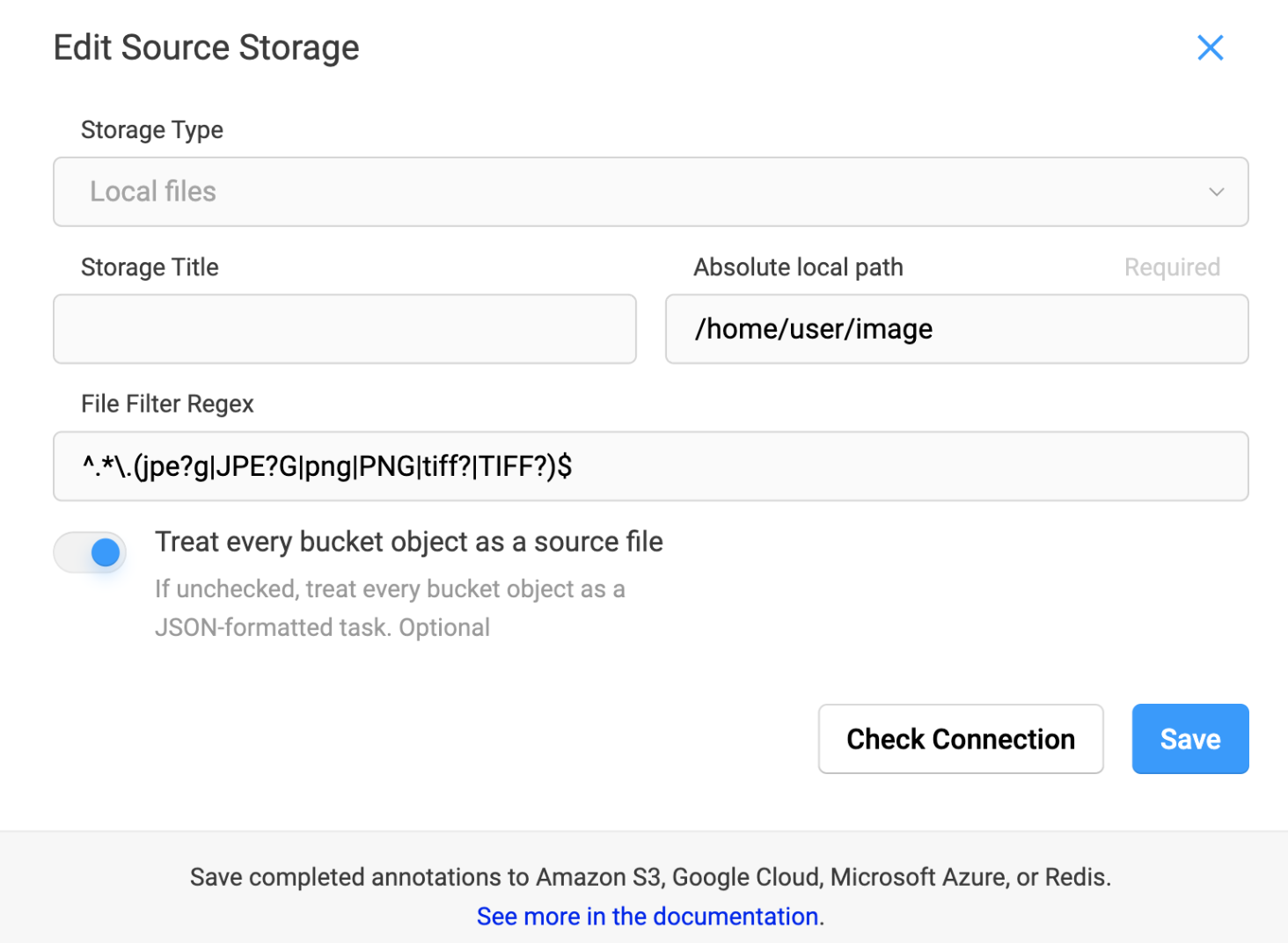
Sync 이후
LabelStudioclass로 생성된 JSON file을 Label Studio에 import하면 아래와 같이 setup 할 수 있다.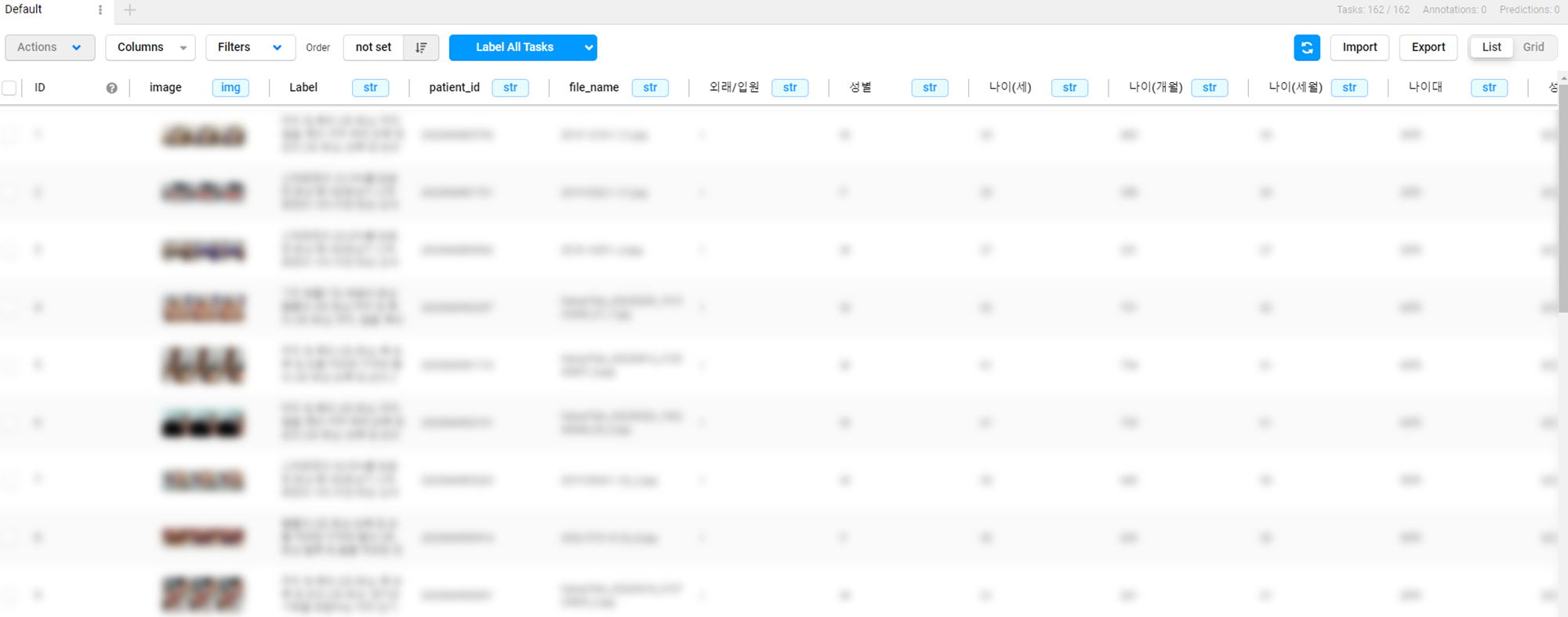
- Parameters:
data_function¶ (
Optional[Callable[[str], Dict[str, Any]]]) – Label Studio에서 사용할 수 있는data항목 추가 함수 (예시 참고)- Returns:
{data_path}.json에 결과 저장- Return type:
None
Examples
- Default:
>>> ls = zz.vision.LabelStudio(data_path)
>>> ls.json()
100%|█████████████| 476/476 [00:00<00:00, 259993.32it/s
[
    {
        "data": {
            "image": "data/local-files/?d=image/0000007864.png"
        }
    },
    {
        "data": {
            "...": "..."
        }
    },
]
- With
data_function: def data_function(file_name): return data_store[file_name]
>>> ls = zz.vision.LabelStudio(data_path)
>>> ls.json(data_function)
100%|█████████████| 476/476 [00:00<00:00, 78794.25it/s]
[
    {
        "data": {
            "image": "data/local-files/?d=image/0000007864.png",
            "Label": "...",
            "patient_id": "...",
            "file_name": "...",
            "외래/입원": "...",
            "성별": "...",
            "나이(세)": "...",
            "나이(개월)": "...",
            "나이(세월)": "...",
            "나이대": "...",
            "...": "...",
        }
    },
    {
        "data": {
            "...": "..."
        }
    },
]
- labelme(target_path, label=None)[source]
Label Studio로 annotation한 JSON data를 LabelMe format으로 변환
- Parameters:
- Returns:
{target_path}/images및{target_path}/labels에 image와 JSON file 저장- Return type:
None
Examples
>>> ls = zz.vision.LabelStudio(data_path, json_path)
>>> ls.labelme(target_path)
100%|█████████████| 476/476 [00:00<00:00, 78794.25it/s]
>>> label = {"label1": "lab1", "label2": "lab2"}
>>> ls.labelme(target_path, label)
100%|█████████████| 476/476 [00:00<00:00, 78794.25it/s]
- yolo(target_path, label=None)[source]
Label Studio로 annotation한 JSON data를 YOLO format으로 변환
- Parameters:
- Returns:
{target_path}/images및{target_path}/labels에 image와 .txt file 저장- Return type:
None
Examples
>>> ls = zz.vision.LabelStudio(data_path, json_path)
>>> ls.yolo(target_path)
100%|█████████████| 476/476 [00:00<00:00, 78794.25it/s]
>>> label = ["label1", "label2"]
>>> ls.yolo(target_path, label)
100%|█████████████| 476/476 [00:00<00:00, 78794.25it/s]
- class zerohertzLib.vision.YoloLoader(data_path='images', txt_path='labels', poly=True, absolute=False, vis_path=None, class_color=None)[source]
Bases:
objectYOLO format의 dataset을 읽고 시각화하는 class
- Parameters:
data_path¶ (
Optional[str]) – Image가 존재하는 directory 경로txt_path¶ (
Optional[str]) – YOLO format의.txt가 존재하는 directory 경로poly¶ (
Optional[bool]) –.txtfile의 format (False: detection,True: segmentation)absolute¶ (
Optional[bool]) –.txtfile의 절대 좌표계 여부 (False: relative coordinates,True: absolute coordinates)vis_path¶ (
Optional[str]) – 시각화 image들이 저장될 경로class_color¶ (
Optional[Dict[Union[int, str], Tuple[int]]]) – 시각화 결과에 적용될 class에 따른 색상
- __getitem__()[source]
Index에 따른 image와
.txtfile에 대한 정보 return (vis_path와class_color입력 시 시각화 imagevis_path에 저장)- Parameters:
idx (
int) – 입력 index- Returns:
읽어온 image와 그에 따른
class_list및bbox혹은poly- Return type:
Tuple[NDArray[np.uint8], List[int], List[NDArray[DTypeLike]]]
Examples
>>> data_path = ".../images"
>>> txt_path = ".../labels"
>>> class_color = {0: (0, 255, 0), 1: (255, 0, 0), 2: (0, 0, 255)}
>>> yolo = zz.vision.YoloLoader(data_path, txt_path, poly=True, absolute=False, vis_path="tmp", class_color=class_color)
>>> image, class_list, objects = yolo[0]
>>> type(image)
<class 'numpy.ndarray'>
>>> class_list
[1, 1]
>>> len(objects)
2
- zerohertzLib.vision.bbox(img, box, color=(0, 0, 255), thickness=2)[source]
여러 Bbox 시각화
- Parameters:
- Returns:
시각화 결과 (
[H, W, C])- Return type:
NDArray[np.uint8]
Examples
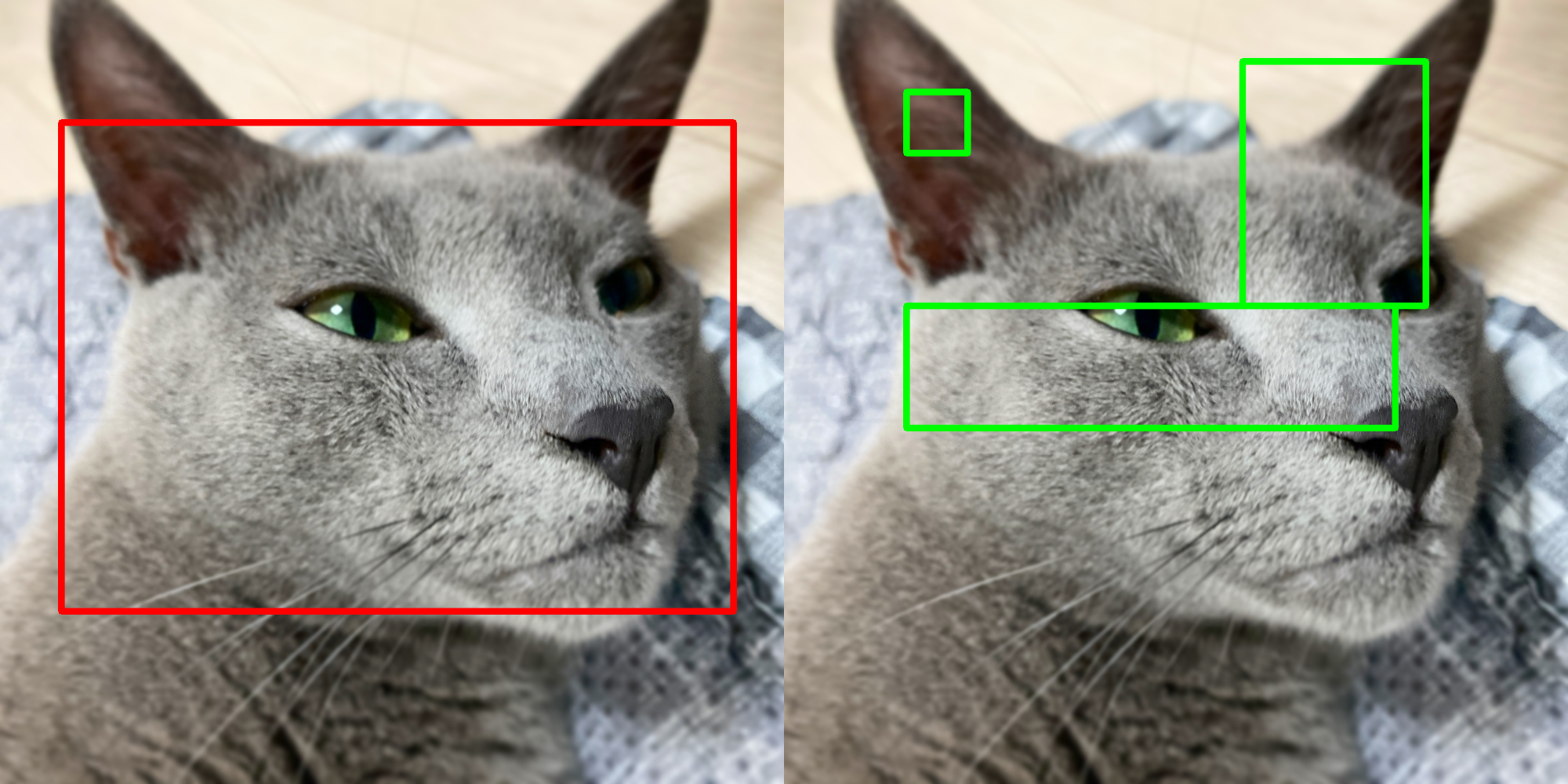
- Bbox:
>>> box = np.array([[100, 200], [100, 1000], [1200, 1000], [1200, 200]])
>>> box.shape
(4, 2)
>>> res1 = zz.vision.bbox(img, box, thickness=10)
- Bboxes:
>>> boxes = np.array([[250, 200, 100, 100], [600, 600, 800, 200], [900, 300, 300, 400]])
>>> boxes.shape
(3, 4)
>>> res2 = zz.vision.bbox(img, boxes, (0, 255, 0), thickness=10)
- zerohertzLib.vision.before_after(before, after, area=None, per=True, quality=100, file_name='tmp')[source]
두 image를 비교하는 image 생성
- Parameters:
- Returns:
현재 directory에 바로 image 저장
- Return type:
None
Examples
- BGR, GRAY:
>>> after = cv2.GaussianBlur(before, (0, 0), 25)
>>> after = cv2.cvtColor(after, cv2.COLOR_BGR2GRAY)
>>> zz.vision.before_after(before, after, quality=10)
- BGR, Resize:
>>> after = cv2.resize(before, (100, 100))
>>> zz.vision.before_after(before, after, [20, 40, 30, 60])
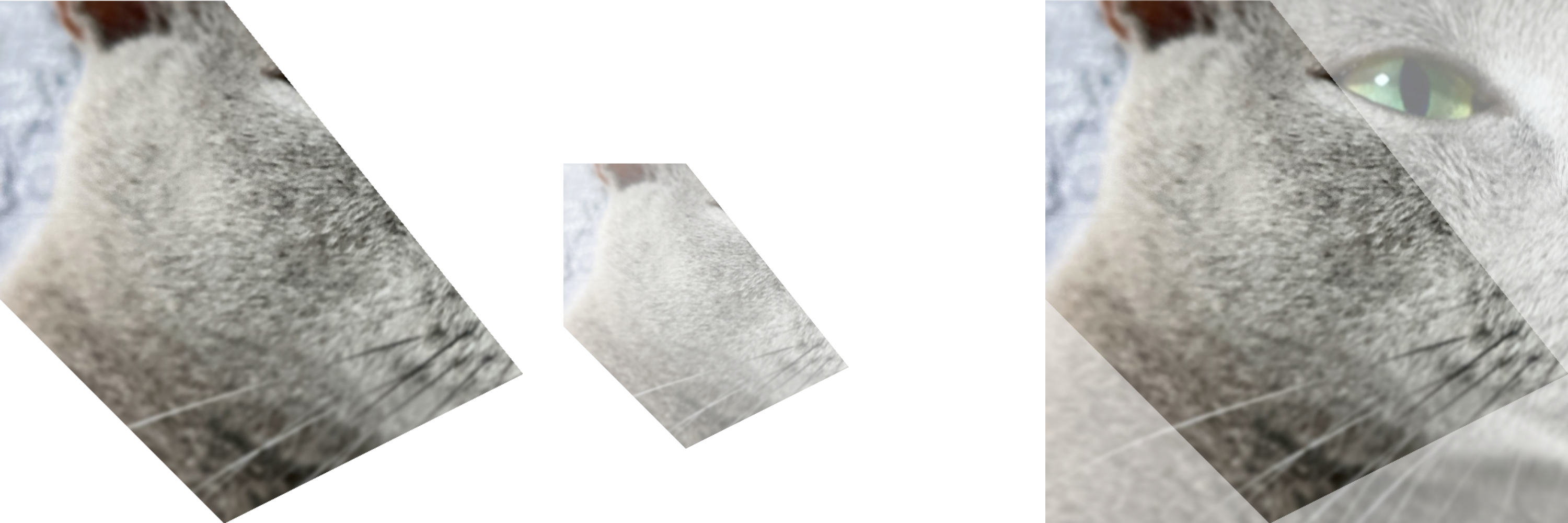
- zerohertzLib.vision.cutout(img, poly, alpha=255, crop=True, background=0)[source]
Image 내에서 지정한 좌표를 제외한 부분을 투명화
- Parameters:
- Returns:
출력 image (
[H, W, 4])- Return type:
NDArray[np.uint8]
Examples
>>> poly = np.array([[100, 400], [400, 400], [800, 900], [400, 1100], [100, 800]])
>>> res1 = zz.vision.cutout(img, poly)
>>> res2 = zz.vision.cutout(img, poly, 128, False)
>>> res3 = zz.vision.cutout(img, poly, background=128)
- zerohertzLib.vision.cwh2poly(box)[source]
Bbox 변환
- Parameters:
box¶ (
Union[List[Union[int, float]], NDArray[DTypeLike]]) –[cx, cy, w, h]로 구성된 bbox ([4]or[N, 4])- Returns:
[[x0, y0], [x1, y1], [x2, y2], [x3, y3]]로 구성된 bbox ([4, 2]or[N, 4, 2])- Return type:
NDArray[DTypeLike]
Examples
>>> zz.vision.cwh2poly([20, 30, 20, 20])
array([[10, 20],
       [30, 20],
       [30, 40],
       [10, 40]])
>>> zz.vision.cwh2poly(np.array([[20, 30, 20, 20], [50, 75, 40, 50]]))
array([[[ 10,  20],
        [ 30,  20],
        [ 30,  40],
        [ 10,  40]],
       [[ 30,  50],
        [ 70,  50],
        [ 70, 100],
        [ 30, 100]]])
- zerohertzLib.vision.cwh2xyxy(box)[source]
Bbox 변환
- Parameters:
box¶ (
Union[List[Union[int, float]], NDArray[DTypeLike]]) –[cx, cy, w, h]로 구성된 bbox ([4]or[N, 4])- Returns:
[x0, y0, x1, y1]로 구성된 bbox ([4]or[N, 4])- Return type:
NDArray[DTypeLike]
Examples
>>> zz.vision.cwh2xyxy([20, 30, 20, 20])
array([10, 20, 30, 40])
>>> zz.vision.cwh2xyxy(np.array([[20, 30, 20, 20], [50, 75, 40, 50]]))
array([[ 10,  20,  30,  40],
       [ 30,  50,  70, 100]])
- zerohertzLib.vision.evaluation(ground_truths, inferences, confidences, gt_classes=None, inf_classes=None, file_name=None, threshold=0.5)[source]
단일 이미지 내 detection model의 추론 성능 평가
- Parameters:
ground_truths¶ (
NDArray[DTypeLike]) – Ground truth object들의 polygon ([N, 4, 2],[[[x_0, y_0], [x_1, y_1], ...], ...])inferences¶ (
NDArray[DTypeLike]) – Model이 추론한 각 object들의 polygon ([M, 4, 2],[[[x_0, y_0], [x_1, y_1], ...], ...])confidences¶ (
List[float]) – Model이 추론한 각 object들의 confidence([M])gt_classes¶ (
Optional[List[str]]) – Ground truth object들의 class ([N])inf_classes¶ (
Optional[List[str]]) – Model이 추론한 각 object들의 class ([M])file_name¶ (
Optional[str]) – 평가 image의 이름threshold¶ (
Optional[float]) – IoU의 threshold
Note
N: 한 이미지의 ground truth 내 존재하는 object의 수
M: 한 이미지의 inference 결과 내 존재하는 object의 수

- Returns:
단일 이미지의 model 성능 평가 결과
- Return type:
pd.DataFrame
Examples
>>> poly = np.array([[0, 0], [10, 0], [10, 10], [0, 10]])
>>> ground_truths = np.array([poly, poly + 20, poly + 40])
>>> inferences = np.array([poly, poly + 19, poly + 80])
>>> confidences = np.array([0.6, 0.7, 0.8])
>>> zz.vision.evaluation(ground_truths, inferences, confidences, file_name="test.png")
  file_name  instance  confidence  class       IoU results  gt_x0  gt_y0  gt_x1  gt_y1  gt_x2  gt_y2  gt_x3  gt_y3  inf_x0  inf_y0  inf_x1  inf_y1  inf_x2  inf_y2  inf_x3  inf_y3
0  test.png         0         0.8    0.0  0.000000      FP    NaN    NaN    NaN    NaN    NaN    NaN    NaN    NaN    80.0    80.0    90.0    80.0    90.0    90.0    80.0    90.0
1  test.png         1         0.7    0.0  0.680672      TP   20.0   20.0   30.0   20.0   30.0   30.0   20.0   30.0    19.0    19.0    29.0    19.0    29.0    29.0    19.0    29.0
2  test.png         2         0.6    0.0  1.000000      TP    0.0    0.0   10.0    0.0   10.0   10.0    0.0   10.0     0.0     0.0    10.0     0.0    10.0    10.0     0.0    10.0
3  test.png         3         0.0    0.0  0.000000      FN   40.0   40.0   50.0   40.0   50.0   50.0   40.0   50.0     NaN     NaN     NaN     NaN     NaN     NaN     NaN     NaN
>>> gt_classes = np.array(["cat", "dog", "cat"])
>>> inf_classes = np.array(["cat", "dog", "cat"])
>>> zz.vision.evaluation(ground_truths, inferences, confidences, gt_classes, inf_classes)
   instance  confidence class       IoU results  gt_x0  gt_y0  gt_x1  gt_y1  gt_x2  gt_y2  gt_x3  gt_y3  inf_x0  inf_y0  inf_x1  inf_y1  inf_x2  inf_y2  inf_x3  inf_y3
0         0         0.8   cat  0.000000      FP    NaN    NaN    NaN    NaN    NaN    NaN    NaN    NaN    80.0    80.0    90.0    80.0    90.0    90.0    80.0    90.0
1         1         0.6   cat  1.000000      TP    0.0    0.0   10.0    0.0   10.0   10.0    0.0   10.0     0.0     0.0    10.0     0.0    10.0    10.0     0.0    10.0
2         2         0.0   cat  0.000000      FN   40.0   40.0   50.0   40.0   50.0   50.0   40.0   50.0     NaN     NaN     NaN     NaN     NaN     NaN     NaN     NaN
3         3         0.7   dog  0.680672      TP   20.0   20.0   30.0   20.0   30.0   30.0   20.0   30.0    19.0    19.0    29.0    19.0    29.0    29.0    19.0    29.0
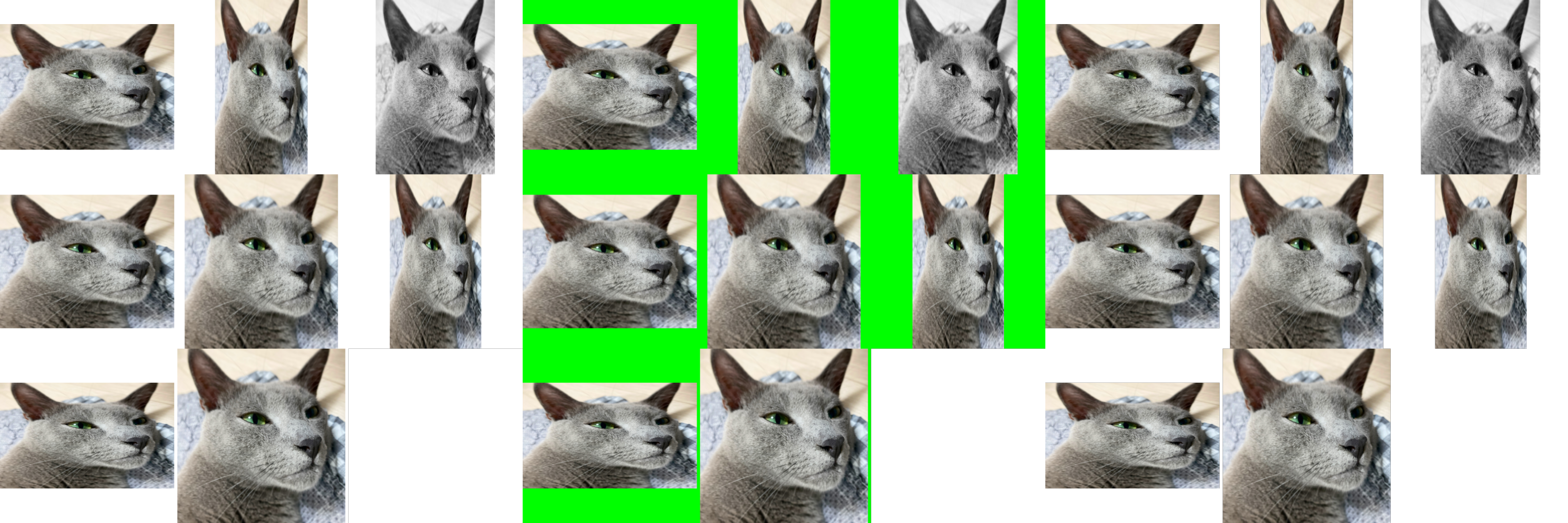
- zerohertzLib.vision.grid(imgs, size=1000, color=(255, 255, 255), file_name='tmp')[source]
여러 image를 입력받아 한 정방형 image로 병합
- Parameters:
- Returns:
현재 directory에 바로 image 저장
- Return type:
None
Examples
>>> imgs = [cv2.resize(img, (random.randrange(300, 1000), random.randrange(300, 1000))) for _ in range(8)]
>>> imgs[2] = cv2.cvtColor(imgs[2], cv2.COLOR_BGR2GRAY)
>>> imgs[3] = cv2.cvtColor(imgs[3], cv2.COLOR_BGR2BGRA)
>>> zz.vision.grid(imgs)
>>> zz.vision.grid(imgs, color=(0, 255, 0))
>>> zz.vision.grid(imgs, color=(0, 0, 0, 0))
- zerohertzLib.vision.img2gif(path, file_name='tmp', duration=500)[source]
Directory 내 image들을 GIF로 변환
- Parameters:
- Returns:
현재 directory에 바로 GIF 저장
- Return type:
None
Examples
>>> zz.vision.img2gif("./")

- zerohertzLib.vision.iou(poly1, poly2)[source]
IoU (Intersection over Union)를 계산하는 함수
- Parameters:
- Returns:
IoU 값
- Return type:
float
Examples
>>> poly1 = np.array([[0, 0], [10, 0], [10, 10], [0, 10]])
>>> poly2 = poly1 + (5, 0)
>>> poly2
array([[ 5,  0],
       [15,  0],
       [15, 10],
       [ 5, 10]])
>>> zz.vision.iou(poly1, poly2)
0.3333333333333333
- zerohertzLib.vision.is_pts_in_poly(poly, pts)[source]
지점들의 좌표 내 존재 여부 확인 함수
- Parameters:
- Returns:
입력
point의 다각형poly내부 존재 여부- Return type:
Union[bool, NDArray[bool]]
Examples
>>> poly = np.array([[10, 10], [20, 10], [30, 40], [20, 60], [10, 20]])
>>> zz.vision.is_pts_in_poly(poly, [20, 20])
True
>>> zz.vision.is_pts_in_poly(poly, [[20, 20], [100, 100]])
array([ True, False])
>>> zz.vision.is_pts_in_poly(poly, np.array([20, 20]))
True
>>> zz.vision.is_pts_in_poly(poly, np.array([[20, 20], [100, 100]]))
array([ True, False])
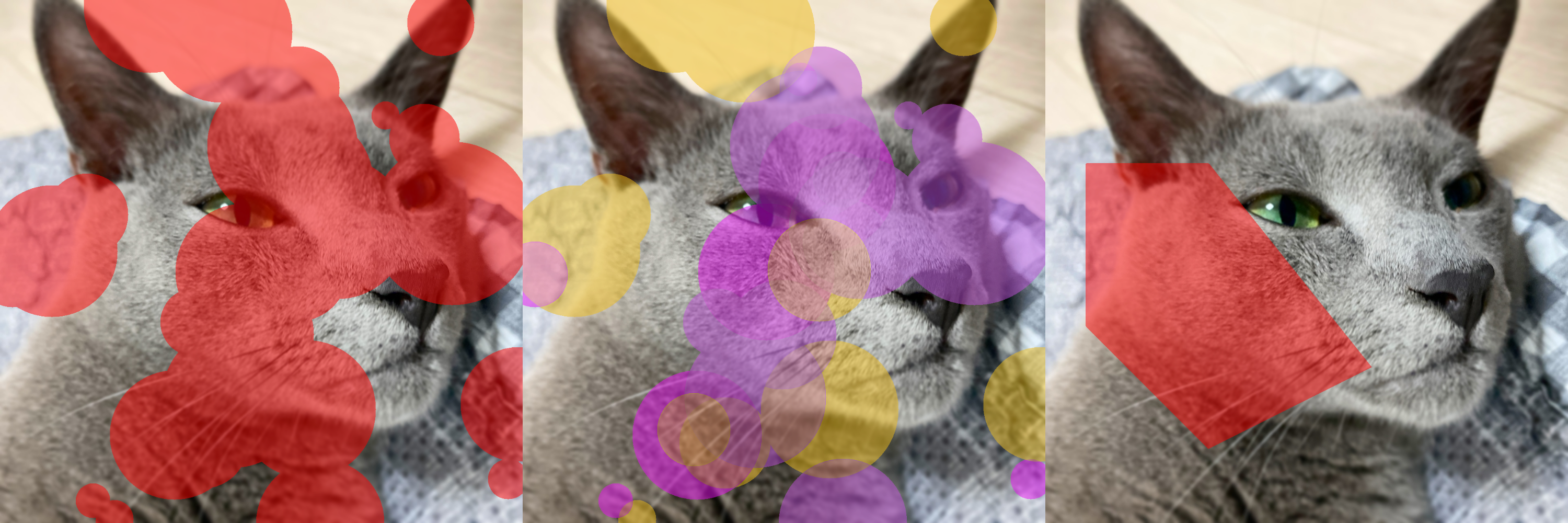
- zerohertzLib.vision.mask(img, mks=None, poly=None, color=(0, 0, 255), class_list=None, class_color=None, border=True, alpha=0.5)[source]
Mask 시각화
- Parameters:
img¶ (
NDArray[np.uint8]) – 입력 image ([H, W, C])mks¶ (
Optional[NDArray[bool]]) – 입력 image 위에 병합할 mask ([H, W]or[N, H, W])poly¶ (
Optional[NDArray[DTypeLike]]) – 입력 image 위에 병합할 mask ([N, 2])color¶ (
Optional[Tuple[int]]) – Mask의 색class_list¶ (
Optional[List[Union[int, str]]]) –mks의 index에 따른 classclass_color¶ (
Optional[Dict[Union[int, str], Tuple[int]]]) – Class에 따른 색 (color무시)border¶ (
Optional[bool]) – Mask의 경계선 표시 여부alpha¶ (
Optional[float]) – Mask의 투명도
- Returns:
시각화 결과 (
[H, W, C])- Return type:
NDArray[np.uint8]
Examples
- Mask (without class):
>>> H, W, _ = img.shape
>>> cnt = 30
>>> mks = np.zeros((cnt, H, W), np.uint8)
>>> for mks_ in mks:
>>>     center_x = random.randint(0, W)
>>>     center_y = random.randint(0, H)
>>>     radius = random.randint(30, 200)
>>>     cv2.circle(mks_, (center_x, center_y), radius, (True), -1)
>>> mks = mks.astype(bool)
>>> res1 = zz.vision.mask(img, mks)
- Mask (with class):
>>> cls = [i for i in range(cnt)]
>>> class_list = [cls[random.randint(0, 2)] for _ in range(cnt)]
>>> class_color = {}
>>> for c in cls:
>>>     class_color[c] = [random.randint(0, 255) for _ in range(3)]
>>> res2 = zz.vision.mask(img, mks, class_list=class_list, class_color=class_color)
- Poly:
>>> poly = np.array([[100, 400], [400, 400], [800, 900], [400, 1100], [100, 800]])
>>> res3 = zz.vision.mask(img, poly=poly)
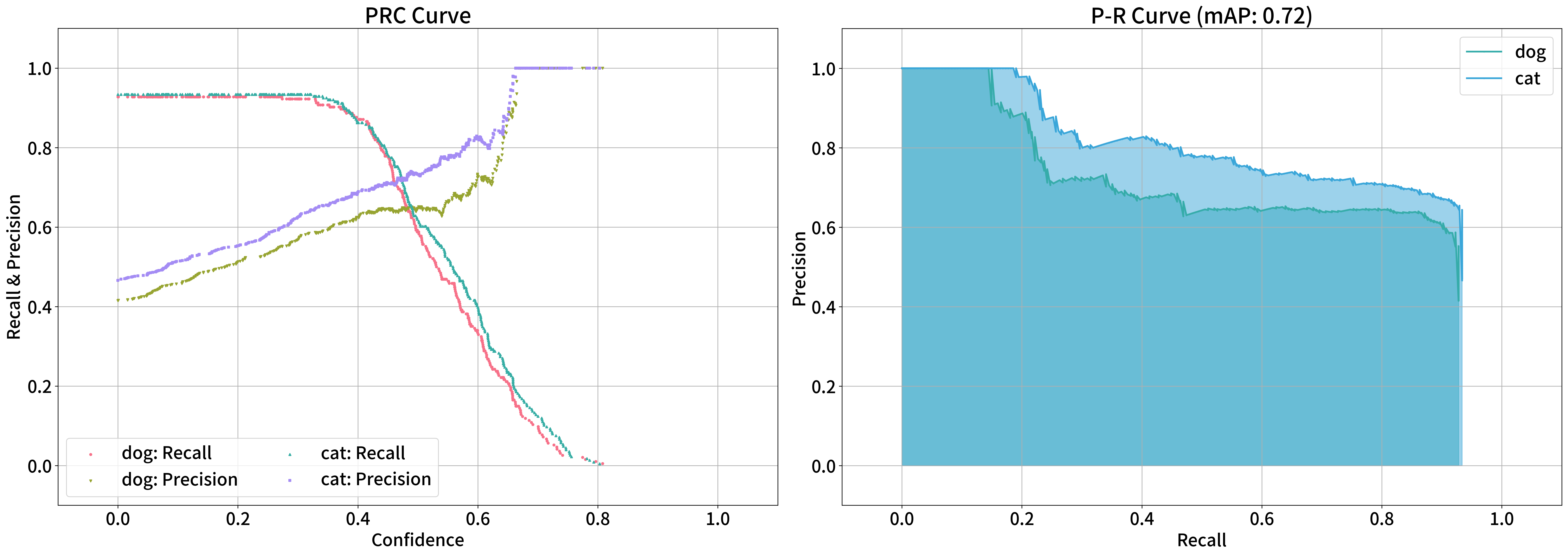
- zerohertzLib.vision.meanap(logs)[source]
Detection model의 P-R curve 시각화 및 mAP 산출
- Parameters:
logs¶ (
pd.DataFrame) –zz.vision.evaluation함수를 통해 평가된 결과- Returns:
mAP 값 및 class에 따른 AP 값 (시각화 결과는
prc_curve.png,pr_curve.png로 현재 directory에 저장)- Return type:
Tuple[float, Dict[str, float]]
Examples
>>> logs1 = zz.vision.evaluation(ground_truths_1, inferences_1, confidences_1, gt_classes, inf_classes, file_name="test_1.png")
>>> logs2 = zz.vision.evaluation(ground_truths_2, inferences_2, confidences_2, gt_classes, inf_classes, file_name="test_2.png")
>>> logs = pd.concat([logs1, logs2], ignore_index=True)
>>> zz.vision.meanap(logs)
(0.7030629916206652, defaultdict(<class 'float'>, {'dog': 0.7177078883735305, 'cat': 0.6884180948677999}))
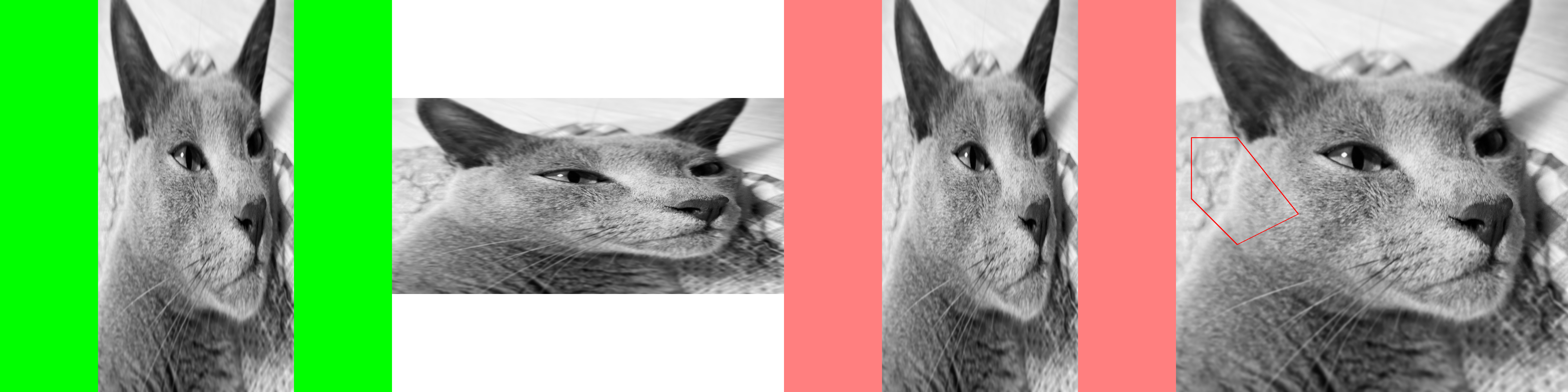
- zerohertzLib.vision.pad(img, shape, color=(255, 255, 255), poly=None)[source]
입력 image를 원하는 shape로 resize 및 pad
- Parameters:
- Returns:
출력 image (
[H, W, C]) 및poly입력 시 padding에 따른 변형된 좌표값- Return type:
Union[NDArray[np.uint8], Tuple[NDArray[np.uint8], NDArray[DTypeLike]]]
Examples
- GRAY:
>>> img = cv2.cvtColor(img, cv2.COLOR_BGRA2GRAY)
>>> res1 = cv2.resize(img, (500, 1000))
>>> res1 = zz.vision.pad(res1, (1000, 1000), color=(0, 255, 0))
- BGR:
>>> res2 = cv2.resize(img, (1000, 500))
>>> res2 = zz.vision.pad(res2, (1000, 1000))
- BGRA:
>>> img = cv2.cvtColor(img, cv2.COLOR_BGR2BGRA)
>>> res3 = cv2.resize(img, (500, 1000))
>>> res3 = zz.vision.pad(res3, (1000, 1000), color=(0, 0, 255, 128))
- Poly:
>>> poly = np.array([[100, 400], [400, 400], [800, 900], [400, 1100], [100, 800]])
>>> res4 = cv2.resize(img, (2000, 1000))
>>> res4 = zz.vision.bbox(res4, poly, color=(255, 0, 0), thickness=20)
>>> res4, poly = zz.vision.pad(res4, (1000, 1000), poly=poly)
>>> res4 = zz.vision.bbox(img, poly, color=(0, 0, 255))
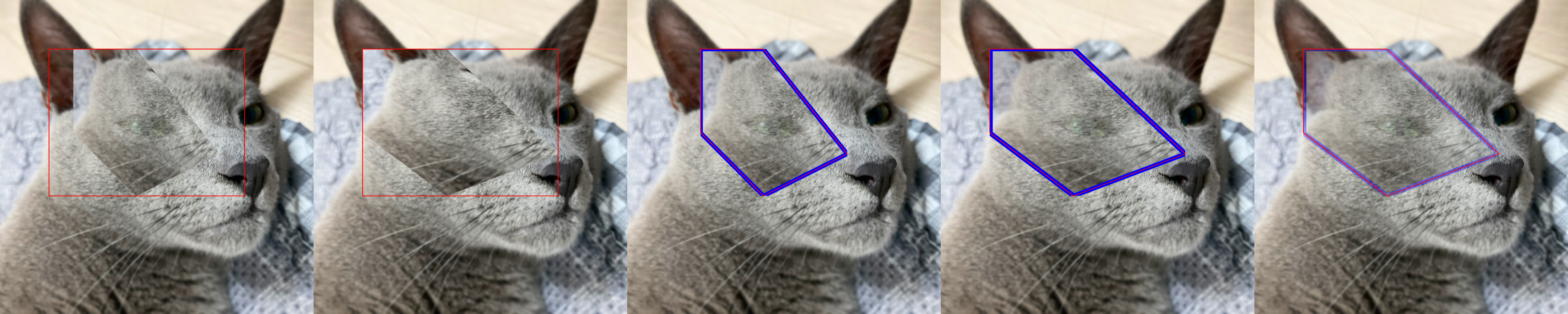
- zerohertzLib.vision.paste(img, target, box, resize=False, vis=False, poly=None, alpha=None, gaussian=None)[source]
targetimage를img위에 투명도를 포함하여 병합Note
PIL.Image.paste를numpy와cv2기반으로 구현>>> img = Image.open("test.png").convert("RGBA") >>> target = Image.open("target.png").convert("RGBA") >>> img.paste(target, (0, 0), target)
- Parameters:
img¶ (
NDArray[np.uint8]) – 입력 image ([H, W, C])target¶ (
NDArray[np.uint8]) – Target image ([H, W, 4])box¶ (
Union[List[Union[int, float]], NDArray[DTypeLike]]) – 병합될 영역 (xyxy형식)resize¶ (
Optional[bool]) – Target image의 resize 여부vis¶ (
Optional[bool]) – 지정한 영역 (box)의 시각화 여부poly¶ (
Optional[NDArray[DTypeLike]]) – 변형된 좌표 ([N, 2])alpha¶ (
Optional[int]) –targetimage의 투명도 변경gaussian¶ (
Optional[int]) – 자연스러운 병합을 위해target의 alpha channel에 적용될 Gaussian blur의 kernel size
- Returns:
시각화 결과 (
[H, W, 4]) 및poly입력 시 변형된 좌표값- Return type:
Union[NDArray[np.uint8], Tuple[NDArray[np.uint8], NDArray[DTypeLike]]]
Examples
- Without Poly:
>>> poly = np.array([[100, 400], [400, 400], [800, 900], [400, 1100], [100, 800]])
>>> target = zz.vision.cutout(img, poly, 200)
>>> res1 = zz.vision.paste(img, target, [200, 200, 1000, 800], resize=False, vis=True)
>>> res2 = zz.vision.paste(img, target, [200, 200, 1000, 800], resize=True, vis=True, alpha=255)
- With Poly:
>>> poly -= zz.vision.poly2xyxy(poly)[:2]
>>> target = zz.vision.bbox(target, poly, color=(255, 0, 0), thickness=20)
>>> res3, poly3 = zz.vision.paste(img, target, [200, 200, 1000, 800], resize=False, poly=poly)
>>> poly3
array([[300.        , 200.        ],
       [557.14285714, 200.        ],
       [900.        , 628.57142857],
       [557.14285714, 800.        ],
       [300.        , 542.85714286]])
>>> res3 = zz.vision.bbox(res3, poly3)
>>> res4, poly4 = zz.vision.paste(img, target, [200, 200, 1000, 800], resize=True, poly=poly)
>>> poly4
array([[ 200.        ,  200.        ],
       [ 542.85714286,  200.        ],
       [1000.        ,  628.57142857],
       [ 542.85714286,  800.        ],
       [ 200.        ,  542.85714286]])
>>> res4 = zz.vision.bbox(res4, poly4)
- Gaussian Blur:
>>> res5, poly5 = zz.vision.paste(img, target, [200, 200, 1000, 800], resize=True, poly=poly, gaussian=501)
>>> res5 = zz.vision.bbox(res5, poly5)
- zerohertzLib.vision.poly2area(poly)[source]
다각형의 면적을 산출하는 함수
- Parameters:
poly¶ (
Union[List[Union[int, float]], NDArray[DTypeLike]]) – 다각형 ([N, 2])- Returns:
다각형의 면적
- Return type:
float
Examples
>>> poly = [[10, 10], [20, 10], [30, 40], [20, 60], [10, 20]]
>>> zz.vision.poly2area(poly)
550.0
>>> box = np.array([[100, 200], [1200, 200], [1200, 1000], [100, 1000]])
>>> zz.vision.poly2area(box)
880000.0
- zerohertzLib.vision.poly2cwh(box)[source]
Bbox 변환
- Parameters:
box¶ (
Union[List[Union[int, float]], NDArray[DTypeLike]]) –[[x0, y0], [x1, y1], [x2, y2], [x3, y3]]로 구성된 bbox ([4, 2]or[N, 4, 2])- Returns:
[cx, cy, w, h]로 구성된 bbox ([4]or[N, 4])- Return type:
NDArray[DTypeLike]
Examples
>>> zz.vision.poly2cwh([[10, 20], [30, 20], [30, 40], [10, 40]])
array([20, 30, 20, 20])
>>> zz.vision.poly2cwh(np.array([[[10, 20], [30, 20], [30, 40], [10, 40]], [[30, 50], [70, 50], [70, 100], [30, 100]]]))
array([[20, 30, 20, 20],
       [50, 75, 40, 50]])
- zerohertzLib.vision.poly2mask(poly, shape)[source]
다각형 좌표를 입력받아 mask로 변환
- Parameters:
- Returns:
시각화 결과 (
[H, W, C])- Return type:
NDArray[bool]
Examples
>>> poly = [[10, 10], [20, 10], [30, 40], [20, 60], [10, 20]]
>>> mask = zz.vision.poly2mask(poly, (70, 100))
>>> mask.shape
(70, 100)
>>> mask.dtype
dtype('bool')

- zerohertzLib.vision.poly2ratio(poly)[source]
다각형의 bbox 대비 다각형의 면적 비율을 산출하는 함수
- Parameters:
poly¶ (
Union[List[Union[int, float]], NDArray[DTypeLike]]) – 다각형 ([N, 2])- Returns:
다각형의 bbox 대비 다각형의 비율
- Return type:
float
Examples
>>> poly = [[10, 10], [20, 10], [30, 40], [20, 60], [10, 20]]
>>> zz.vision.poly2ratio(poly)
0.55
>>> box = np.array([[100, 200], [1200, 200], [1200, 1000], [100, 1000]])
>>> zz.vision.poly2ratio(box)
1.0
- zerohertzLib.vision.poly2xyxy(box)[source]
Bbox 변환
- Parameters:
box¶ (
Union[List[Union[int, float]], NDArray[DTypeLike]]) –[[x0, y0], [x1, y1], [x2, y2], [x3, y3]]로 구성된 bbox ([4, 2]or[N, 4, 2])- Returns:
[x0, y0, x1, y1]로 구성된 bbox ([4]or[N, 4])- Return type:
NDArray[DTypeLike]
Examples
>>> zz.vision.poly2xyxy([[10, 20], [30, 20], [30, 40], [10, 40]])
array([10, 20, 30, 40])
>>> zz.vision.poly2xyxy(np.array([[[10, 20], [30, 20], [30, 40], [10, 40]], [[30, 50], [70, 50], [70, 100], [30, 100]]]))
array([[ 10,  20,  30,  40],
       [ 30,  50,  70, 100]])
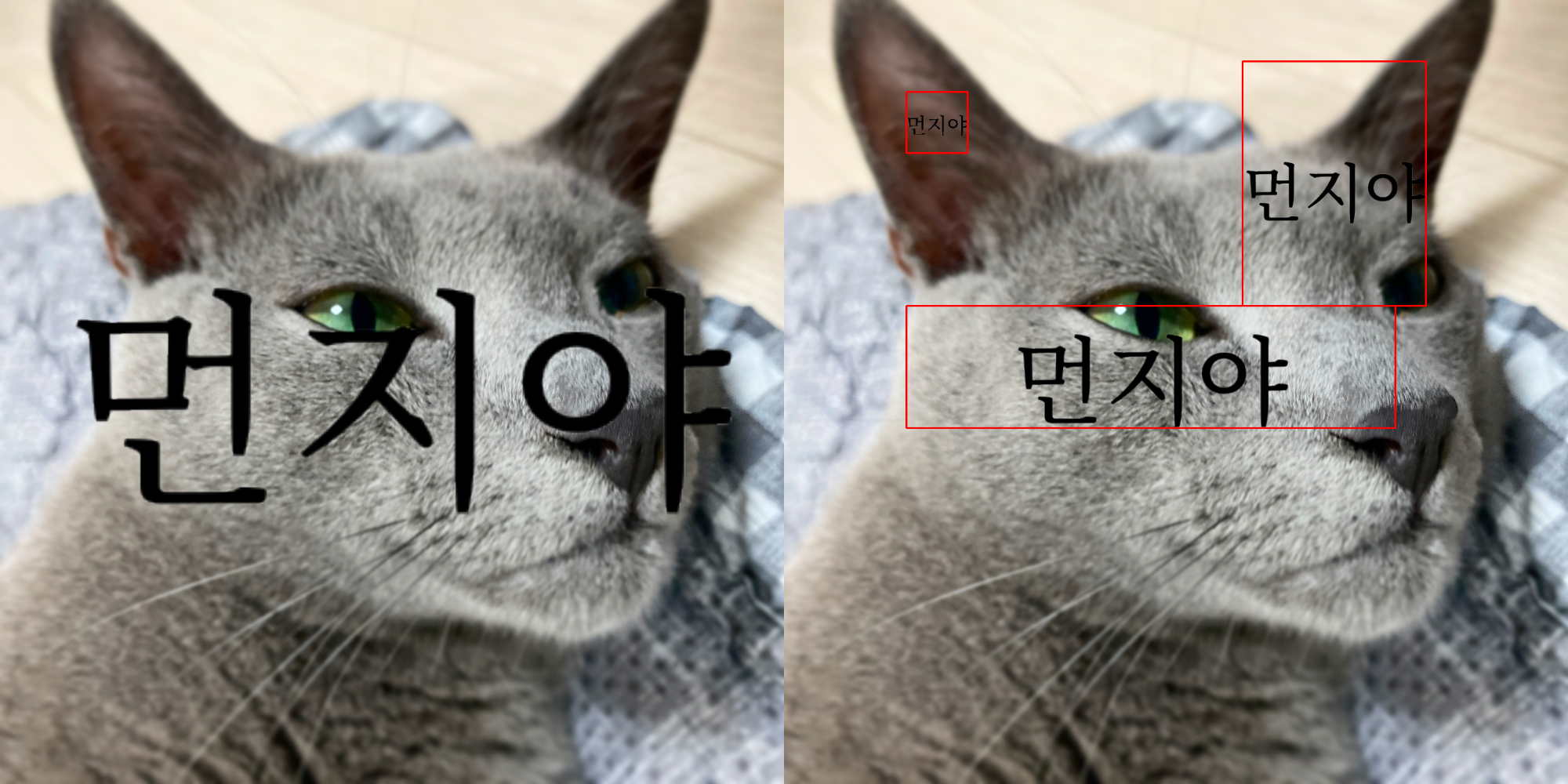
- zerohertzLib.vision.text(img, box, txt, color=(0, 0, 0), vis=False, fontsize=100)[source]
Text 시각화
- Parameters:
img¶ (
NDArray[np.uint8]) – 입력 image ([H, W, C])box¶ (
Union[List[Union[int, float]], NDArray[DTypeLike]]) – 문자열이 존재할 bbox ([4],[N, 4],[4, 2],[N, 4, 2])txt¶ (
Union[str, List[str]]) – Image에 추가할 문자열color¶ (
Optional[Tuple[int]]) – 문자의 색vis¶ (
Optional[bool]) – 문자 영역의 시각화 여부fontsize¶ (
Optional[int]) – 문자의 크기
- Returns:
시각화 결과 (
[H, W, 4])- Return type:
NDArray[np.uint8]
Examples
- Bbox:
>>> box = np.array([[100, 200], [100, 1000], [1200, 1000], [1200, 200]])
>>> box.shape
(4, 2)
>>> res1 = zz.vision.text(img, box, "먼지야")
- Bboxes:
>>> boxes = np.array([[250, 200, 100, 100], [600, 600, 800, 200], [900, 300, 300, 400]])
>>> boxes.shape
(3, 4)
>>> res2 = zz.vision.text(img, boxes, ["먼지야", "먼지야", "먼지야"], vis=True)
- zerohertzLib.vision.transparent(img, threshold=128, reverse=False)[source]
입력 image에 대해
threshold미만의 pixel들을 투명화- Parameters:
- Returns:
출력 image (
[H, W, 4])- Return type:
NDArray[np.uint8]
Examples
>>> res1 = zz.vision.transparent(img)
>>> res2 = zz.vision.transparent(img, reverse=True)

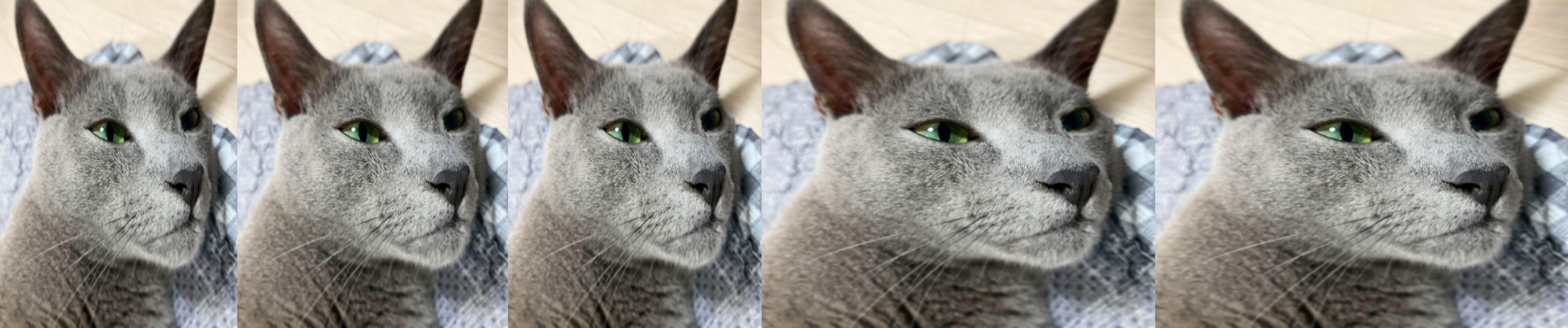
- zerohertzLib.vision.vert(imgs, height=1000, file_name='tmp')[source]
여러 image를 입력받아 한 가로 image로 병합
- Parameters:
- Returns:
현재 directory에 바로 image 저장
- Return type:
None
Examples
>>> imgs = [cv2.resize(img, (random.randrange(300, 600), random.randrange(300, 600))) for _ in range(5)]
>>> zz.vision.vert(imgs)
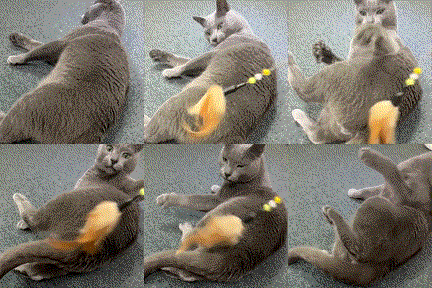
- zerohertzLib.vision.vid2gif(path, file_name='tmp', quality=100, fps=15, speed=1.0)[source]
동영상을 GIF로 변환
- Parameters:
- Returns:
현재 directory에 바로 GIF 저장
- Return type:
None
Examples
>>> zz.vision.vid2gif("test.mp4")
- zerohertzLib.vision.xyxy2cwh(box)[source]
Bbox 변환
- Parameters:
box¶ (
Union[List[Union[int, float]], NDArray[DTypeLike]]) –[x0, y0, x1, y1]로 구성된 bbox ([4]or[N, 4])- Returns:
[cx, cy, w, h]로 구성된 bbox ([4]or[N, 4])- Return type:
NDArray[DTypeLike]
Examples
>>> zz.vision.xyxy2cwh([10, 20, 30, 40])
array([20, 30, 20, 20])
>>> zz.vision.xyxy2cwh(np.array([[10, 20, 30, 40], [30, 50, 70, 100]]))
array([[20, 30, 20, 20],
       [50, 75, 40, 50]])
- zerohertzLib.vision.xyxy2poly(box)[source]
Bbox 변환
- Parameters:
box¶ (
Union[List[Union[int, float]], NDArray[DTypeLike]]) –[x0, y0, x1, y1]로 구성된 bbox ([4]or[N, 4])- Returns:
[[x0, y0], [x1, y1], [x2, y2], [x3, y3]]로 구성된 bbox ([4, 2]or[N, 4, 2])- Return type:
NDArray[DTypeLike]
Examples
>>> zz.vision.xyxy2poly([10, 20, 30, 40])
array([[10, 20],
       [30, 20],
       [30, 40],
       [10, 40]])
>>> zz.vision.xyxy2poly(np.array([[10, 20, 30, 40], [30, 50, 70, 100]]))
array([[[ 10,  20],
        [ 30,  20],
        [ 30,  40],
        [ 10,  40]],
       [[ 30,  50],
        [ 70,  50],
        [ 70, 100],
        [ 30, 100]]])