Skip to content

zerohertzLib.vision.visual

Functions:

Name Description
bbox

여러 Bbox 시각화

mask

Mask 시각화

paste

target image를 img 위에 투명도를 포함하여 병합

text

Text 시각화

_bbox

_bbox(img: NDArray[uint8], box_poly: NDArray[DTypeLike], color: tuple[int, int, int], thickness: int) -> NDArray[uint8]

Bbox 시각화

Parameters:

Name Type Description Default
img NDArray[uint8]

Input image ([H, W, C])

required
box_poly NDArray[DTypeLike]

하나의 bbox ([4, 2])

required
color tuple[int, int, int]

bbox의 색

required
thickness int

bbox 선의 두께

required

Returns:

Type Description
NDArray[uint8]

시각화 결과 ([H, W, C])

Source code in zerohertzLib/vision/visual.py
def _bbox(
    img: NDArray[np.uint8],
    box_poly: NDArray[DTypeLike],
    color: tuple[int, int, int],
    thickness: int,
) -> NDArray[np.uint8]:
    """Bbox 시각화

    Args:
        img: Input image (`[H, W, C]`)
        box_poly: 하나의 bbox (`[4, 2]`)
        color: bbox의 색
        thickness: bbox 선의 두께

    Returns:
        시각화 결과 (`[H, W, C]`)
    """
    return cv2.polylines(
        img,
        [box_poly.astype(np.int32)],
        isClosed=True,
        color=color,
        thickness=thickness,
    )

_make_text

_make_text(txt: str, shape: tuple[int, int], color: tuple[int, int, int], fontsize: int) -> NDArray[uint8]

배경이 투명한 문자열 image 생성

Parameters:

Name Type Description Default
txt str

입력 문자열

required
shape tuple[int, int]

출력 image의 shape

required
color tuple[int, int, int]

문자의 색

required
fontsize int

문자의 크기

required

Returns:

Type Description
NDArray[uint8]

시각화 결과 ([H, W, 4])

Source code in zerohertzLib/vision/visual.py
def _make_text(
    txt: str, shape: tuple[int, int], color: tuple[int, int, int], fontsize: int
) -> NDArray[np.uint8]:
    """배경이 투명한 문자열 image 생성

    Args:
        txt: 입력 문자열
        shape: 출력 image의 shape
        color: 문자의 색
        fontsize: 문자의 크기

    Returns:
        시각화 결과 (`[H, W, 4]`)
    """
    size = (1000, 1000)
    palette = Image.new("RGBA", size, (255, 255, 255, 0))
    draw = ImageDraw.Draw(palette)
    font = ImageFont.truetype(
        os.path.join(FONT_PATH, "NotoSerifKR-Medium.otf"),
        fontsize,
    )
    _, _, text_width, text_height = draw.textbbox((0, 0), txt, font=font)
    d_x, d_y = (size[0] - text_width) // 2, (size[1] - text_height) // 2
    if d_x < 0 or d_y < 0:
        raise ValueError("Input text 'txt' is too long")
    x_0, x_1 = d_x, d_x + text_width
    y_0, y_1 = d_y, d_y + text_height
    draw.text((d_x, d_y), txt, font=font, fill=(*color, 255))
    palette = np.array(palette)[y_0:y_1, x_0:x_1, :]
    return pad(palette, shape, (0, 0, 0, 0))[0]

_paste

_paste(img: NDArray[uint8], target: NDArray[uint8]) -> NDArray[uint8]

target image를 img 위에 투명도를 포함하여 병합

Parameters:

Name Type Description Default
img NDArray[uint8]

입력 image ([H, W, 4])

required
target NDArray[uint8]

Target image ([H, W, 4])

required

Returns:

Type Description
NDArray[uint8]

시각화 결과 ([H, W, 4])

Source code in zerohertzLib/vision/visual.py
def _paste(img: NDArray[np.uint8], target: NDArray[np.uint8]) -> NDArray[np.uint8]:
    """`target` image를 `img` 위에 투명도를 포함하여 병합

    Args:
        img: 입력 image (`[H, W, 4]`)
        target: Target image (`[H, W, 4]`)

    Returns:
        시각화 결과 (`[H, W, 4]`)
    """
    alpha_overlay = target[:, :, 3] / 255.0
    alpha_background = 1.0 - alpha_overlay
    for channel in range(0, 3):
        img[:, :, channel] = (
            alpha_overlay * target[:, :, channel]
            + alpha_background * img[:, :, channel]
        )
    return img

_text

_text(img: NDArray[uint8], box_cwh: NDArray[DTypeLike], txt: str, color: tuple[int, int, int], fontsize: int) -> NDArray[uint8]

단일 text 시각화

Parameters:

Name Type Description Default
img NDArray[uint8]

입력 image ([H, W, C])

required
box_cwh NDArray[DTypeLike]

문자열이 존재할 bbox ([4])

required
txt str

Image에 추가할 문자열

required
color tuple[int, int, int]

문자의 색

required
fontsize int

문자의 크기

required

Returns:

Type Description
NDArray[uint8]

시각화 결과 ([H, W, 4])

Source code in zerohertzLib/vision/visual.py
def _text(
    img: NDArray[np.uint8],
    box_cwh: NDArray[DTypeLike],
    txt: str,
    color: tuple[int, int, int],
    fontsize: int,
) -> NDArray[np.uint8]:
    """단일 text 시각화

    Args:
        img: 입력 image (`[H, W, C]`)
        box_cwh: 문자열이 존재할 bbox (`[4]`)
        txt: Image에 추가할 문자열
        color: 문자의 색
        fontsize: 문자의 크기

    Returns:
        시각화 결과 (`[H, W, 4]`)
    """
    x_0, y_0, x_1, y_1 = cwh2xyxy(box_cwh).astype(np.int32)
    width, height = x_1 - x_0, y_1 - y_0
    txt = _make_text(txt, (height, width), color, fontsize)
    img[y_0:y_1, x_0:x_1, :] = _paste(img[y_0:y_1, x_0:x_1, :], txt)
    return img

bbox

bbox(img: NDArray[uint8], box: list[int | float] | NDArray[DTypeLike], color: tuple[int, int, int] = (0, 0, 255), thickness: int = 2) -> NDArray[uint8]

여러 Bbox 시각화

Parameters:

Name Type Description Default
img NDArray[uint8]

Input image ([H, W, C])

required
box list[int | float] | NDArray[DTypeLike]

하나 혹은 여러 개의 bbox ([4], [N, 4], [4, 2], [N, 4, 2])

required
color tuple[int, int, int]

bbox의 색

(0, 0, 255)
thickness int

bbox 선의 두께

2

Returns:

Type Description
NDArray[uint8]

시각화 결과 ([H, W, C])

Examples:

Bbox: >>> box = np.array([[100, 200], [100, 1000], [1200, 1000], [1200, 200]]) >>> box.shape (4, 2) >>> res1 = zz.vision.bbox(img, box, thickness=10)

Bboxes: >>> boxes = np.array([[250, 200, 100, 100], [600, 600, 800, 200], [900, 300, 300, 400]]) >>> boxes.shape (3, 4) >>> res2 = zz.vision.bbox(img, boxes, (0, 255, 0), thickness=10)
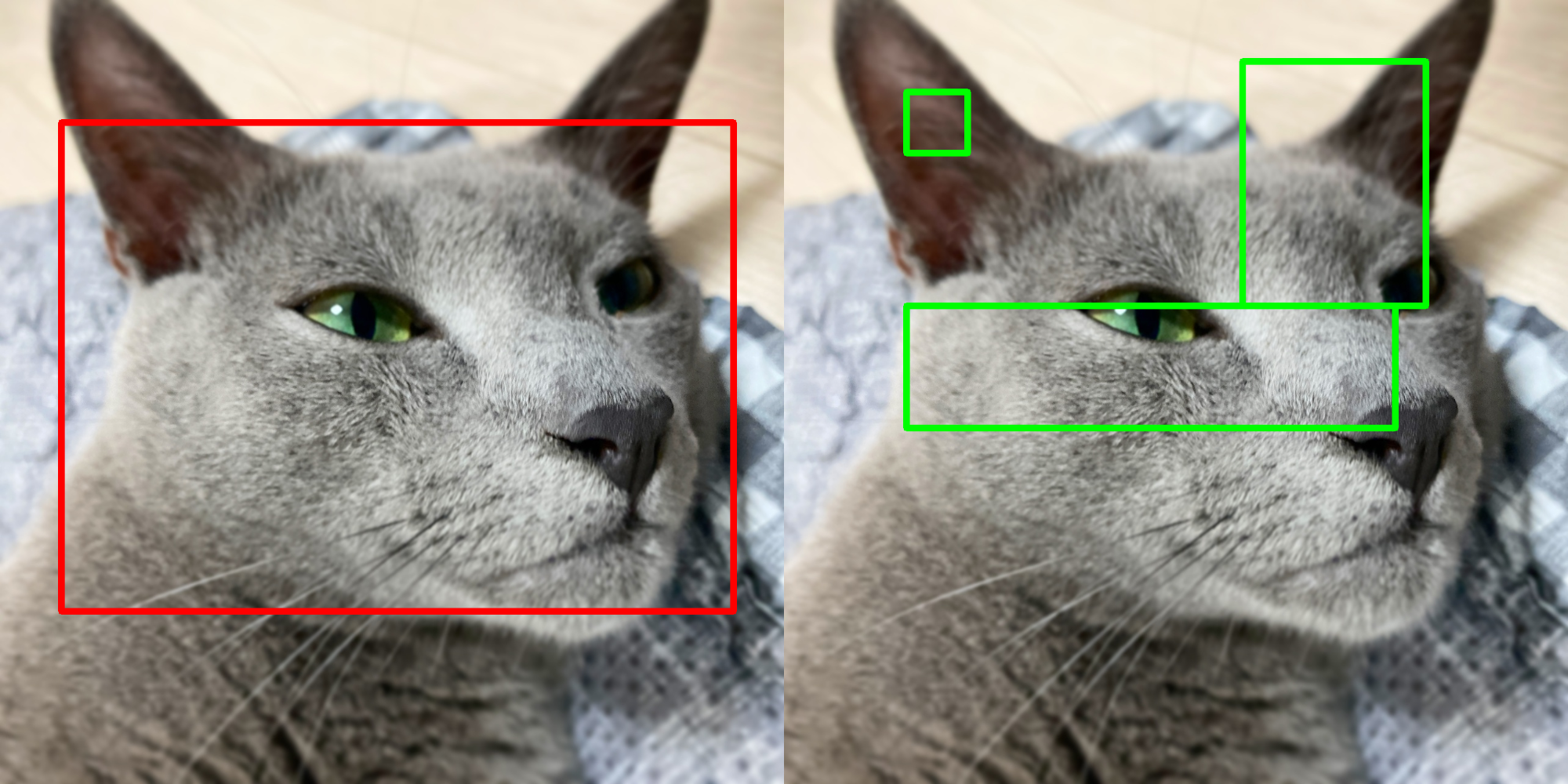
Bounding box visualization example

Source code in zerohertzLib/vision/visual.py
def bbox(
    img: NDArray[np.uint8],
    box: list[int | float] | NDArray[DTypeLike],
    color: tuple[int, int, int] = (0, 0, 255),
    thickness: int = 2,
) -> NDArray[np.uint8]:
    """여러 Bbox 시각화

    Args:
        img: Input image (`[H, W, C]`)
        box: 하나 혹은 여러 개의 bbox (`[4]`, `[N, 4]`, `[4, 2]`, `[N, 4, 2]`)
        color: bbox의 색
        thickness: bbox 선의 두께

    Returns:
        시각화 결과 (`[H, W, C]`)

    Examples:
        Bbox:
            >>> box = np.array([[100, 200], [100, 1000], [1200, 1000], [1200, 200]])
            >>> box.shape
            (4, 2)
            >>> res1 = zz.vision.bbox(img, box, thickness=10)

        Bboxes:
            >>> boxes = np.array([[250, 200, 100, 100], [600, 600, 800, 200], [900, 300, 300, 400]])
            >>> boxes.shape
            (3, 4)
            >>> res2 = zz.vision.bbox(img, boxes, (0, 255, 0), thickness=10)

        ![Bounding box visualization example](../../../assets/vision/bbox.png){ width="600" }
    """
    box = _list2np(box)
    img = img.copy()
    shape = img.shape
    if len(shape) == 2:
        img = cv2.cvtColor(img, cv2.COLOR_GRAY2BGR)
    elif shape[2] == 4 and len(color) == 3:
        color = (*color, 255)
    shape = box.shape
    multi, poly = _is_bbox(shape)
    if not poly:
        box = cwh2poly(box)
    if multi:
        for box_ in box:
            img = _bbox(img, box_, color, thickness)
    else:
        img = _bbox(img, box, color, thickness)
    return img

mask

mask(img: NDArray[uint8], mks: NDArray[bool] | None = None, poly: list[int | float] | NDArray[DTypeLike] | list[NDArray[DTypeLike]] | None = None, color: tuple[int, int, int] = (0, 0, 255), class_list: list[int | str] | None = None, class_color: dict[int | str, tuple[int, int, int]] | None = None, border: bool = True, alpha: float = 0.5) -> NDArray[uint8]

Mask 시각화

Parameters:

Name Type Description Default
img NDArray[uint8]

입력 image ([H, W, C])

required
mks NDArray[bool] | None

입력 image 위에 병합할 mask ([H, W] or [N, H, W])

None
poly list[int | float] | NDArray[DTypeLike] | list[NDArray[DTypeLike]] | None

입력 image 위에 병합할 mask ([M, 2] or [N, M, 2])

None
color tuple[int, int, int]

Mask의 색

(0, 0, 255)
class_list list[int | str] | None

mks 의 index에 따른 class

None
class_color dict[int | str, tuple[int, int, int]] | None

Class에 따른 색 (color 무시)

None
border bool

Mask의 경계선 표시 여부

True
alpha float

Mask의 투명도

0.5

Returns:

Type Description
NDArray[uint8]

시각화 결과 ([H, W, C])

Examples:

Mask:

>>> H, W, _ = img.shape
>>> cnt = 30
>>> mks = np.zeros((cnt, H, W), np.uint8)
>>> for mks_ in mks:
>>>     center_x = random.randint(0, W)
>>>     center_y = random.randint(0, H)
>>>     radius = random.randint(30, 200)
>>>     cv2.circle(mks_, (center_x, center_y), radius, (True), -1)
>>> mks = mks.astype(bool)
>>> res1 = zz.vision.mask(img, mks)
Mask:
>>> cls = [i for i in range(cnt)]
>>> class_list = [cls[random.randint(0, 5)] for _ in range(cnt)]
>>> class_color = {}
>>> for c in cls:
>>>     class_color[c] = [random.randint(0, 255) for _ in range(3)]
>>> res2 = zz.vision.mask(img, mks, class_list=class_list, class_color=class_color)
Poly:
>>> poly = np.array([[100, 400], [400, 400], [800, 900], [400, 1100], [100, 800]])
>>> res3 = zz.vision.mask(img, poly=poly)
Poly:
>>> poly = zz.vision.xyxy2poly(zz.vision.poly2xyxy((np.random.rand(cnt, 4, 2) * (W, H))))
>>> res4 = zz.vision.mask(img, poly=poly, class_list=class_list, class_color=class_color)
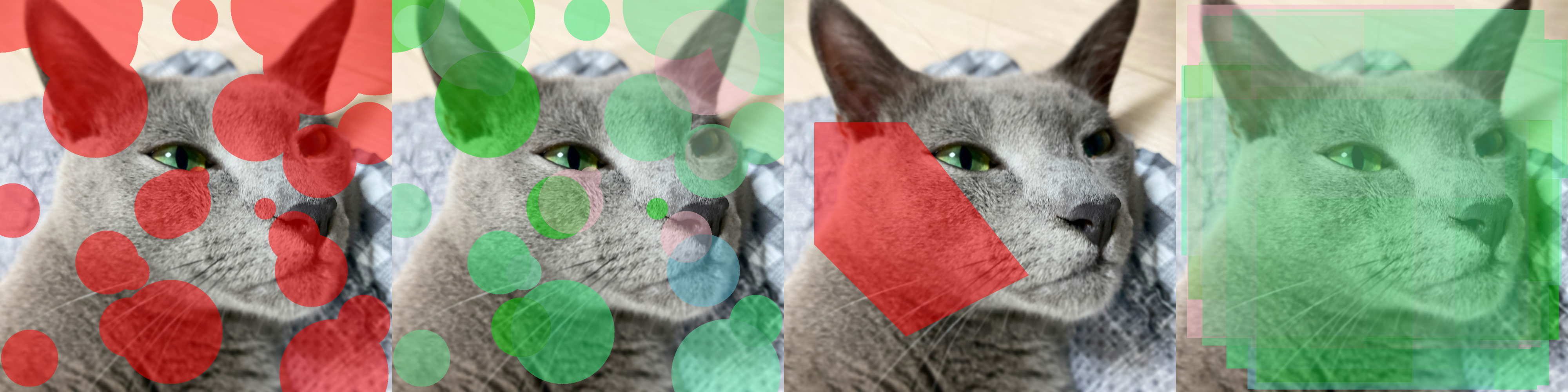
Mask visualization example

Source code in zerohertzLib/vision/visual.py
def mask(
    img: NDArray[np.uint8],
    mks: NDArray[bool] | None = None,
    poly: (
        list[int | float] | NDArray[DTypeLike] | list[NDArray[DTypeLike]] | None
    ) = None,
    color: tuple[int, int, int] = (0, 0, 255),
    class_list: list[int | str] | None = None,
    class_color: dict[int | str, tuple[int, int, int]] | None = None,
    border: bool = True,
    alpha: float = 0.5,
) -> NDArray[np.uint8]:
    """Mask 시각화

    Args:
        img: 입력 image (`[H, W, C]`)
        mks: 입력 image 위에 병합할 mask (`[H, W]` or `[N, H, W]`)
        poly: 입력 image 위에 병합할 mask (`[M, 2]` or `[N, M, 2]`)
        color: Mask의 색
        class_list: `mks` 의 index에 따른 class
        class_color: Class에 따른 색 (`color` 무시)
        border: Mask의 경계선 표시 여부
        alpha: Mask의 투명도

    Returns:
        시각화 결과 (`[H, W, C]`)

    Examples:
        Mask:
            ```python
            >>> H, W, _ = img.shape
            >>> cnt = 30
            >>> mks = np.zeros((cnt, H, W), np.uint8)
            >>> for mks_ in mks:
            >>>     center_x = random.randint(0, W)
            >>>     center_y = random.randint(0, H)
            >>>     radius = random.randint(30, 200)
            >>>     cv2.circle(mks_, (center_x, center_y), radius, (True), -1)
            >>> mks = mks.astype(bool)
            >>> res1 = zz.vision.mask(img, mks)
            ```
        Mask:
            ```python
            >>> cls = [i for i in range(cnt)]
            >>> class_list = [cls[random.randint(0, 5)] for _ in range(cnt)]
            >>> class_color = {}
            >>> for c in cls:
            >>>     class_color[c] = [random.randint(0, 255) for _ in range(3)]
            >>> res2 = zz.vision.mask(img, mks, class_list=class_list, class_color=class_color)
            ```
        Poly:
            ```python
            >>> poly = np.array([[100, 400], [400, 400], [800, 900], [400, 1100], [100, 800]])
            >>> res3 = zz.vision.mask(img, poly=poly)
            ```
        Poly:
            ```python
            >>> poly = zz.vision.xyxy2poly(zz.vision.poly2xyxy((np.random.rand(cnt, 4, 2) * (W, H))))
            >>> res4 = zz.vision.mask(img, poly=poly, class_list=class_list, class_color=class_color)
            ```

        ![Mask visualization example](../../../assets/vision/mask.png){ width="600" }
    """
    assert (mks is None) ^ (poly is None)
    shape = img.shape
    if len(shape) == 2:
        img = cv2.cvtColor(img, cv2.COLOR_GRAY2BGR)
    elif shape[2] == 4 and len(color) == 3:
        color = (*color, 255)
        if class_list is not None and class_color is not None:
            for key, value in class_color.items():
                if len(value) == 3:
                    class_color[key] = [*value, 255]
    if poly is not None:
        mks = poly2mask(poly, (shape[:2]))
    shape = mks.shape
    overlay = img.copy()
    cumulative_mask = np.zeros(img.shape[:2], dtype=bool)
    if len(shape) == 2:
        overlay[mks] = color
        if border:
            edges = cv2.Canny(mks.astype(np.uint8) * 255, 100, 200)
            overlay[edges > 0] = color
    elif len(shape) == 3:
        for idx, mks_ in enumerate(mks):
            if class_list is not None and class_color is not None:
                color = class_color[class_list[idx]]
            overlapping = cumulative_mask & mks_
            non_overlapping = mks_ & ~cumulative_mask
            cumulative_mask |= mks_
            if overlapping.any():
                overlapping_color = overlay[overlapping].astype(np.float32)
                mixed_color = ((overlapping_color + color) / 2).astype(np.uint8)
                overlay[overlapping] = mixed_color
            if non_overlapping.any():
                overlay[non_overlapping] = color
            if border:
                edges = cv2.Canny(mks_.astype(np.uint8) * 255, 100, 200)
                overlay[edges > 0] = color
    else:
        raise ValueError("The 'mks' must be of shape [H, W] or [N, H, W]")
    return cv2.addWeighted(img, 1 - alpha, overlay, alpha, 0)

paste

paste(img: NDArray[uint8], target: NDArray[uint8], box: list[int | float] | NDArray[DTypeLike], resize: bool = False, vis: bool = False, poly: NDArray[DTypeLike] | None = None, alpha: int | None = None, gaussian: int | None = None) -> NDArray[uint8] | tuple[NDArray[uint8], NDArray[DTypeLike]]

target image를 img 위에 투명도를 포함하여 병합

Note

PIL.Image.pastenumpycv2 기반으로 구현

>>> img = Image.open("test.png").convert("RGBA")
>>> target = Image.open("target.png").convert("RGBA")
>>> img.paste(target, (0, 0), target)

Parameters:

Name Type Description Default
img NDArray[uint8]

입력 image ([H, W, C])

required
target NDArray[uint8]

Target image ([H, W, 4])

required
box list[int | float] | NDArray[DTypeLike]

병합될 영역 (xyxy 형식)

required
resize bool

Target image의 resize 여부

False
vis bool

지정한 영역 (box)의 시각화 여부

False
poly NDArray[DTypeLike] | None

변형된 좌표 ([N, 2])

None
alpha int | None

target image의 투명도 변경

None
gaussian int | None

자연스러운 병합을 위해 target 의 alpha channel에 적용될 Gaussian blur의 kernel size

None

Returns:

Type Description
NDArray[uint8] | tuple[NDArray[uint8], NDArray[DTypeLike]]

시각화 결과 ([H, W, 4]) 및 poly 입력 시 변형된 좌표값

Examples:

Without Poly:

>>> poly = np.array([[100, 400], [400, 400], [800, 900], [400, 1100], [100, 800]])
>>> target = zz.vision.cutout(img, poly, 200)
>>> res1 = zz.vision.paste(img, target, [200, 200, 1000, 800], resize=False, vis=True)
>>> res2 = zz.vision.paste(img, target, [200, 200, 1000, 800], resize=True, vis=True, alpha=255)
With Poly:
>>> poly -= zz.vision.poly2xyxy(poly)[:2]
>>> target = zz.vision.bbox(target, poly, color=(255, 0, 0), thickness=20)
>>> res3, poly3 = zz.vision.paste(img, target, [200, 200, 1000, 800], resize=False, poly=poly)
>>> poly3
array([[300.        , 200.        ],
       [557.14285714, 200.        ],
       [900.        , 628.57142857],
       [557.14285714, 800.        ],
       [300.        , 542.85714286]])
>>> res3 = zz.vision.bbox(res3, poly3)
>>> res4, poly4 = zz.vision.paste(img, target, [200, 200, 1000, 800], resize=True, poly=poly)
>>> poly4
array([[ 200.        ,  200.        ],
       [ 542.85714286,  200.        ],
       [1000.        ,  628.57142857],
       [ 542.85714286,  800.        ],
       [ 200.        ,  542.85714286]])
>>> res4 = zz.vision.bbox(res4, poly4)
Gaussian Blur:
>>> res5, poly5 = zz.vision.paste(img, target, [200, 200, 1000, 800], resize=True, poly=poly, gaussian=501)
>>> res5 = zz.vision.bbox(res5, poly5)
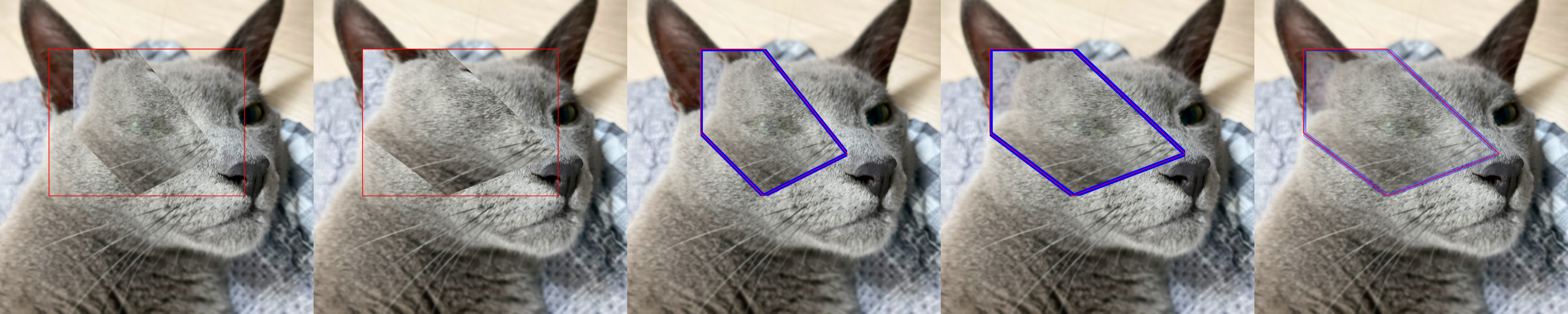
Image pasting example

Source code in zerohertzLib/vision/visual.py
def paste(
    img: NDArray[np.uint8],
    target: NDArray[np.uint8],
    box: list[int | float] | NDArray[DTypeLike],
    resize: bool = False,
    vis: bool = False,
    poly: NDArray[DTypeLike] | None = None,
    alpha: int | None = None,
    gaussian: int | None = None,
) -> NDArray[np.uint8] | tuple[NDArray[np.uint8], NDArray[DTypeLike]]:
    """`target` image를 `img` 위에 투명도를 포함하여 병합

    Note:
        `PIL.Image.paste` 를 `numpy` 와 `cv2` 기반으로 구현

        ```python
        >>> img = Image.open("test.png").convert("RGBA")
        >>> target = Image.open("target.png").convert("RGBA")
        >>> img.paste(target, (0, 0), target)
        ```

    Args:
        img: 입력 image (`[H, W, C]`)
        target: Target image (`[H, W, 4]`)
        box: 병합될 영역 (`xyxy` 형식)
        resize: Target image의 resize 여부
        vis: 지정한 영역 (`box`)의 시각화 여부
        poly: 변형된 좌표 (`[N, 2]`)
        alpha: `target` image의 투명도 변경
        gaussian: 자연스러운 병합을 위해 `target` 의 alpha channel에 적용될 Gaussian blur의 kernel size

    Returns:
        시각화 결과 (`[H, W, 4]`) 및 `poly` 입력 시 변형된 좌표값

    Examples:
        Without Poly:
            ```python
            >>> poly = np.array([[100, 400], [400, 400], [800, 900], [400, 1100], [100, 800]])
            >>> target = zz.vision.cutout(img, poly, 200)
            >>> res1 = zz.vision.paste(img, target, [200, 200, 1000, 800], resize=False, vis=True)
            >>> res2 = zz.vision.paste(img, target, [200, 200, 1000, 800], resize=True, vis=True, alpha=255)
            ```
        With Poly:
            ```python
            >>> poly -= zz.vision.poly2xyxy(poly)[:2]
            >>> target = zz.vision.bbox(target, poly, color=(255, 0, 0), thickness=20)
            >>> res3, poly3 = zz.vision.paste(img, target, [200, 200, 1000, 800], resize=False, poly=poly)
            >>> poly3
            array([[300.        , 200.        ],
                   [557.14285714, 200.        ],
                   [900.        , 628.57142857],
                   [557.14285714, 800.        ],
                   [300.        , 542.85714286]])
            >>> res3 = zz.vision.bbox(res3, poly3)
            >>> res4, poly4 = zz.vision.paste(img, target, [200, 200, 1000, 800], resize=True, poly=poly)
            >>> poly4
            array([[ 200.        ,  200.        ],
                   [ 542.85714286,  200.        ],
                   [1000.        ,  628.57142857],
                   [ 542.85714286,  800.        ],
                   [ 200.        ,  542.85714286]])
            >>> res4 = zz.vision.bbox(res4, poly4)
            ```
        Gaussian Blur:
            ```python
            >>> res5, poly5 = zz.vision.paste(img, target, [200, 200, 1000, 800], resize=True, poly=poly, gaussian=501)
            >>> res5 = zz.vision.bbox(res5, poly5)
            ```

        ![Image pasting example](../../../assets/vision/paste.png){ width="600" }
    """
    x_0, y_0, x_1, y_1 = map(int, box)
    box_height, box_width = y_1 - y_0, x_1 - x_0
    img = img.copy()
    img = _cvt_bgra(img)
    target = target.copy()
    tar_height, tar_width = target.shape[:2]
    if alpha is not None:
        target[:, :, 3][0 < target[:, :, 3]] = alpha
    if gaussian is not None:
        invisible = target[:, :, 3] == 0
        pad_gaussian = gaussian * 3
        target_alpha = cv2.copyMakeBorder(
            target[:, :, 3],
            pad_gaussian,
            pad_gaussian,
            pad_gaussian,
            pad_gaussian,
            cv2.BORDER_CONSTANT,
        )
        target[:, :, 3] = cv2.GaussianBlur(target_alpha, (gaussian, gaussian), 0)[
            pad_gaussian:-pad_gaussian, pad_gaussian:-pad_gaussian
        ]
        target[:, :, 3][invisible] = 0
    if resize:
        target = cv2.resize(
            target, (box_width, box_height), interpolation=cv2.INTER_LINEAR
        )
        if poly is not None:
            poly = poly * (box_width / tar_width, box_height / tar_height) + (x_0, y_0)
    else:
        if poly is None:
            target, _ = pad(target, (box_height, box_width), (0, 0, 0, 0))
        else:
            target, poly = pad(target, (box_height, box_width), (0, 0, 0, 0), poly)
            poly += (x_0, y_0)
    img[y_0:y_1, x_0:x_1, :] = _paste(img[y_0:y_1, x_0:x_1, :], target)
    if vis:
        box = np.array([[x_0, y_0], [x_0, y_1], [x_1, y_1], [x_1, y_0]])
        img = _bbox(img, box, (0, 0, 255, 255), 2)
    if poly is None:
        return img
    return img, poly

text

text(img: NDArray[uint8], box: list[int | float] | NDArray[DTypeLike], txt: str | list[str], color: tuple[int, int, int] = (0, 0, 0), vis: bool = False, fontsize: int = 100) -> NDArray[uint8]

Text 시각화

Parameters:

Name Type Description Default
img NDArray[uint8]

입력 image ([H, W, C])

required
box list[int | float] | NDArray[DTypeLike]

문자열이 존재할 bbox ([4], [N, 4], [4, 2], [N, 4, 2])

required
txt str | list[str]

Image에 추가할 문자열

required
color tuple[int, int, int]

문자의 색

(0, 0, 0)
vis bool

문자 영역의 시각화 여부

False
fontsize int

문자의 크기

100

Returns:

Type Description
NDArray[uint8]

시각화 결과 ([H, W, 4])

Examples:

Bbox:

>>> box = np.array([[100, 200], [100, 1000], [1200, 1000], [1200, 200]])
>>> box.shape
(4, 2)
>>> res1 = zz.vision.text(img, box, "먼지야")
Bboxes:
>>> boxes = np.array([[250, 200, 100, 100], [600, 600, 800, 200], [900, 300, 300, 400]])
>>> boxes.shape
(3, 4)
>>> res2 = zz.vision.text(img, boxes, ["먼지야", "먼지야", "먼지야"], vis=True)
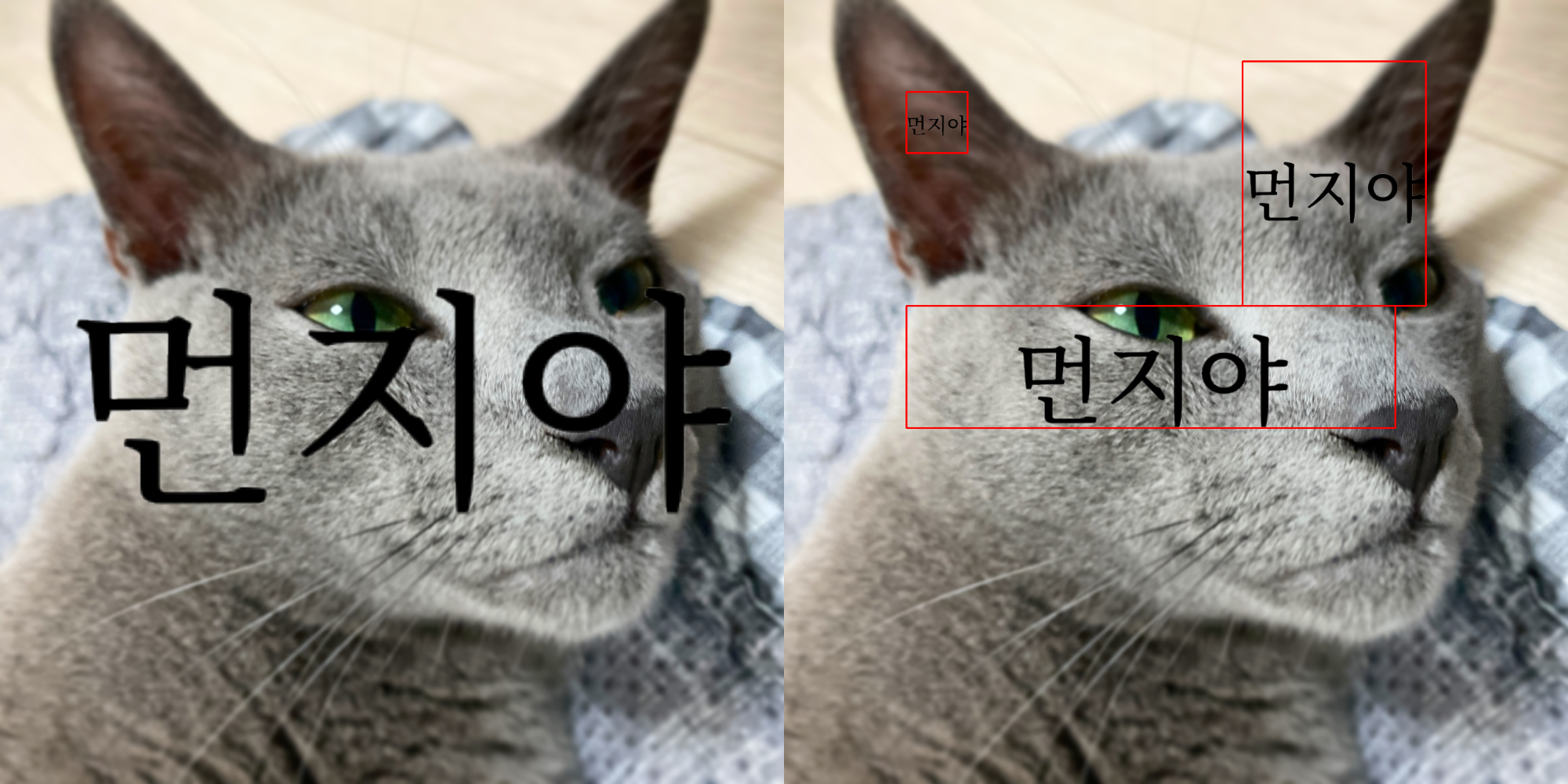
Text on image example

Source code in zerohertzLib/vision/visual.py
def text(
    img: NDArray[np.uint8],
    box: list[int | float] | NDArray[DTypeLike],
    txt: str | list[str],
    color: tuple[int, int, int] = (0, 0, 0),
    vis: bool = False,
    fontsize: int = 100,
) -> NDArray[np.uint8]:
    """Text 시각화

    Args:
        img: 입력 image (`[H, W, C]`)
        box: 문자열이 존재할 bbox (`[4]`, `[N, 4]`, `[4, 2]`, `[N, 4, 2]`)
        txt: Image에 추가할 문자열
        color: 문자의 색
        vis: 문자 영역의 시각화 여부
        fontsize: 문자의 크기

    Returns:
        시각화 결과 (`[H, W, 4]`)

    Examples:
        Bbox:
            ```python
            >>> box = np.array([[100, 200], [100, 1000], [1200, 1000], [1200, 200]])
            >>> box.shape
            (4, 2)
            >>> res1 = zz.vision.text(img, box, "먼지야")
            ```
        Bboxes:
            ```python
            >>> boxes = np.array([[250, 200, 100, 100], [600, 600, 800, 200], [900, 300, 300, 400]])
            >>> boxes.shape
            (3, 4)
            >>> res2 = zz.vision.text(img, boxes, ["먼지야", "먼지야", "먼지야"], vis=True)
            ```

        ![Text on image example](../../../assets/vision/text.png){ width="600" }
    """
    box = _list2np(box)
    img = img.copy()
    img = _cvt_bgra(img)
    shape = box.shape
    multi, poly = _is_bbox(shape)
    if poly:
        box_poly = box
        box_cwh = poly2cwh(box)
    else:
        box_poly = cwh2poly(box)
        box_cwh = box
    if multi:
        if not shape[0] == len(txt):
            raise ValueError("'box.shape[0]' and 'len(txt)' must be equal")
        for b_poly, b_cwh, txt_ in zip(box_poly, box_cwh, txt):
            img = _text(img, b_cwh, txt_, color, fontsize)
            if vis:
                img = _bbox(img, b_poly, (0, 0, 255, 255), 2)
    else:
        img = _text(img, box_cwh, txt, color, fontsize)
        if vis:
            img = _bbox(img, box_poly, (0, 0, 255, 255), 2)
    return img