Skip to content

zerohertzLib.vision.gif

Functions:

Name Description
img2gif

Directory 내 image들을 GIF로 변환

vid2gif

동영상을 GIF로 변환

_create_gif_from_frames

_create_gif_from_frames(frames: list[Image], file_name: str, duration: int) -> None
Source code in zerohertzLib/vision/gif.py
def _create_gif_from_frames(
    frames: list[Image.Image], file_name: str, duration: int
) -> None:
    frames[0].save(
        f"{file_name}.gif",
        save_all=True,
        append_images=frames[1:],
        loop=0,
        duration=duration,
    )

img2gif

img2gif(path: str, file_name: str = 'tmp', duration: int = 500) -> None

Directory 내 image들을 GIF로 변환

Parameters:

Name Type Description Default
path str

GIF로 변환할 image들이 존재하는 경로

required
file_name str

출력될 GIF file 이름

'tmp'
duration int

ms 단위의 사진 간 간격

500

Returns:

Type Description
None

현재 directory에 바로 GIF 저장

Examples:

>>> zz.vision.img2gif("./")

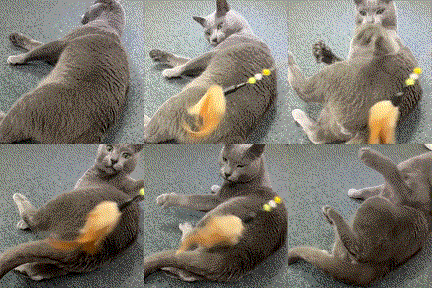
Images to GIF conversion example

Source code in zerohertzLib/vision/gif.py
def img2gif(
    path: str,
    file_name: str = "tmp",
    duration: int = 500,
) -> None:
    """Directory 내 image들을 GIF로 변환

    Args:
        path: GIF로 변환할 image들이 존재하는 경로
        file_name: 출력될 GIF file 이름
        duration: ms 단위의 사진 간 간격

    Returns:
        현재 directory에 바로 GIF 저장

    Examples:
        >>> zz.vision.img2gif("./")

        ![Images to GIF conversion example](../../../assets/vision/img2gif.gif){ width="200" }
    """
    ext = (
        "jpg",
        "JPG",
        "jpeg",
        "JPEG",
        "png",
        "PNG",
        "tif",
        "TIF",
        "tiff",
        "TIFF",
    )
    image_files = [f for f in os.listdir(path) if f.endswith(ext)]
    image_files.sort()
    images = [Image.open(os.path.join(path, image_file)) for image_file in image_files]
    _create_gif_from_frames(images, file_name, duration)

vid2gif

vid2gif(path: str, file_name: str = 'tmp', quality: int = 100, fps: int = 15, speed: float = 1.0) -> None

동영상을 GIF로 변환

Parameters:

Name Type Description Default
path str

GIF로 변환할 동영상이 존재하는 경로

required
file_name str

출력될 GIF file 이름

'tmp'
quality int

출력될 GIF의 품질

100
fps int

출력될 GIF의 FPS (Frames Per Second)

15
speed float

출력될 GIF의 배속

1.0

Returns:

Type Description
None

현재 directory에 바로 GIF 저장

Examples:

>>> zz.vision.vid2gif("test.mp4")

Video to GIF conversion example

Source code in zerohertzLib/vision/gif.py
def vid2gif(
    path: str,
    file_name: str = "tmp",
    quality: int = 100,
    fps: int = 15,
    speed: float = 1.0,
) -> None:
    """동영상을 GIF로 변환

    Args:
        path: GIF로 변환할 동영상이 존재하는 경로
        file_name: 출력될 GIF file 이름
        quality: 출력될 GIF의 품질
        fps: 출력될 GIF의 FPS (Frames Per Second)
        speed: 출력될 GIF의 배속

    Returns:
        현재 directory에 바로 GIF 저장

    Examples:
        >>> zz.vision.vid2gif("test.mp4")

        ![Video to GIF conversion example](../../../assets/vision/vid2gif.gif){ width="300" }
    """
    frames = []
    cap = cv2.VideoCapture(path)
    original_fps = round(cap.get(cv2.CAP_PROP_FPS))
    fps = min(original_fps, fps)
    frame_count_speed = frame_count_fps = 0
    while True:
        ret, frame = cap.read()
        if not ret:
            break
        frame_count_speed += 1
        if round(frame_count_speed % speed) != 0:
            continue
        if frame_count_fps % (int(original_fps / fps)) == 0:
            frame_rgb = cv2.cvtColor(frame, cv2.COLOR_BGR2RGB)
            pil_img = Image.fromarray(frame_rgb)
            width, height = pil_img.size
            new_width = int(width * quality / 100)
            new_height = int(height * quality / 100)
            resized_img = pil_img.resize((new_width, new_height), Image.LANCZOS)
            frames.append(resized_img)
        frame_count_fps += 1
    cap.release()
    duration = int(1000 / fps)
    _create_gif_from_frames(frames, file_name, duration)