Label Studio 관련 data를 handling하는 class
Parameters:
| Name | Type | Description | Default |
data_path | str | Image들이 존재하는 directory 경로 | required |
json_path | str | None | Label Studio에서 다른 format으로 변환할 시 사용될 annotation 정보가 담긴 JSON file | None |
Examples:
Without json_path:
>>> ls = zz.vision.LabelStudio(data_path)
>>> ls[0]
('0000007864.png', {'data': {'image': 'data/local-files/?d=/label-studio/data/local/tmp/0000007864.png'}})
>>> ls[1]
('0000008658.png', {'data': {'image': 'data/local-files/?d=/label-studio/data/local/tmp/0000008658.png'}})
With
json_path: Bbox:
>>> ls = zz.vision.LabelStudio(data_path, json_path)
>>> ls[0]
>>> ls[0]
('/PATH/TO/IMAGE', {'labels': ['label1', ...], 'polys': [array([0.39471694, 0.30683403, 0.03749811, 0.0167364 ]), ...], 'whs': [(1660, 2349), ...]})
>>> ls[1]
('/PATH/TO/IMAGE', {'labels': ['label2', ...], 'polys': [array([0.29239837, 0.30149896, 0.04013469, 0.02736506]), ...], 'whs': [(1655, 2324), ...]})
>>> ls.labels
{'label1', 'label2'}
>>> ls.type
'rectanglelabels'
Poly:
>>> ls = zz.vision.LabelStudio(data_path, json_path)
>>> ls[0]
('/PATH/TO/IMAGE', {'labels': ['label1', ...], 'polys': [array([[0.4531892 , 0.32880674], ..., [0.46119428, 0.32580483]]), ...], 'whs': [(3024, 4032), ...]})
>>> ls[1]
('/PATH/TO/IMAGE', {'labels': ['label2', ...], 'polys': [array([[0.31973699, 0.14660367], ..., [0.29032053, 0.1484422 ]]), ...], 'whs': [(3024, 4032), ...]})
>>> ls.labels
{'label1', 'label2'}
>>> ls.type
'polygonlabels'
Methods:
| Name | Description |
__getitem__ | |
__len__ | |
classification | Label Studio로 annotation한 JSON data를 classification format으로 변환 |
coco | Label Studio로 annotation한 JSON data를 COCO format으로 변환 |
json | Label Studio에 mount된 data를 불러오기 위한 JSON file 생성 |
labelme | Label Studio로 annotation한 JSON data를 LabelMe format으로 변환 |
yolo | Label Studio로 annotation한 JSON data를 YOLO format으로 변환 |
Attributes:
Source code in zerohertzLib/vision/data.py
| def __init__(
self,
data_path: str,
json_path: str | None = None,
) -> None:
self.annotations = None
if json_path is None:
self.path = "/label-studio/data/local"
self.data_paths = _get_image_paths(data_path)
else:
self.annotations = Json(json_path)
self.type = self.annotations[0]["annotations"][0]["result"][0]["type"]
self.data_path = data_path
self.labels = set()
|
instance-attribute
instance-attribute
instance-attribute
instance-attribute
instance-attribute
path = '/label-studio/data/local'
instance-attribute
type = annotations[0]['annotations'][0]['result'][0]['type']
Parameters:
| Name | Type | Description | Default |
idx | int | | required |
Returns:
Source code in zerohertzLib/vision/data.py
| def __getitem__(
self, idx: int
) -> tuple[str, dict[str, dict[str, str]]] | tuple[str, dict[str, list[Any]]]:
"""
Args:
idx: 입력 index
Returns:
Index에 따른 image file 이름 또는 경로와 JSON file에 포함될 dictionary 또는 annotation 정보
"""
if self.annotations is None:
file_name = os.path.basename(self.data_paths[idx])
return (
file_name,
{
"data": {
"image": f"data/local-files/?d={self.path}/{self.data_paths[idx]}"
}
},
)
file_name = os.path.basename(self.annotations[idx]["data"]["image"])
file_name = urllib.parse.unquote(file_name)
if len(file_name) > 8 and "-" == file_name[8]:
file_name = "-".join(file_name.split("-")[1:])
file_path = os.path.join(self.data_path, file_name)
if len(self.annotations[idx]["annotations"]) > 1:
raise ValueError("The 'annotations' are plural")
if self.type == "rectanglelabels":
return (
file_path,
self._dict2cwh(self.annotations[idx]["annotations"][0]["result"]),
)
if self.type == "polygonlabels":
return (
file_path,
self._dict2poly(self.annotations[idx]["annotations"][0]["result"]),
)
raise ValueError(f"Unknown annotation type: {self.type}")
|
데이터 개수를 반환
Returns:
| Type | Description |
int | 읽어온 image file 혹은 annotation들의 수 |
Source code in zerohertzLib/vision/data.py
| def __len__(self) -> int:
"""데이터 개수를 반환
Returns:
읽어온 image file 혹은 annotation들의 수
"""
if self.annotations is None:
return len(self.data_paths)
return len(self.annotations)
|
Source code in zerohertzLib/vision/data.py
| def _dict2cwh(self, results: list[dict[str, Any]]) -> dict[str, Any]:
labels, polys, whs = [], [], []
for result in results:
width, height = result["original_width"], result["original_height"]
box_cwh = (
np.array(
[
result["value"]["x"],
result["value"]["y"],
result["value"]["width"],
result["value"]["height"],
]
)
/ 100
)
if len(result["value"]["rectanglelabels"]) > 1:
raise ValueError("The 'rectanglelabels' are plural")
label = result["value"]["rectanglelabels"][0]
labels.append(label)
self.labels.add(label)
polys.append(box_cwh)
whs.append((width, height))
return {"labels": labels, "polys": polys, "whs": whs}
|
Source code in zerohertzLib/vision/data.py
| def _dict2poly(self, results: list[dict[str, Any]]) -> dict[str, Any]:
labels, polys, whs = [], [], []
for result in results:
width, height = result["original_width"], result["original_height"]
box_poly = np.array(result["value"]["points"]) / 100
if len(result["value"]["polygonlabels"]) > 1:
raise ValueError("The 'polygonlabels' are plural")
label = result["value"]["polygonlabels"][0]
labels.append(label)
self.labels.add(label)
polys.append(box_poly)
whs.append((width, height))
return {"labels": labels, "polys": polys, "whs": whs}
|
classification(target_path: str, label: dict[str, Any] | None = None, rand: int = 0, shrink: bool = True, aug: int = 1) -> None
Label Studio로 annotation한 JSON data를 classification format으로 변환
Parameters:
| Name | Type | Description | Default |
target_path | str | Classification format data가 저장될 경로 | required |
label | dict[str, Any] | None | Label Studio에서 사용한 label을 변경하는 dictionary | None |
rand | int | Image crop 시 random 범위 추가 | 0 |
shrink | bool | rand 에 의한 crop 시 image의 수축 여부
| True |
aug | int | 한 annotation 당 저장할 image의 수 | 1 |
Returns:
| Type | Description |
None | annotation의 index, i: rand 의 index) |
Examples:
>>> ls = zz.vision.LabelStudio(data_path, json_path)
>>> ls.classification(target_path)
100%|█████████████| 476/476 [00:00<00:00, 78794.25it/s]
>>> label = {"label1": "lab1", "label2": "lab2"}
>>> ls.classification(target_path, label, rand=10, aug=10, shrink=False)
100%|█████████████| 476/476 [00:00<00:00, 78794.25it/s]
Source code in zerohertzLib/vision/data.py
| def classification(
self,
target_path: str,
label: dict[str, Any] | None = None,
rand: int = 0,
shrink: bool = True,
aug: int = 1,
) -> None:
"""Label Studio로 annotation한 JSON data를 classification format으로 변환
Args:
target_path: Classification format data가 저장될 경로
label: Label Studio에서 사용한 label을 변경하는 dictionary
rand: Image crop 시 random 범위 추가
shrink: `rand` 에 의한 crop 시 image의 수축 여부
aug: 한 annotation 당 저장할 image의 수
Returns:
annotation의 index, `i`: `rand` 의 index)
Examples:
>>> ls = zz.vision.LabelStudio(data_path, json_path)
>>> ls.classification(target_path)
100%|█████████████| 476/476 [00:00<00:00, 78794.25it/s]
>>> label = {"label1": "lab1", "label2": "lab2"}
>>> ls.classification(target_path, label, rand=10, aug=10, shrink=False)
100%|█████████████| 476/476 [00:00<00:00, 78794.25it/s]
"""
if label is None:
label = {}
for file_path, result in tqdm(self):
img = cv2.imread(file_path)
if img is None:
print(f"'{file_path}' is not found")
continue
img_file = file_path.split("/")[-1].split(".")
img_file_name = ".".join(img_file[:-1])
img_file_ext = img_file[-1]
for idx, (lab, poly, wh) in enumerate(
zip(result["labels"], result["polys"], result["whs"])
):
if self.type == "rectanglelabels":
box_xyxy = poly * (wh * 2)
box_xyxy[2:] += box_xyxy[:2]
elif self.type == "polygonlabels":
box_poly = poly * wh
box_xyxy = poly2xyxy(box_poly)
else:
raise ValueError(f"Unknown annotation type: {self.type}")
os.makedirs(
os.path.join(target_path, label.get(lab, lab)), exist_ok=True
)
for i in range(aug):
bias = (2 * rand * (np.random.rand(4) - 0.5)).astype(np.int32)
if not shrink:
bias[:2] = -abs(bias[:2])
bias[2:] = abs(bias[2:])
x_0, y_0, x_1, y_1 = box_xyxy.astype(np.int32) + bias
try:
cv2.imwrite(
os.path.join(
target_path,
label.get(lab, lab),
f"{img_file_name}_{idx}_{i}.{img_file_ext}",
),
img[y_0:y_1, x_0:x_1, :],
)
except cv2.error:
print(
f"Impossible crop ('x_0': {x_0}, 'y_0': {y_0}, 'x_1': {x_1}, 'y_1': {y_1})"
)
|
Label Studio로 annotation한 JSON data를 COCO format으로 변환
Parameters:
| Name | Type | Description | Default |
target_path | str | | required |
label | dict[str, int] | Label Studio에서 사용한 label을 변경하는 dictionary | required |
Returns:
| Type | Description |
None | {target_path}.json 에 JSON file 저장
|
Examples:
>>> ls = zz.vision.LabelStudio(data_path, json_path)
>>> label = {"label1": 1, "label2": 2}
>>> ls.coco(target_path, label)
100%|█████████████| 476/476 [00:00<00:00, 78794.25it/s]
Source code in zerohertzLib/vision/data.py
| def coco(self, target_path: str, label: dict[str, int]) -> None:
"""Label Studio로 annotation한 JSON data를 COCO format으로 변환
Args:
target_path: COCO format data가 저장될 경로
label: Label Studio에서 사용한 label을 변경하는 dictionary
Returns:
`{target_path}.json` 에 JSON file 저장
Examples:
>>> ls = zz.vision.LabelStudio(data_path, json_path)
>>> label = {"label1": 1, "label2": 2}
>>> ls.coco(target_path, label)
100%|█████████████| 476/476 [00:00<00:00, 78794.25it/s]
"""
converted_gt = {
"images": [],
"annotations": [],
"categories": [],
}
for lab, id_ in label.items():
converted_gt["categories"].append({"id": id_, "name": lab})
ant_id = 0
for id_, (file_path, result) in enumerate(tqdm(self)):
_images = {
"file_name": os.path.basename(file_path),
"height": result["whs"][0][1],
"width": result["whs"][0][0],
"id": id_,
}
_annotations = []
for ant_id_, (lab, poly, wh) in enumerate(
zip(result["labels"], result["polys"], result["whs"])
):
# box_cwh is [x_0, y_0, width, height] not [cx, cy, width, height]
if self.type == "rectanglelabels":
poly = poly * (wh * 2)
box_cwh = poly.copy()
poly[2:] += poly[:2]
poly = xyxy2poly(poly)
elif self.type == "polygonlabels":
poly = poly * wh
box_cwh = poly2cwh(poly)
box_cwh[:2] -= box_cwh[2:] / 2
else:
raise ValueError(f"Unknown annotation type: {self.type}")
box_cwh = box_cwh.tolist()
_annotations.append(
{
"segmentation": [poly.reshape(-1).tolist()],
"area": box_cwh[2] * box_cwh[3],
"iscrowd": 0,
"image_id": id_,
"bbox": box_cwh,
"category_id": label[lab],
"id": ant_id + ant_id_,
}
)
converted_gt["images"].append(_images)
converted_gt["annotations"] += _annotations
ant_id += len(result["labels"]) + 1
write_json(converted_gt, target_path)
|
Label Studio에 mount된 data를 불러오기 위한 JSON file 생성
Note
아래와 같이 환경 변수가 설정된 Label Studio image를 사용하면 LabelStudio class로 생성된 JSON file을 적용할 수 있다.
FROM heartexlabs/label-studio

ENV LABEL_STUDIO_LOCAL_FILES_SERVING_ENABLED=true
docker run --name label-studio -p 8080:8080 -v ${PWD}/data:/label-studio/data label-studio
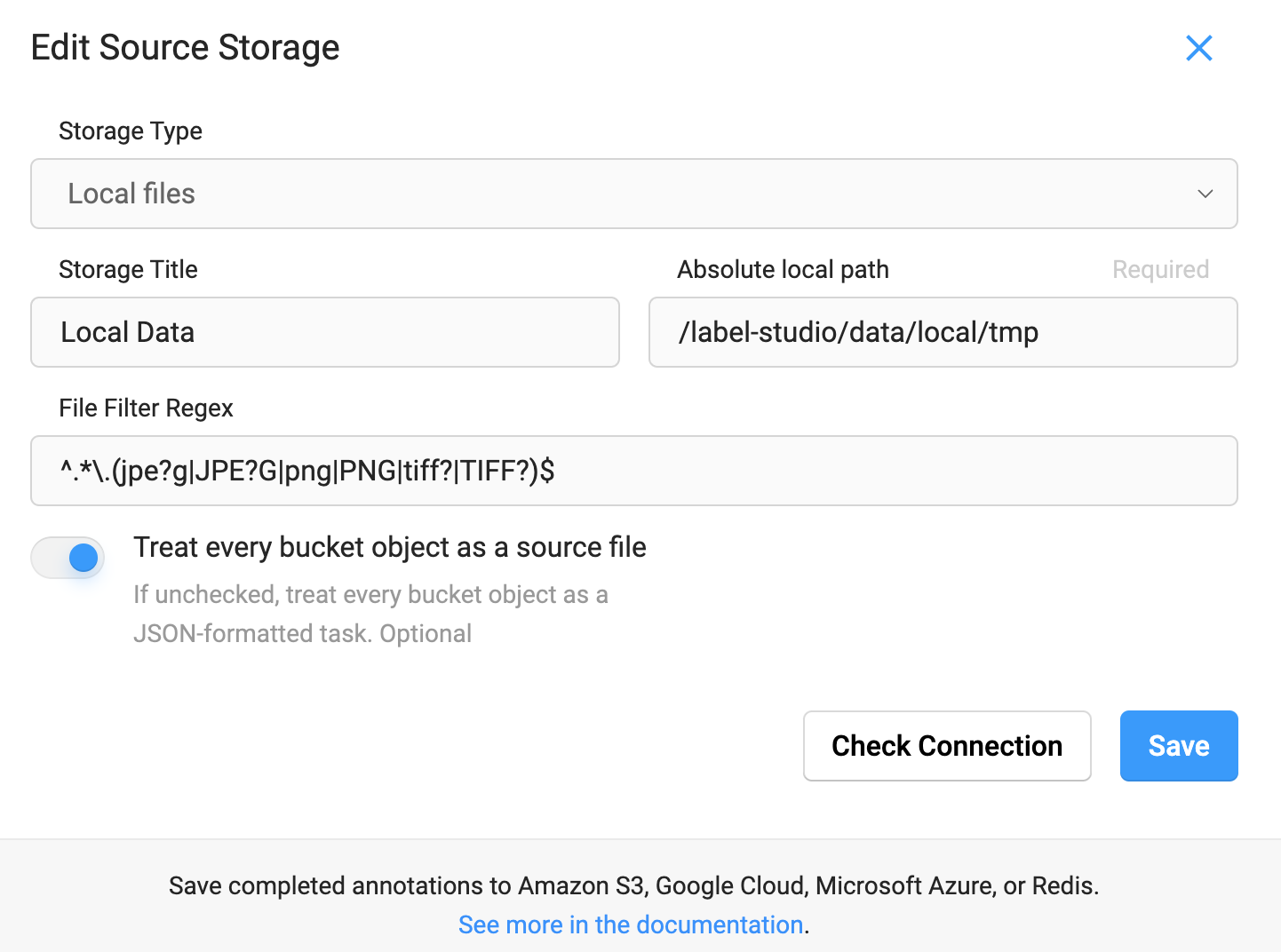
Projects → {PROJECT_NAME} → Settings → Cloud Storage → Add Source Storage 클릭 후 아래와 같이 정보를 기재하고 Sync Storage 를 누른다.
- Storage Type:
Local files - Absolute local path:
/label-studio/data/local/${PATH} (data_path: ${PWD}/data/local) - File Filter Regex:
^.*\.(jpe?g|JPE?G|png|PNG|tiff?|TIFF?)$ - Treat every bucket object as a source file:
True
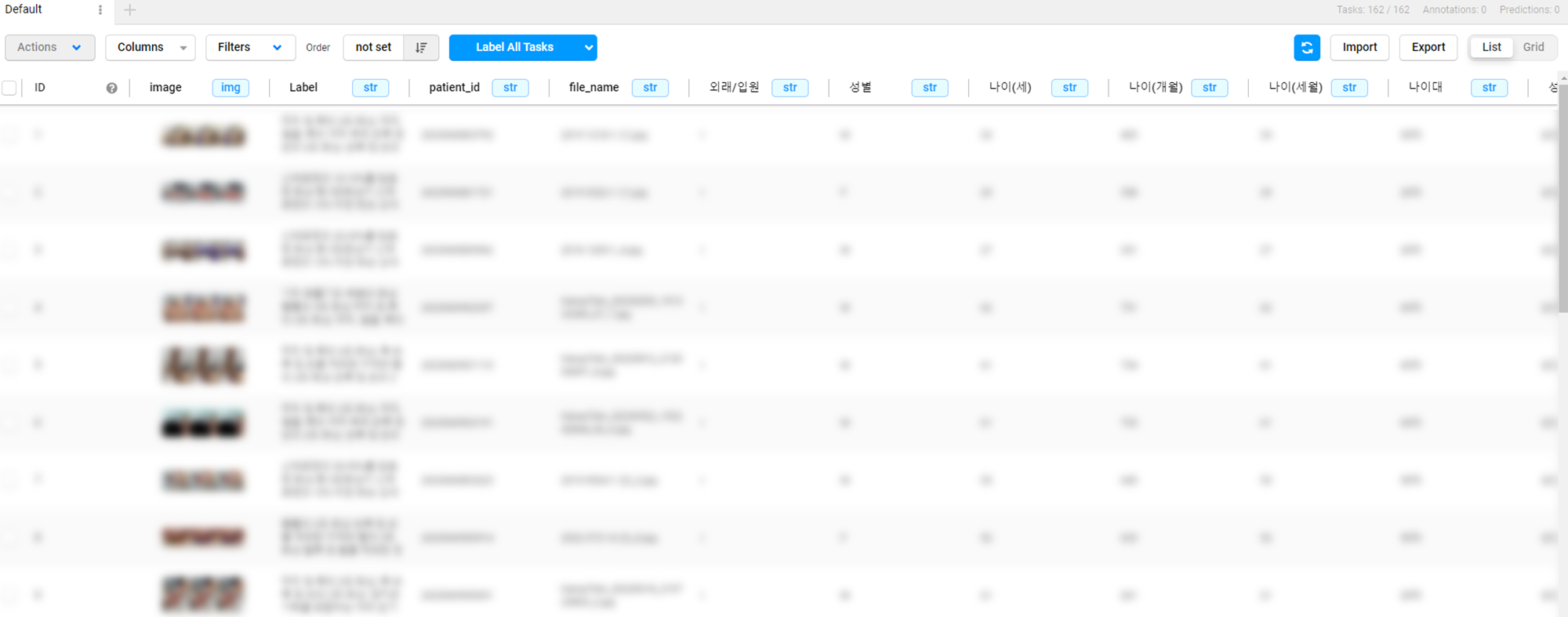
Sync 이후 LabelStudio class로 생성된 JSON file을 Label Studio에 import하면 아래와 같이 setup 할 수 있다.
Parameters:
| Name | Type | Description | Default |
path | str | | '/label-studio/data/local' |
data_function | Callable[[str], dict[str, Any]] | None | Label Studio에서 사용할 수 있는 data 항목 추가 method (예시 참고) | None |
Returns:
Examples:
Default:
>>> ls = zz.vision.LabelStudio(data_path)
>>> ls.json()
100%|█████████████| 476/476 [00:00<00:00, 259993.32it/s
[
    {
        "data": {
            "image": "data/local-files/?d=/label-studio/data/local/tmp/0000007864.png"
        }
    },
    {
        "data": {
            "...": "..."
        }
    },
]
With
data_function:
def data_function:
    return data_store[file_name]
>>> ls = zz.vision.LabelStudio(data_path)
>>> ls.json(data_function)
100%|█████████████| 476/476 [00:00<00:00, 78794.25it/s]
[
    {
        "data": {
            "image": "data/local-files/?d=/label-studio/data/local/tmp/0000007864.png",
            "Label": "...",
            "patient_id": "...",
            "...": "...",
        }
    },
    {
        "data": {
            "...": "..."
        }
    },
]
Source code in zerohertzLib/vision/data.py
| def json(
self,
path: str = "/label-studio/data/local",
data_function: Callable[[str], dict[str, Any]] | None = None,
) -> None:
r"""Label Studio에 mount된 data를 불러오기 위한 JSON file 생성
Note:
아래와 같이 환경 변수가 설정된 Label Studio image를 사용하면 `LabelStudio` class로 생성된 JSON file을 적용할 수 있다.
```dockerfile
FROM heartexlabs/label-studio
ENV LABEL_STUDIO_LOCAL_FILES_SERVING_ENABLED=true
```
```bash
docker run --name label-studio -p 8080:8080 -v ${PWD}/data:/label-studio/data label-studio
```
`Projects` → `{PROJECT_NAME}` → `Settings` → `Cloud Storage` → `Add Source Storage` 클릭 후 아래와 같이 정보를 기재하고 `Sync Storage` 를 누른다.
+ Storage Type: `Local files`
+ Absolute local path: `/label-studio/data/local/${PATH}` (`data_path`: `${PWD}/data/local`)
+ File Filter Regex: `^.*\.(jpe?g|JPE?G|png|PNG|tiff?|TIFF?)$`
+ Treat every bucket object as a source file: `True`

Sync 이후 `LabelStudio` class로 생성된 JSON file을 Label Studio에 import하면 아래와 같이 setup 할 수 있다.

Args:
path: Local files의 경로
data_function: Label Studio에서 사용할 수 있는 `data` 항목 추가 method (예시 참고)
Returns:
`{data_path}.json` 에 결과 저장
Examples:
Default:
```python
>>> ls = zz.vision.LabelStudio(data_path)
>>> ls.json()
100%|█████████████| 476/476 [00:00<00:00, 259993.32it/s
```
```json
[
{
"data": {
"image": "data/local-files/?d=/label-studio/data/local/tmp/0000007864.png"
}
},
{
"data": {
"...": "..."
}
},
]
```
With `data_function`:
```python
def data_function:
return data_store[file_name]
```
```python
>>> ls = zz.vision.LabelStudio(data_path)
>>> ls.json(data_function)
100%|█████████████| 476/476 [00:00<00:00, 78794.25it/s]
```
```json
[
{
"data": {
"image": "data/local-files/?d=/label-studio/data/local/tmp/0000007864.png",
"Label": "...",
"patient_id": "...",
"...": "...",
}
},
{
"data": {
"...": "..."
}
},
]
```
"""
self.path = path
json_data = []
for file_name, data in tqdm(self):
if "aug" in file_name:
continue
if data_function is not None:
data["data"].update(data_function(file_name))
json_data.append(data)
write_json(json_data, self.data_path)
|
labelme(target_path: str, label: dict[str, Any] | None = None) -> None
Label Studio로 annotation한 JSON data를 LabelMe format으로 변환
Parameters:
| Name | Type | Description | Default |
target_path | str | LabelMe format data가 저장될 경로 | required |
label | dict[str, Any] | None | Label Studio에서 사용한 label을 변경하는 dictionary | None |
Returns:
| Type | Description |
None | {target_path}/images 및 {target_path}/labels 에 image와 JSON file 저장
|
Examples:
>>> ls = zz.vision.LabelStudio(data_path, json_path)
>>> ls.labelme(target_path)
100%|█████████████| 476/476 [00:00<00:00, 78794.25it/s]
>>> label = {"label1": "lab1", "label2": "lab2"}
>>> ls.labelme(target_path, label)
100%|█████████████| 476/476 [00:00<00:00, 78794.25it/s]
Source code in zerohertzLib/vision/data.py
| def labelme(self, target_path: str, label: dict[str, Any] | None = None) -> None:
"""Label Studio로 annotation한 JSON data를 LabelMe format으로 변환
Args:
target_path: LabelMe format data가 저장될 경로
label: Label Studio에서 사용한 label을 변경하는 dictionary
Returns:
`{target_path}/images` 및 `{target_path}/labels` 에 image와 JSON file 저장
Examples:
>>> ls = zz.vision.LabelStudio(data_path, json_path)
>>> ls.labelme(target_path)
100%|█████████████| 476/476 [00:00<00:00, 78794.25it/s]
>>> label = {"label1": "lab1", "label2": "lab2"}
>>> ls.labelme(target_path, label)
100%|█████████████| 476/476 [00:00<00:00, 78794.25it/s]
"""
if label is None:
label = {}
rmtree(os.path.join(target_path, "images"))
rmtree(os.path.join(target_path, "labels"))
for file_path, result in tqdm(self):
img_file_name = file_path.split("/")[-1]
json_file_name = ".".join(img_file_name.split(".")[:-1])
converted_gt = []
for lab, poly, wh in zip(result["labels"], result["polys"], result["whs"]):
if self.type == "rectanglelabels":
box_xyxy = poly * (wh * 2)
box_xyxy[2:] += box_xyxy[:2]
box_poly = xyxy2poly(box_xyxy)
elif self.type == "polygonlabels":
box_poly = poly * wh
else:
raise ValueError(f"Unknown annotation type: {self.type}")
converted_gt.append(
{
"label": label.get(lab, lab),
"points": box_poly.tolist(),
"shape_type": "polygon",
}
)
try:
shutil.copy(
file_path, os.path.join(target_path, "images", img_file_name)
)
write_json(
{"shapes": converted_gt},
os.path.join(target_path, "labels", json_file_name),
)
except FileNotFoundError:
print(f"'{file_path}' is not found")
|
yolo(target_path: str, label: list[str] | None = None) -> None
Label Studio로 annotation한 JSON data를 YOLO format으로 변환
Parameters:
| Name | Type | Description | Default |
target_path | str | | required |
label | list[str] | None | Label Studio에서 사용한 label을 정수로 변환하는 list (index 사용) | None |
Returns:
| Type | Description |
None | {target_path}/images 및 {target_path}/labels 에 image와 .txt file 저장
|
Examples:
>>> ls = zz.vision.LabelStudio(data_path, json_path)
>>> ls.yolo(target_path)
100%|█████████████| 476/476 [00:00<00:00, 78794.25it/s]
>>> label = ["label1", "label2"]
>>> ls.yolo(target_path, label)
100%|█████████████| 476/476 [00:00<00:00, 78794.25it/s]
Source code in zerohertzLib/vision/data.py
| def yolo(self, target_path: str, label: list[str] | None = None) -> None:
"""Label Studio로 annotation한 JSON data를 YOLO format으로 변환
Args:
target_path: YOLO format data가 저장될 경로
label: Label Studio에서 사용한 label을 정수로 변환하는 list (index 사용)
Returns:
`{target_path}/images` 및 `{target_path}/labels` 에 image와 `.txt` file 저장
Examples:
>>> ls = zz.vision.LabelStudio(data_path, json_path)
>>> ls.yolo(target_path)
100%|█████████████| 476/476 [00:00<00:00, 78794.25it/s]
>>> label = ["label1", "label2"]
>>> ls.yolo(target_path, label)
100%|█████████████| 476/476 [00:00<00:00, 78794.25it/s]
"""
if label is None:
label = []
rmtree(os.path.join(target_path, "images"))
rmtree(os.path.join(target_path, "labels"))
for file_path, result in tqdm(self):
img_file_name = os.path.basename(file_path)
txt_file_name = ".".join(img_file_name.split(".")[:-1]) + ".txt"
converted_gt = []
for lab, poly in zip(result["labels"], result["polys"]):
if self.type == "rectanglelabels":
poly[:2] += poly[2:] / 2
box_cwh = poly
elif self.type == "polygonlabels":
box_cwh = poly2cwh(poly)
else:
raise ValueError(f"Unknown annotation type: {self.type}")
if lab not in label:
label.append(lab)
converted_gt.append(
f"{label.index(lab)} " + " ".join(map(str, box_cwh)) + "\n"
)
try:
shutil.copy(
file_path, os.path.join(target_path, "images", img_file_name)
)
with open(
os.path.join(target_path, "labels", txt_file_name),
"w",
encoding="utf-8",
) as file:
file.writelines(converted_gt)
except FileNotFoundError:
print(f"'{file_path}' is not found")
|