Vision
다양한 image들을 handling하고 시각화하는 함수 및 class들
Important
Bbox의 types
cwh:[cx, cy, w, h]로 구성된 bbox ([4]or[N, 4])xyxy:[x0, y0, x1, y1]로 구성된 bbox ([4]or[N, 4])poly:[[x0, y0], [x1, y1], [x2, y2], [x3, y3]]로 구성된 bbox ([4, 2]or[N, 4, 2])
Modules:
| Name | Description |
|---|---|
cli | |
compare | |
convert | |
data | |
eval | |
gif | |
loader | |
transform | |
util | |
visual | |

Classes:
| Name | Description |
|---|---|
CocoLoader | COCO format의 dataset을 읽고 시각화하는 class |
ImageLoader | 경로와 image의 수를 지정하여 경로 내 image를 return하는 class |
JsonImageLoader | JSON file을 통해 image와 JSON file 내 정보를 불러오는 class |
LabelStudio | Label Studio 관련 data를 handling하는 class |
YoloLoader | YOLO format의 dataset을 읽고 시각화하는 class |
Functions:
| Name | Description |
|---|---|
bbox | 여러 Bbox 시각화 |
before_after | 두 image를 비교하는 image 생성 |
cutout | Image 내에서 지정한 좌표를 제외한 부분을 투명화 |
cwh2poly | Bbox 변환 |
cwh2xyxy | Bbox 변환 |
evaluation | 단일 image 내 detection model의 추론 성능 평가 |
grid | 여러 image를 입력받아 정방형 image로 병합 |
img2gif | Directory 내 image들을 GIF로 변환 |
iou | IoU (Intersection over Union)를 계산하는 function |
is_pts_in_poly | 지점들의 좌표 내 존재 여부 확인 function |
mask | Mask 시각화 |
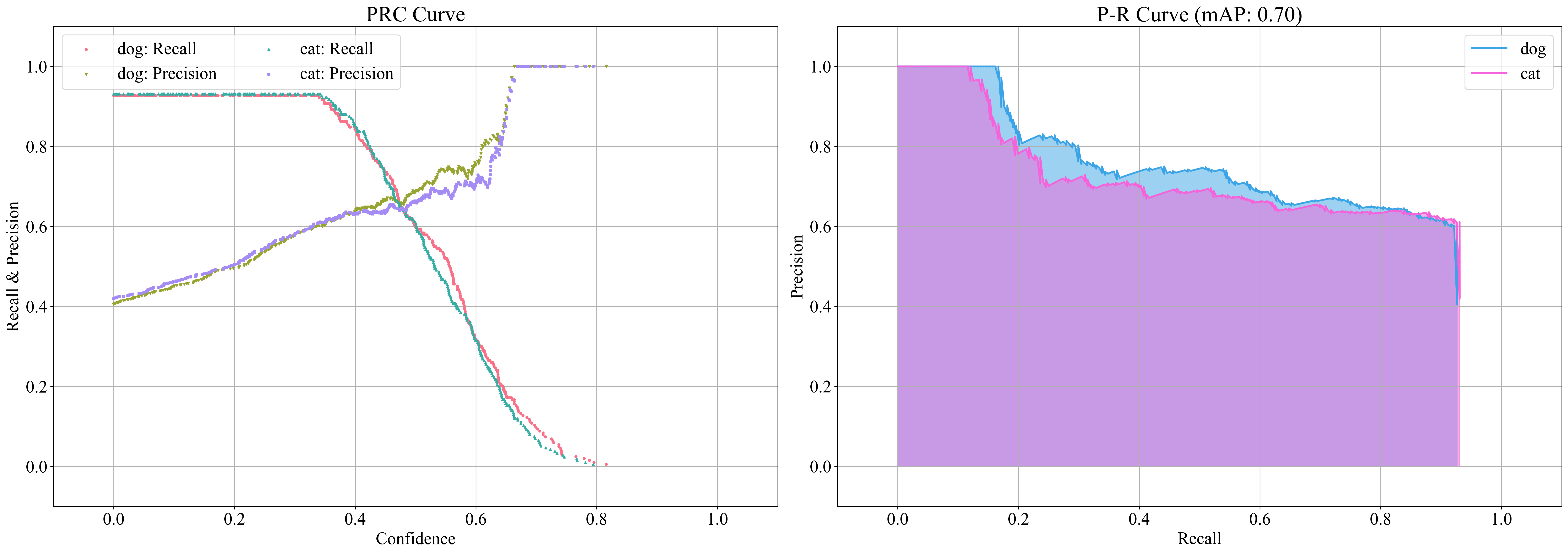
meanap | Detection model의 P-R curve 시각화 및 mAP 산출 |
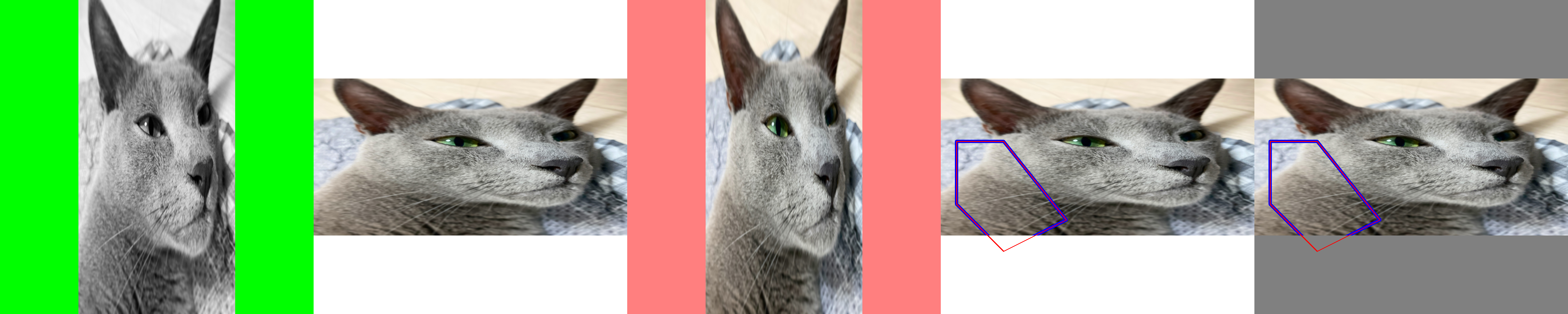
pad | 입력 image를 원하는 shape로 resize 및 pad |
paste |
|
poly2area | 다각형의 면적을 산출하는 function |
poly2cwh | Bbox 변환 |
poly2mask | 다각형 좌표를 입력받아 mask로 변환 |
poly2ratio | 다각형의 bbox 대비 다각형의 면적 비율을 산출하는 function |
poly2xyxy | Bbox 변환 |
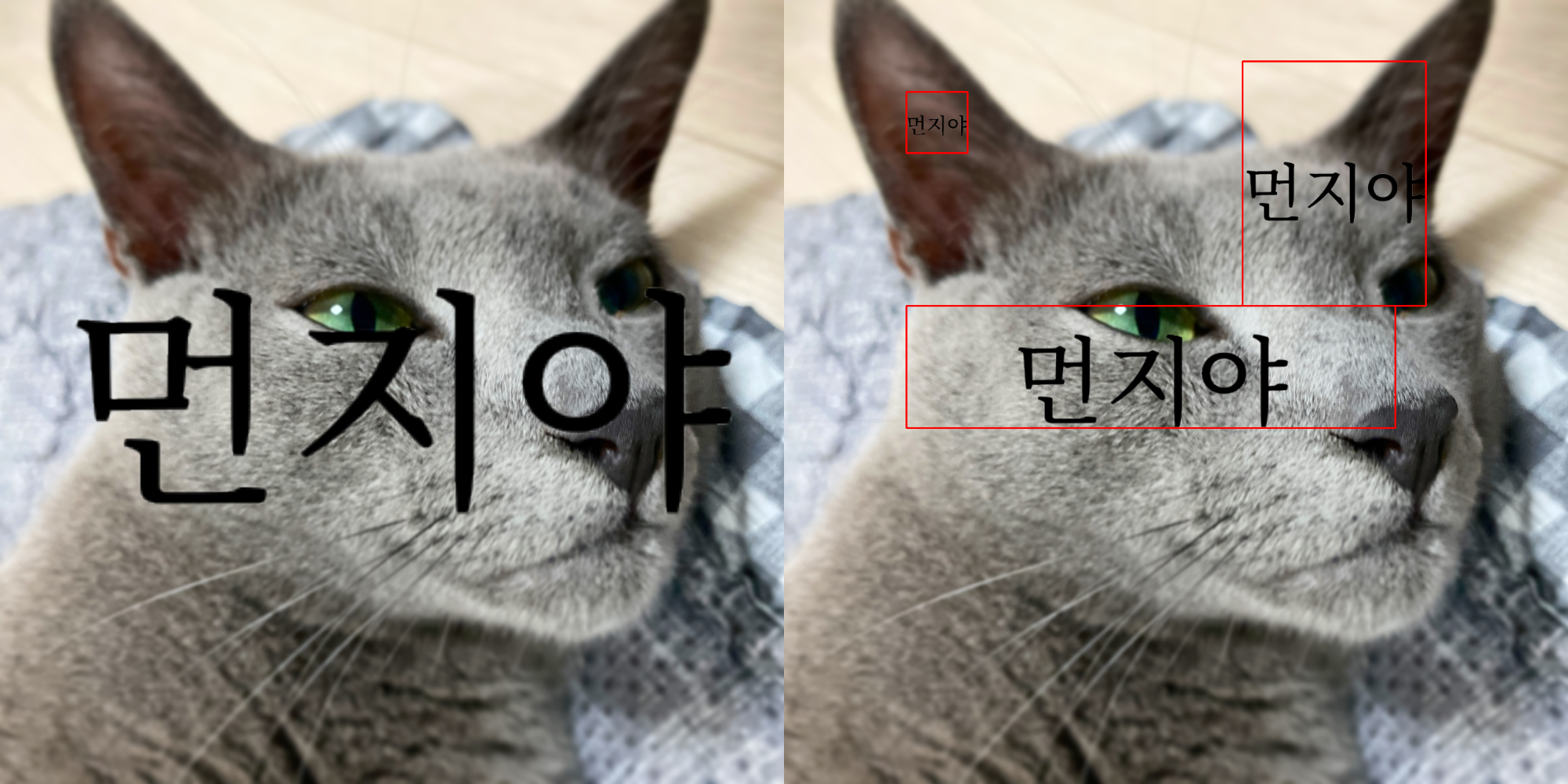
text | Text 시각화 |
transparent | 입력 image에 대해 |
vert | 여러 image를 입력받아 가로 image로 병합 |
vid2gif | 동영상을 GIF로 변환 |
xyxy2cwh | Bbox 변환 |
xyxy2poly | Bbox 변환 |
module-attribute 
__all__ = ['img2gif', 'vid2gif', 'before_after', 'grid', 'bbox', 'mask', 'text', 'cwh2poly', 'cwh2xyxy', 'poly2cwh', 'poly2mask', 'poly2xyxy', 'xyxy2cwh', 'xyxy2poly', 'cutout', 'paste', 'is_pts_in_poly', 'JsonImageLoader', 'vert', 'pad', 'poly2area', 'poly2ratio', 'ImageLoader', 'transparent', 'YoloLoader', 'LabelStudio', 'iou', 'meanap', 'evaluation', 'CocoLoader']
CocoLoader(data_path: str, vis_path: str | None = None, class_color: dict[int | str, tuple[int, int, int]] | None = None)
COCO format의 dataset을 읽고 시각화하는 class
Parameters:
| Name | Type | Description | Default |
|---|---|---|---|
data_path | str | Image 및 annotation이 존재하는 directory 경로 | required |
vis_path | str | None | 시각화 image들이 저장될 경로 | None |
class_color | dict[int | str, tuple[int, int, int]] | None | 시각화 결과에 적용될 class에 따른 색상 | None |
Examples:
>>> data_path = "train"
>>> class_color = {"label1": (0, 255, 0), "label2": (255, 0, 0)}
>>> coco = zz.vision.CocoLoader(data_path, vis_path="tmp", class_color=class_color)
>>> image, class_list, bboxes, polys = coco(0, False, True)
>>> type(image)
<class 'str'>
>>> image
'{IMAGE_PATH}.jpg'
>>> class_list
[0, 1]
>>> type(bboxes)
<class 'numpy.ndarray'>
>>> bboxes.shape
(2, 4)
>>> image, class_list, bboxes, polys = coco[0]
>>> type(image)
<class 'numpy.ndarray'>
>>> class_list
['label1', 'label2']
>>> type(bboxes)
<class 'numpy.ndarray'>
>>> bboxes.shape
(2, 4)
>>> type(polys)
<class 'list'>
Methods:
| Name | Description |
|---|---|
__call__ | Index에 따른 image와 annotation에 대한 정보 return ( |
__getitem__ | Index에 따른 image와 annotation에 대한 정보 return ( |
__len__ | Image 수를 반환 |
yolo | COCO format을 YOLO format으로 변환 |
Attributes:
| Name | Type | Description |
|---|---|---|
annotations | | |
class_color | | |
classes | | |
data_path | | |
image2annotation | | |
images | | |
vis_path | |
Source code in zerohertzLib/vision/loader.py
__call__(idx: int, read: bool = False, int_class: bool = False) -> tuple[str | NDArray[uint8], list[int | str], NDArray[DTypeLike], list[NDArray[DTypeLike]]]
Index에 따른 image와 annotation에 대한 정보 return (vis_path 와 class_color 입력 시 시각화 image vis_path 에 저장)
Parameters:
| Name | Type | Description | Default |
|---|---|---|---|
idx | int | 입력 index | required |
read | bool | Image 읽음 여부 | False |
int_class | bool | 출력될 class의 type 지정 | False |
Returns:
| Type | Description |
|---|---|
tuple[str | NDArray[uint8], list[int | str], NDArray[DTypeLike], list[NDArray[DTypeLike]]] | Image 경로 혹은 읽어온 image와 그에 따른 |
Source code in zerohertzLib/vision/loader.py
__getitem__(idx: int) -> tuple[NDArray[uint8], list[str], NDArray[DTypeLike], list[NDArray[DTypeLike]]]
Index에 따른 image와 annotation에 대한 정보 return (vis_path 와 class_color 입력 시 시각화 image vis_path 에 저장)
Parameters:
| Name | Type | Description | Default |
|---|---|---|---|
idx | int | 입력 index | required |
Returns:
| Type | Description |
|---|---|
tuple[NDArray[uint8], list[str], NDArray[DTypeLike], list[NDArray[DTypeLike]]] | 읽어온 image와 그에 따른 |
Source code in zerohertzLib/vision/loader.py
_visualization(file_name: str, img: NDArray[uint8], class_list: list[str], bboxes: NDArray[DTypeLike], polys: list[NDArray[DTypeLike]]) -> None
Source code in zerohertzLib/vision/loader.py
COCO format을 YOLO format으로 변환
Parameters:
| Name | Type | Description | Default |
|---|---|---|---|
target_path | str | YOLO format data가 저장될 경로 | required |
label | list[str] | None | COCO에서 사용한 label을 정수로 변환하는 list (index 사용) | None |
poly | bool | Segmentation format 유무 | False |
Returns:
| Type | Description |
|---|---|
None |
|
Examples:
>>> coco = zz.vision.CocoLoader(data_path)
>>> coco.yolo(target_path)
100%|█████████████| 476/476 [00:00<00:00, 78794.25it/s]
>>> label = ["label1", "label2"]
>>> cooc.yolo(target_path, label)
100%|█████████████| 476/476 [00:00<00:00, 78794.25it/s]
Source code in zerohertzLib/vision/loader.py
경로와 image의 수를 지정하여 경로 내 image를 return하는 class
Parameters:
| Name | Type | Description | Default |
|---|---|---|---|
path | str | Image들이 존재하는 경로 | './' |
cnt | int | 호출 시 return 할 image의 수 | 1 |
Attributes:
| Name | Type | Description |
|---|---|---|
image_paths | 지정한 경로 내 image들의 경로 |
Examples:
>>> il = zz.vision.ImageLoader()
>>> len(il)
510
>>> il[0][0]
'./1.2.410.200001.1.9999.1.20220513101953581.1.1.jpg'
>>> il[0][1].shape
(480, 640, 3)
>>> il = zz.vision.ImageLoader(cnt=4)
>>> len(il)
128
>>> il[0][0]
['./1.2.410.200001.1.9999.1.20220513101953581.1.1.jpg', '...', '...', '...']
>>> il[0][1][0].shape
(480, 640, 3)
>>> len(il[0][0])
4
>>> len(il[0][1])
4
Methods:
| Name | Description |
|---|---|
__getitem__ | Index에 따른 image 정보를 반환 |
__len__ | Image 수를 반환 |
Source code in zerohertzLib/vision/loader.py
Index에 따른 image 정보를 반환
Parameters:
| Name | Type | Description | Default |
|---|---|---|---|
idx | int | 입력 index | required |
Returns:
| Type | Description |
|---|---|
tuple[str, NDArray[uint8]] | tuple[list[str], list[NDArray[uint8]]] |
|
Source code in zerohertzLib/vision/loader.py
JSON file을 통해 image와 JSON file 내 정보를 불러오는 class
Parameters:
| Name | Type | Description | Default |
|---|---|---|---|
data_path | str | 목표 data가 존재하는 directory 경로 | required |
json_path | str | 목표 JSON file이 존재하는 directory 경로 | required |
json_key | str |
| required |
Attributes:
| Name | Type | Description |
|---|---|---|
json | JSON file들을 읽어 data 구축 시 활용 |
Examples:
>>> jil = zz.vision.JsonImageLoader(data_path, json_path, json_key)
100%|█████████████| 17248/17248 [00:04<00:00, 3581.22it/s]
>>> img, js = jil[10]
>>> img.shape
(600, 800, 3)
>>> js.tree()
└─ info
    └─ name
    └─ date_created
...
Methods:
| Name | Description |
|---|---|
__getitem__ | 읽어온 JSON file들을 list와 같이 indexing 후 해당하는 image return |
__len__ | Image 수를 반환 |
Source code in zerohertzLib/vision/loader.py
읽어온 JSON file들을 list와 같이 indexing 후 해당하는 image return
Parameters:
| Name | Type | Description | Default |
|---|---|---|---|
idx | int | 입력 index | required |
Returns:
| Type | Description |
|---|---|
tuple[NDArray[uint8], Json] | Image와 JSON 내 정보 |
Source code in zerohertzLib/vision/loader.py
Label Studio 관련 data를 handling하는 class
Parameters:
| Name | Type | Description | Default |
|---|---|---|---|
data_path | str | Image들이 존재하는 directory 경로 | required |
json_path | str | None | Label Studio에서 다른 format으로 변환할 시 사용될 annotation 정보가 담긴 JSON file | None |
Examples:
Without json_path:
>>> ls = zz.vision.LabelStudio(data_path)
>>> ls[0]
('0000007864.png', {'data': {'image': 'data/local-files/?d=/label-studio/data/local/tmp/0000007864.png'}})
>>> ls[1]
('0000008658.png', {'data': {'image': 'data/local-files/?d=/label-studio/data/local/tmp/0000008658.png'}})
json_path: Bbox: >>> ls = zz.vision.LabelStudio(data_path, json_path)
>>> ls[0]
>>> ls[0]
('/PATH/TO/IMAGE', {'labels': ['label1', ...], 'polys': [array([0.39471694, 0.30683403, 0.03749811, 0.0167364 ]), ...], 'whs': [(1660, 2349), ...]})
>>> ls[1]
('/PATH/TO/IMAGE', {'labels': ['label2', ...], 'polys': [array([0.29239837, 0.30149896, 0.04013469, 0.02736506]), ...], 'whs': [(1655, 2324), ...]})
>>> ls.labels
{'label1', 'label2'}
>>> ls.type
'rectanglelabels'
>>> ls = zz.vision.LabelStudio(data_path, json_path)
>>> ls[0]
('/PATH/TO/IMAGE', {'labels': ['label1', ...], 'polys': [array([[0.4531892 , 0.32880674], ..., [0.46119428, 0.32580483]]), ...], 'whs': [(3024, 4032), ...]})
>>> ls[1]
('/PATH/TO/IMAGE', {'labels': ['label2', ...], 'polys': [array([[0.31973699, 0.14660367], ..., [0.29032053, 0.1484422 ]]), ...], 'whs': [(3024, 4032), ...]})
>>> ls.labels
{'label1', 'label2'}
>>> ls.type
'polygonlabels'
Methods:
| Name | Description |
|---|---|
__getitem__ | Args: |
__len__ | 데이터 개수를 반환 |
classification | Label Studio로 annotation한 JSON data를 classification format으로 변환 |
coco | Label Studio로 annotation한 JSON data를 COCO format으로 변환 |
json | Label Studio에 mount된 data를 불러오기 위한 JSON file 생성 |
labelme | Label Studio로 annotation한 JSON data를 LabelMe format으로 변환 |
yolo | Label Studio로 annotation한 JSON data를 YOLO format으로 변환 |
Attributes:
| Name | Type | Description |
|---|---|---|
annotations | | |
data_path | | |
data_paths | | |
labels | | |
path | | |
type | |
Source code in zerohertzLib/vision/data.py
Parameters:
| Name | Type | Description | Default |
|---|---|---|---|
idx | int | 입력 index | required |
Returns:
| Type | Description |
|---|---|
tuple[str, dict[str, dict[str, str]]] | tuple[str, dict[str, list[Any]]] | Index에 따른 image file 이름 또는 경로와 JSON file에 포함될 dictionary 또는 annotation 정보 |
Source code in zerohertzLib/vision/data.py
__len__() -> int
Source code in zerohertzLib/vision/data.py
Source code in zerohertzLib/vision/data.py
classification(target_path: str, label: dict[str, Any] | None = None, rand: int = 0, shrink: bool = True, aug: int = 1) -> None
Label Studio로 annotation한 JSON data를 classification format으로 변환
Parameters:
| Name | Type | Description | Default |
|---|---|---|---|
target_path | str | Classification format data가 저장될 경로 | required |
label | dict[str, Any] | None | Label Studio에서 사용한 label을 변경하는 dictionary | None |
rand | int | Image crop 시 random 범위 추가 | 0 |
shrink | bool |
| True |
aug | int | 한 annotation 당 저장할 image의 수 | 1 |
Returns:
| Type | Description |
|---|---|
None | annotation의 index, |
Examples:
>>> ls = zz.vision.LabelStudio(data_path, json_path)
>>> ls.classification(target_path)
100%|█████████████| 476/476 [00:00<00:00, 78794.25it/s]
>>> label = {"label1": "lab1", "label2": "lab2"}
>>> ls.classification(target_path, label, rand=10, aug=10, shrink=False)
100%|█████████████| 476/476 [00:00<00:00, 78794.25it/s]
Source code in zerohertzLib/vision/data.py
Label Studio로 annotation한 JSON data를 COCO format으로 변환
Parameters:
| Name | Type | Description | Default |
|---|---|---|---|
target_path | str | COCO format data가 저장될 경로 | required |
label | dict[str, int] | Label Studio에서 사용한 label을 변경하는 dictionary | required |
Returns:
| Type | Description |
|---|---|
None |
|
Examples:
>>> ls = zz.vision.LabelStudio(data_path, json_path)
>>> label = {"label1": 1, "label2": 2}
>>> ls.coco(target_path, label)
100%|█████████████| 476/476 [00:00<00:00, 78794.25it/s]
Source code in zerohertzLib/vision/data.py
json(path: str = '/label-studio/data/local', data_function: Callable[[str], dict[str, Any]] | None = None) -> None
Label Studio에 mount된 data를 불러오기 위한 JSON file 생성
Note
아래와 같이 환경 변수가 설정된 Label Studio image를 사용하면 LabelStudio class로 생성된 JSON file을 적용할 수 있다.
Projects → {PROJECT_NAME} → Settings → Cloud Storage → Add Source Storage 클릭 후 아래와 같이 정보를 기재하고 Sync Storage 를 누른다.
- Storage Type:
Local files - Absolute local path:
/label-studio/data/local/${PATH}(data_path:${PWD}/data/local) - File Filter Regex:
^.*\.(jpe?g|JPE?G|png|PNG|tiff?|TIFF?)$ - Treat every bucket object as a source file:
True
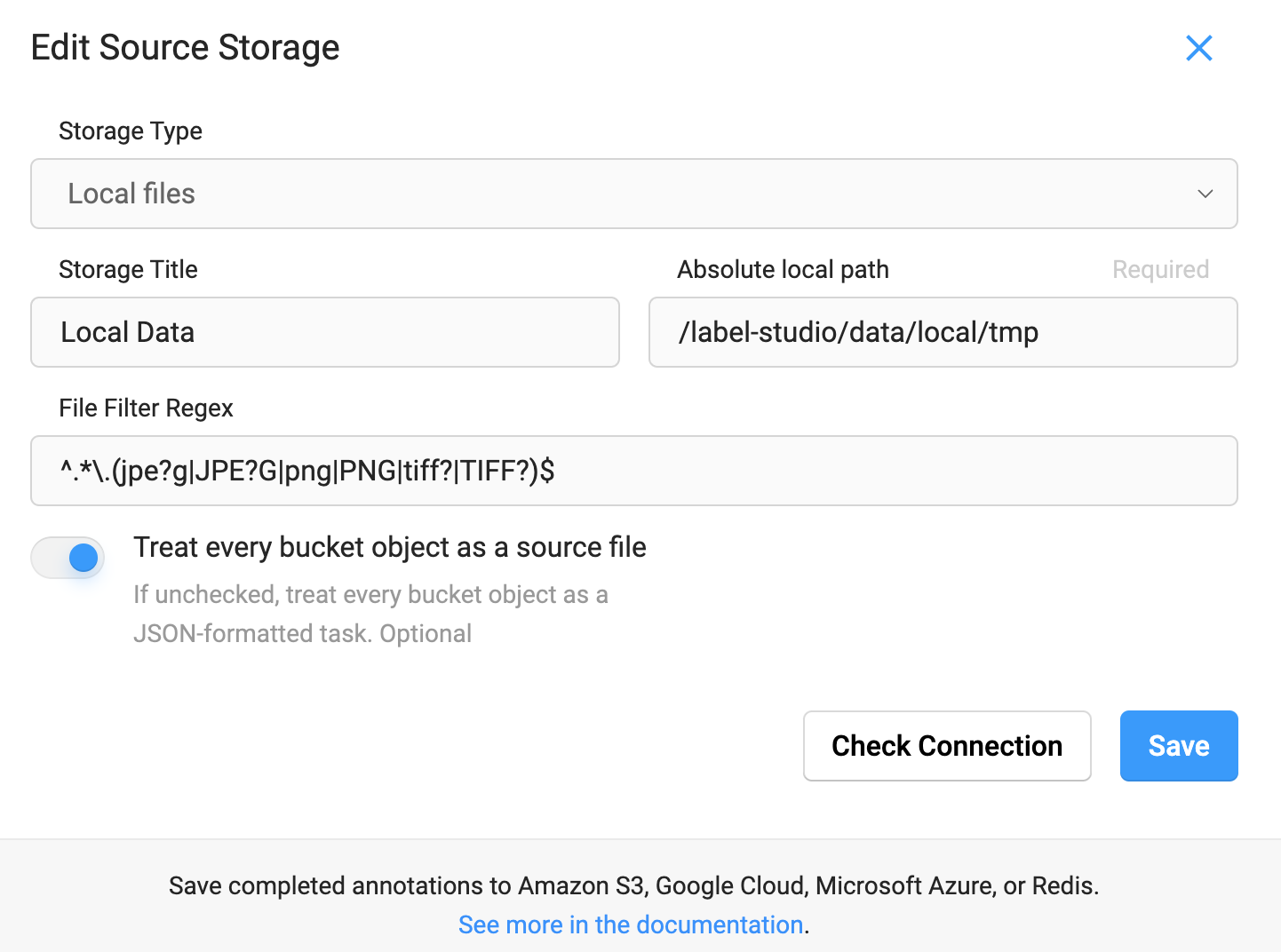
Sync 이후 LabelStudio class로 생성된 JSON file을 Label Studio에 import하면 아래와 같이 setup 할 수 있다.
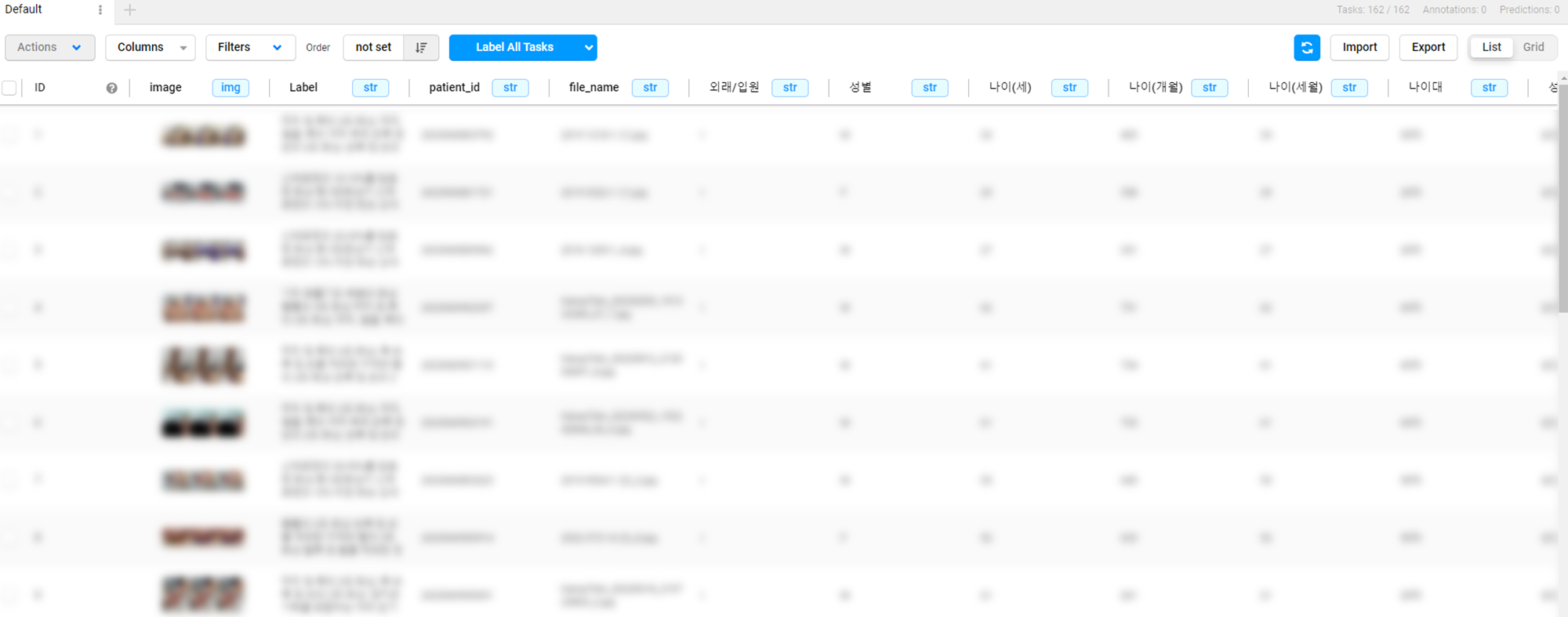
Parameters:
| Name | Type | Description | Default |
|---|---|---|---|
path | str | Local files의 경로 | '/label-studio/data/local' |
data_function | Callable[[str], dict[str, Any]] | None | Label Studio에서 사용할 수 있는 | None |
Returns:
| Type | Description |
|---|---|
None |
|
Examples:
Default:
>>> ls = zz.vision.LabelStudio(data_path)
>>> ls.json()
100%|█████████████| 476/476 [00:00<00:00, 259993.32it/s
[
    {
        "data": {
            "image": "data/local-files/?d=/label-studio/data/local/tmp/0000007864.png"
        }
    },
    {
        "data": {
            "...": "..."
        }
    },
]
data_function: >>> ls = zz.vision.LabelStudio(data_path)
>>> ls.json(data_function)
100%|█████████████| 476/476 [00:00<00:00, 78794.25it/s]
[
    {
        "data": {
            "image": "data/local-files/?d=/label-studio/data/local/tmp/0000007864.png",
            "Label": "...",
            "patient_id": "...",
            "...": "...",
        }
    },
    {
        "data": {
            "...": "..."
        }
    },
]
Source code in zerohertzLib/vision/data.py
192 193 194 195 196 197 198 199 200 201 202 203 204 205 206 207 208 209 210 211 212 213 214 215 216 217 218 219 220 221 222 223 224 225 226 227 228 229 230 231 232 233 234 235 236 237 238 239 240 241 242 243 244 245 246 247 248 249 250 251 252 253 254 255 256 257 258 259 260 261 262 263 264 265 266 267 268 269 270 271 272 273 274 275 276 277 278 279 280 281 282 283 284 285 286 287 288 289 | |
Label Studio로 annotation한 JSON data를 LabelMe format으로 변환
Parameters:
| Name | Type | Description | Default |
|---|---|---|---|
target_path | str | LabelMe format data가 저장될 경로 | required |
label | dict[str, Any] | None | Label Studio에서 사용한 label을 변경하는 dictionary | None |
Returns:
| Type | Description |
|---|---|
None |
|
Examples:
>>> ls = zz.vision.LabelStudio(data_path, json_path)
>>> ls.labelme(target_path)
100%|█████████████| 476/476 [00:00<00:00, 78794.25it/s]
>>> label = {"label1": "lab1", "label2": "lab2"}
>>> ls.labelme(target_path, label)
100%|█████████████| 476/476 [00:00<00:00, 78794.25it/s]
Source code in zerohertzLib/vision/data.py
Label Studio로 annotation한 JSON data를 YOLO format으로 변환
Parameters:
| Name | Type | Description | Default |
|---|---|---|---|
target_path | str | YOLO format data가 저장될 경로 | required |
label | list[str] | None | Label Studio에서 사용한 label을 정수로 변환하는 list (index 사용) | None |
Returns:
| Type | Description |
|---|---|
None |
|
Examples:
>>> ls = zz.vision.LabelStudio(data_path, json_path)
>>> ls.yolo(target_path)
100%|█████████████| 476/476 [00:00<00:00, 78794.25it/s]
>>> label = ["label1", "label2"]
>>> ls.yolo(target_path, label)
100%|█████████████| 476/476 [00:00<00:00, 78794.25it/s]
Source code in zerohertzLib/vision/data.py
YoloLoader(data_path: str = 'images', txt_path: str = 'labels', poly: bool = False, absolute: bool = False, vis_path: str | None = None, class_color: dict[int | str, tuple[int, int, int]] | None = None)
YOLO format의 dataset을 읽고 시각화하는 class
Parameters:
| Name | Type | Description | Default |
|---|---|---|---|
data_path | str | Image가 존재하는 directory 경로 | 'images' |
txt_path | str | YOLO format의 | 'labels' |
poly | bool |
| False |
absolute | bool |
| False |
vis_path | str | None | 시각화 image들이 저장될 경로 | None |
class_color | dict[int | str, tuple[int, int, int]] | None | 시각화 결과에 적용될 class에 따른 색상 | None |
Examples:
>>> data_path = ".../images"
>>> txt_path = ".../labels"
>>> class_color = {0: (0, 255, 0), 1: (255, 0, 0), 2: (0, 0, 255)}
>>> yolo = zz.vision.YoloLoader(data_path, txt_path, poly=True, absolute=False, vis_path="tmp", class_color=class_color)
>>> image, class_list, objects = yolo[0]
>>> type(image)
<class 'numpy.ndarray'>
>>> class_list
[1, 1]
>>> len(objects)
2
Methods:
| Name | Description |
|---|---|
__getitem__ | Index에 따른 image와 |
__len__ | Image 수를 반환 |
labelstudio | YOLO format의 data를 Label Studio에서 확인 및 수정할 수 있게 변환 |
Attributes:
| Name | Type | Description |
|---|---|---|
absolute | | |
class_color | | |
data_path | | |
data_paths | | |
poly | | |
txt_path | | |
vis_path | |
Source code in zerohertzLib/vision/loader.py
Index에 따른 image와 .txt file에 대한 정보 return (vis_path 와 class_color 입력 시 시각화 image vis_path 에 저장)
Parameters:
| Name | Type | Description | Default |
|---|---|---|---|
idx | int | 입력 index | required |
Returns:
| Type | Description |
|---|---|
tuple[NDArray[uint8], list[int], list[NDArray[DTypeLike]]] | 읽어온 image와 그에 따른 |
Source code in zerohertzLib/vision/loader.py
Source code in zerohertzLib/vision/loader.py
Source code in zerohertzLib/vision/loader.py
Source code in zerohertzLib/vision/loader.py
_visualization(file_name: str, img: NDArray[uint8], class_list: list[int], objects: list[NDArray[DTypeLike]]) -> None
Source code in zerohertzLib/vision/loader.py
YOLO format의 data를 Label Studio에서 확인 및 수정할 수 있게 변환
Parameters:
| Name | Type | Description | Default |
|---|---|---|---|
directory | str | Label Studio 내 | 'image' |
labels | list[str | None] | YOLO format의 | None |
mp_num | int | 병렬 처리에 사용될 process의 수 ( | 0 |
Returns:
| Type | Description |
|---|---|
None |
|
Examples >>> yolo.labelstudio("images", mp_num=10, labels=["t1", "t2", "t3", "t4"])
Source code in zerohertzLib/vision/loader.py
bbox(img: NDArray[uint8], box: list[int | float] | NDArray[DTypeLike], color: tuple[int, int, int] = (0, 0, 255), thickness: int = 2) -> NDArray[uint8]
여러 Bbox 시각화
Parameters:
| Name | Type | Description | Default |
|---|---|---|---|
img | NDArray[uint8] | Input image ( | required |
box | list[int | float] | NDArray[DTypeLike] | 하나 혹은 여러 개의 bbox ( | required |
color | tuple[int, int, int] | bbox의 색 | (0, 0, 255) |
thickness | int | bbox 선의 두께 | 2 |
Returns:
| Type | Description |
|---|---|
NDArray[uint8] | 시각화 결과 ( |
Examples:
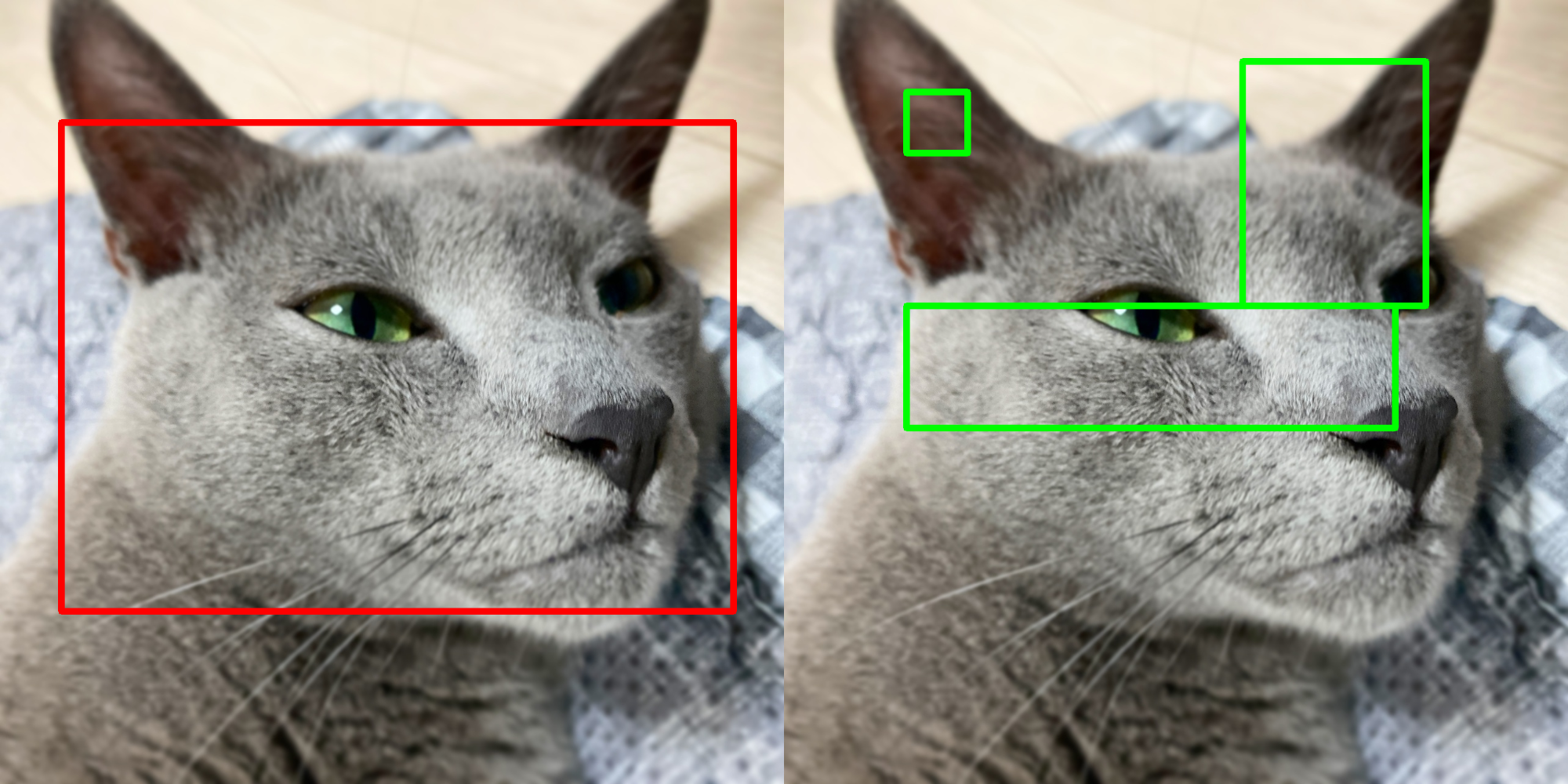
Bbox: >>> box = np.array([[100, 200], [100, 1000], [1200, 1000], [1200, 200]]) >>> box.shape (4, 2) >>> res1 = zz.vision.bbox(img, box, thickness=10)
Bboxes: >>> boxes = np.array([[250, 200, 100, 100], [600, 600, 800, 200], [900, 300, 300, 400]]) >>> boxes.shape (3, 4) >>> res2 = zz.vision.bbox(img, boxes, (0, 255, 0), thickness=10)
Source code in zerohertzLib/vision/visual.py
before_after(before: NDArray[uint8], after: NDArray[uint8], area: list[int | float] | None = None, per: bool = True, quality: int = 100, file_name: str = 'tmp') -> None
두 image를 비교하는 image 생성
Parameters:
| Name | Type | Description | Default |
|---|---|---|---|
before | NDArray[uint8] | 원본 image | required |
after | NDArray[uint8] | 영상 처리 혹은 모델 추론 후 image | required |
area | list[int | float] | None | 비교할 좌표 ( | None |
per | bool |
| True |
quality | int | 출력 image의 quality (단위: %) | 100 |
file_name | str | 저장될 file의 이름 | 'tmp' |
Returns:
| Type | Description |
|---|---|
None | 현재 directory에 바로 image 저장 |
Examples:
BGR, GRAY:
>>> after = cv2.GaussianBlur(before, (0, 0), 25)
>>> after = cv2.cvtColor(after, cv2.COLOR_BGR2GRAY)
>>> zz.vision.before_after(before, after, quality=10)
 BGR, Resize:
 >>> after = cv2.resize(before, (100, 100))
>>> zz.vision.before_after(before, after, [20, 40, 30, 60])

Source code in zerohertzLib/vision/compare.py
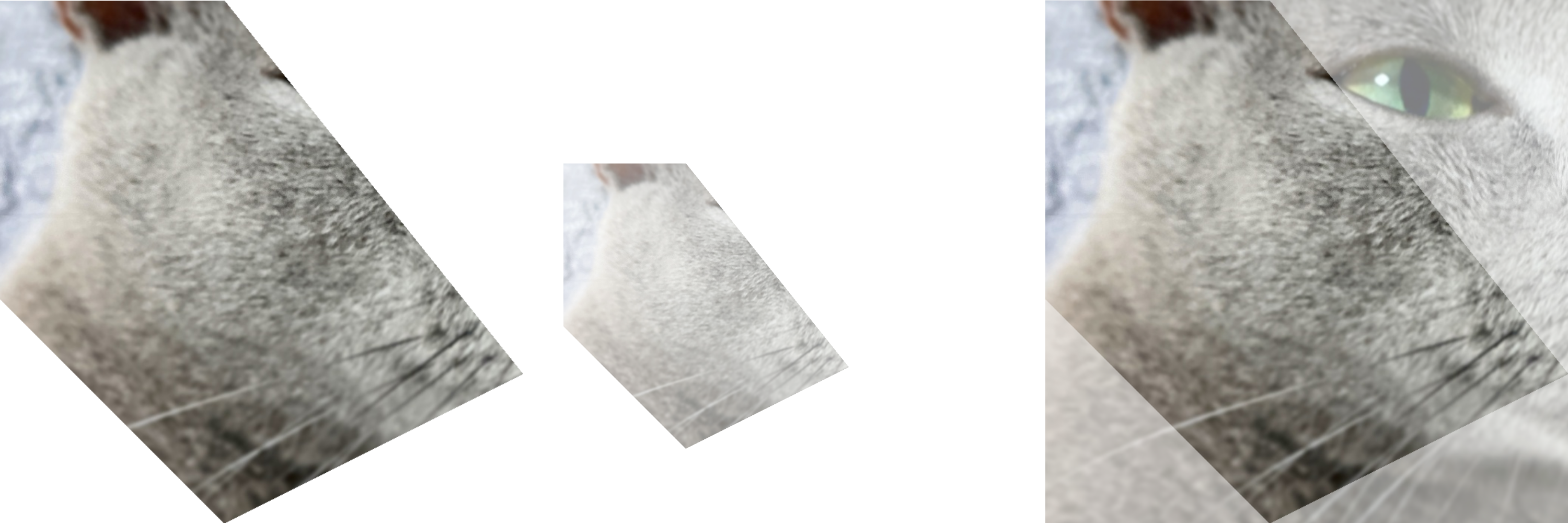
cutout(img: NDArray[uint8], poly: list[int | float] | NDArray[DTypeLike], alpha: int = 255, crop: bool = True, background: int = 0) -> NDArray[uint8]
Image 내에서 지정한 좌표를 제외한 부분을 투명화
Parameters:
| Name | Type | Description | Default |
|---|---|---|---|
img | NDArray[uint8] | 입력 image ( | required |
poly | list[int | float] | NDArray[DTypeLike] | 지정할 좌표 ( | required |
alpha | int | 지정한 좌표 영역의 투명도 | 255 |
crop | bool | 출력 image의 Crop 여부 | True |
background | int | 지정한 좌표 외 배경의 투명도 | 0 |
Returns:
| Type | Description |
|---|---|
NDArray[uint8] | 출력 image ( |
Examples:
>>> poly = np.array([[100, 400], [400, 400], [800, 900], [400, 1100], [100, 800]])
>>> res1 = zz.vision.cutout(img, poly)
>>> res2 = zz.vision.cutout(img, poly, 128, False)
>>> res3 = zz.vision.cutout(img, poly, background=128)
Source code in zerohertzLib/vision/transform.py
Bbox 변환
Parameters:
| Name | Type | Description | Default |
|---|---|---|---|
box | list[int | float] | NDArray[DTypeLike] |
| required |
Returns:
| Type | Description |
|---|---|
NDArray[DTypeLike] |
|
Examples:
>>> zz.vision.cwh2poly([20, 30, 20, 20])
array([[10, 20],
       [30, 20],
       [30, 40],
       [10, 40]])
>>> zz.vision.cwh2poly(np.array([[20, 30, 20, 20], [50, 75, 40, 50]]))
array([[[ 10,  20],
        [ 30,  20],
        [ 30,  40],
        [ 10,  40]],
       [[ 30,  50],
        [ 70,  50],
        [ 70, 100],
        [ 30, 100]]])
Source code in zerohertzLib/vision/convert.py
Bbox 변환
Parameters:
| Name | Type | Description | Default |
|---|---|---|---|
box | list[int | float] | NDArray[DTypeLike] |
| required |
Returns:
| Type | Description |
|---|---|
NDArray[DTypeLike] |
|
Examples:
>>> zz.vision.cwh2xyxy([20, 30, 20, 20])
array([10, 20, 30, 40])
>>> zz.vision.cwh2xyxy(np.array([[20, 30, 20, 20], [50, 75, 40, 50]]))
array([[ 10,  20,  30,  40],
       [ 30,  50,  70, 100]])
Source code in zerohertzLib/vision/convert.py
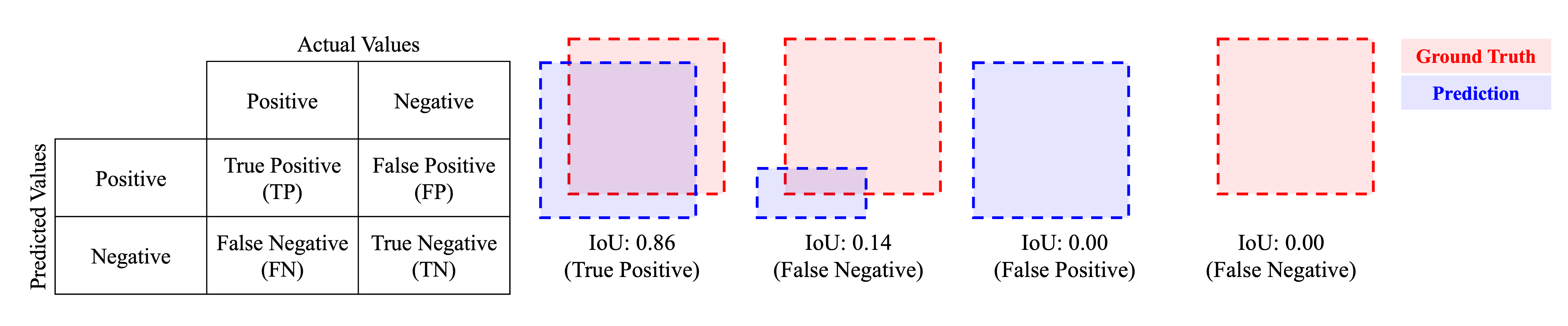
evaluation(ground_truths: NDArray[DTypeLike], inferences: NDArray[DTypeLike], confidences: list[float], gt_classes: list[str] | None = None, inf_classes: list[str] | None = None, file_name: str | None = None, threshold: float = 0.5) -> DataFrame
단일 image 내 detection model의 추론 성능 평가
Parameters:
| Name | Type | Description | Default |
|---|---|---|---|
ground_truths | NDArray[DTypeLike] | Ground truth object들의 polygon ( | required |
inferences | NDArray[DTypeLike] | Model이 추론한 각 object들의 polygon ( | required |
confidences | list[float] | Model이 추론한 각 object들의 confidence( | required |
gt_classes | list[str] | None | Ground truth object들의 class ( | None |
inf_classes | list[str] | None | Model이 추론한 각 object들의 class ( | None |
file_name | str | None | 평가 image의 이름 | None |
threshold | float | IoU의 threshold | 0.5 |
Note
N: 한 image의 ground truth 내 존재하는 object의 수M: 한 image의 inference 결과 내 존재하는 object의 수
Returns:
| Type | Description |
|---|---|
DataFrame | 단일 image의 model 성능 평가 결과 |
Examples:
>>> poly = np.array([[0, 0], [10, 0], [10, 10], [0, 10]])
>>> ground_truths = np.array([poly, poly + 20, poly + 40])
>>> inferences = np.array([poly, poly + 19, poly + 80])
>>> confidences = np.array([0.6, 0.7, 0.8])
>>> zz.vision.evaluation(ground_truths, inferences, confidences, file_name="test.png")
  file_name  instance  confidence  class       IoU results  gt_x0  gt_y0  gt_x1  gt_y1  gt_x2  gt_y2  gt_x3  gt_y3  inf_x0  inf_y0  inf_x1  inf_y1  inf_x2  inf_y2  inf_x3  inf_y3
0  test.png         0         0.8    0.0  0.000000      FP    NaN    NaN    NaN    NaN    NaN    NaN    NaN    NaN    80.0    80.0    90.0    80.0    90.0    90.0    80.0    90.0
1  test.png         1         0.7    0.0  0.680672      TP   20.0   20.0   30.0   20.0   30.0   30.0   20.0   30.0    19.0    19.0    29.0    19.0    29.0    29.0    19.0    29.0
2  test.png         2         0.6    0.0  1.000000      TP    0.0    0.0   10.0    0.0   10.0   10.0    0.0   10.0     0.0     0.0    10.0     0.0    10.0    10.0     0.0    10.0
3  test.png         3         0.0    0.0  0.000000      FN   40.0   40.0   50.0   40.0   50.0   50.0   40.0   50.0     NaN     NaN     NaN     NaN     NaN     NaN     NaN     NaN
>>> gt_classes = np.array(["cat", "dog", "cat"])
>>> inf_classes = np.array(["cat", "dog", "cat"])
>>> zz.vision.evaluation(ground_truths, inferences, confidences, gt_classes, inf_classes)
   instance  confidence class       IoU results  gt_x0  gt_y0  gt_x1  gt_y1  gt_x2  gt_y2  gt_x3  gt_y3  inf_x0  inf_y0  inf_x1  inf_y1  inf_x2  inf_y2  inf_x3  inf_y3
0         0         0.8   cat  0.000000      FP    NaN    NaN    NaN    NaN    NaN    NaN    NaN    NaN    80.0    80.0    90.0    80.0    90.0    90.0    80.0    90.0
1         1         0.6   cat  1.000000      TP    0.0    0.0   10.0    0.0   10.0   10.0    0.0   10.0     0.0     0.0    10.0     0.0    10.0    10.0     0.0    10.0
2         2         0.0   cat  0.000000      FN   40.0   40.0   50.0   40.0   50.0   50.0   40.0   50.0     NaN     NaN     NaN     NaN     NaN     NaN     NaN     NaN
3         3         0.7   dog  0.680672      TP   20.0   20.0   30.0   20.0   30.0   30.0   20.0   30.0    19.0    19.0    29.0    19.0    29.0    29.0    19.0    29.0
Source code in zerohertzLib/vision/eval.py
95 96 97 98 99 100 101 102 103 104 105 106 107 108 109 110 111 112 113 114 115 116 117 118 119 120 121 122 123 124 125 126 127 128 129 130 131 132 133 134 135 136 137 138 139 140 141 142 143 144 145 146 147 148 149 150 151 152 153 154 155 156 157 158 159 160 161 162 163 164 165 166 167 168 169 170 171 172 173 174 175 176 177 178 179 180 181 182 183 184 185 186 187 188 189 190 191 | |
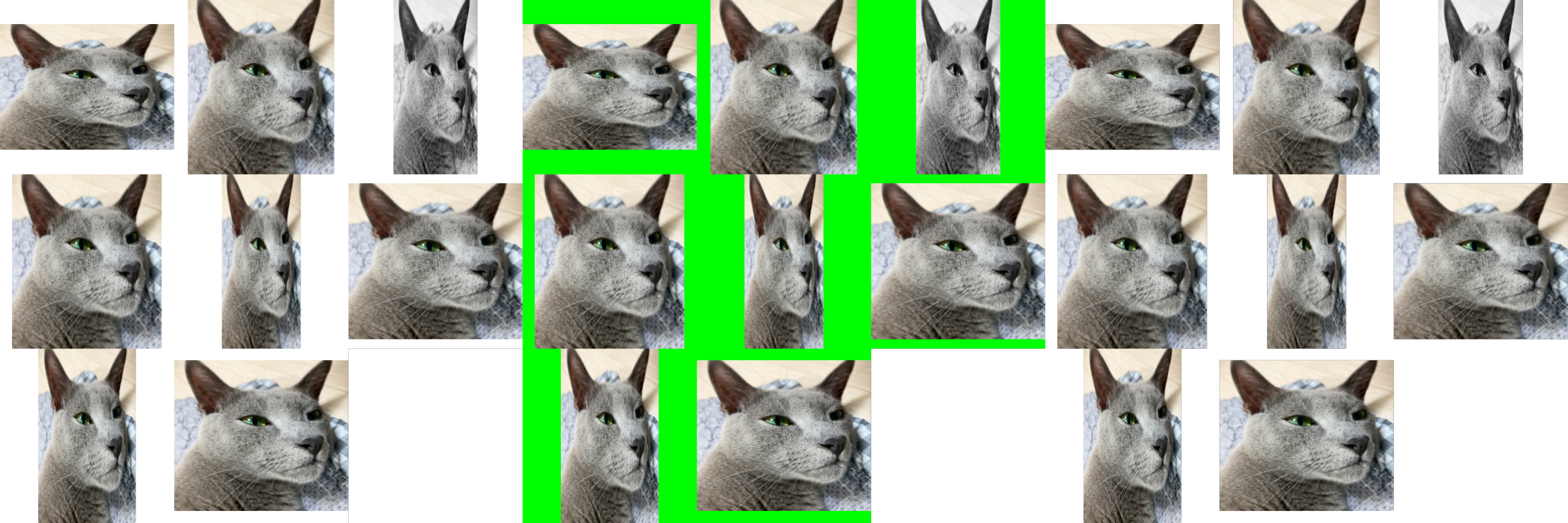
grid(imgs: list[NDArray[uint8]], size: int = 1000, color: tuple[int, int, int] = (255, 255, 255), file_name: str = 'tmp') -> None
여러 image를 입력받아 정방형 image로 병합
Parameters:
| Name | Type | Description | Default |
|---|---|---|---|
imgs | list[NDArray[uint8]] | 입력 image | required |
size | int | 출력 image의 크기 | 1000 |
color | tuple[int, int, int] | Padding의 색 | (255, 255, 255) |
file_name | str | 저장될 file의 이름 | 'tmp' |
Returns:
| Type | Description |
|---|---|
None | 현재 directory에 바로 image 저장 |
Examples:
>>> imgs = [cv2.resize(img, (random.randrange(300, 1000), random.randrange(300, 1000))) for _ in range(8)]
>>> imgs[2] = cv2.cvtColor(imgs[2], cv2.COLOR_BGR2GRAY)
>>> imgs[3] = cv2.cvtColor(imgs[3], cv2.COLOR_BGR2BGRA)
>>> zz.vision.grid(imgs)
>>> zz.vision.grid(imgs, color=(0, 255, 0))
>>> zz.vision.grid(imgs, color=(0, 0, 0, 0))
Source code in zerohertzLib/vision/compare.py
Directory 내 image들을 GIF로 변환
Parameters:
| Name | Type | Description | Default |
|---|---|---|---|
path | str | GIF로 변환할 image들이 존재하는 경로 | required |
file_name | str | 출력될 GIF file 이름 | 'tmp' |
duration | int | ms 단위의 사진 간 간격 | 500 |
Returns:
| Type | Description |
|---|---|
None | 현재 directory에 바로 GIF 저장 |
Examples:

Source code in zerohertzLib/vision/gif.py
IoU (Intersection over Union)를 계산하는 function
Parameters:
| Name | Type | Description | Default |
|---|---|---|---|
poly1 | NDArray[DTypeLike] | IoU를 계산할 polygon ( | required |
poly2 | NDArray[DTypeLike] | IoU를 계산할 polygon ( | required |
Returns:
| Type | Description |
|---|---|
float | IoU 값 |
Examples:
>>> poly1 = np.array([[0, 0], [10, 0], [10, 10], [0, 10]])
>>> poly2 = poly1 + (5, 0)
>>> poly2
array([[ 5,  0],
       [15,  0],
       [15, 10],
       [ 5, 10]])
>>> zz.vision.iou(poly1, poly2)
0.3333333333333333
Source code in zerohertzLib/vision/eval.py
is_pts_in_poly(poly: NDArray[DTypeLike], pts: list[int | float] | NDArray[DTypeLike]) -> bool | NDArray[bool]
지점들의 좌표 내 존재 여부 확인 function
Parameters:
| Name | Type | Description | Default |
|---|---|---|---|
poly | NDArray[DTypeLike] | 다각형 ( | required |
pts | list[int | float] | NDArray[DTypeLike] | point ( | required |
Returns:
| Type | Description |
|---|---|
bool | NDArray[bool] | 입력 |
Examples:
>>> poly = np.array([[10, 10], [20, 10], [30, 40], [20, 60], [10, 20]])
>>> zz.vision.is_pts_in_poly(poly, [20, 20])
True
>>> zz.vision.is_pts_in_poly(poly, [[20, 20], [100, 100]])
array([ True, False])
>>> zz.vision.is_pts_in_poly(poly, np.array([20, 20]))
True
>>> zz.vision.is_pts_in_poly(poly, np.array([[20, 20], [100, 100]]))
array([ True, False])
Source code in zerohertzLib/vision/util.py
mask(img: NDArray[uint8], mks: NDArray[bool] | None = None, poly: list[int | float] | NDArray[DTypeLike] | list[NDArray[DTypeLike]] | None = None, color: tuple[int, int, int] = (0, 0, 255), class_list: list[int | str] | None = None, class_color: dict[int | str, tuple[int, int, int]] | None = None, border: bool = True, alpha: float = 0.5) -> NDArray[uint8]
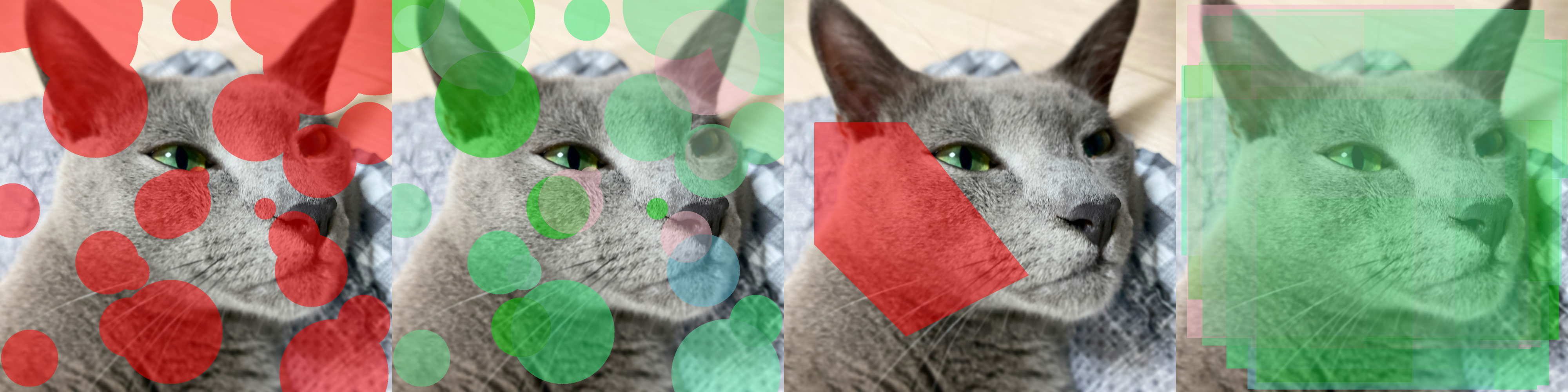
Mask 시각화
Parameters:
| Name | Type | Description | Default |
|---|---|---|---|
img | NDArray[uint8] | 입력 image ( | required |
mks | NDArray[bool] | None | 입력 image 위에 병합할 mask ( | None |
poly | list[int | float] | NDArray[DTypeLike] | list[NDArray[DTypeLike]] | None | 입력 image 위에 병합할 mask ( | None |
color | tuple[int, int, int] | Mask의 색 | (0, 0, 255) |
class_list | list[int | str] | None |
| None |
class_color | dict[int | str, tuple[int, int, int]] | None | Class에 따른 색 ( | None |
border | bool | Mask의 경계선 표시 여부 | True |
alpha | float | Mask의 투명도 | 0.5 |
Returns:
| Type | Description |
|---|---|
NDArray[uint8] | 시각화 결과 ( |
Examples:
Mask:
>>> H, W, _ = img.shape
>>> cnt = 30
>>> mks = np.zeros((cnt, H, W), np.uint8)
>>> for mks_ in mks:
>>>     center_x = random.randint(0, W)
>>>     center_y = random.randint(0, H)
>>>     radius = random.randint(30, 200)
>>>     cv2.circle(mks_, (center_x, center_y), radius, (True), -1)
>>> mks = mks.astype(bool)
>>> res1 = zz.vision.mask(img, mks)
>>> cls = [i for i in range(cnt)]
>>> class_list = [cls[random.randint(0, 5)] for _ in range(cnt)]
>>> class_color = {}
>>> for c in cls:
>>>     class_color[c] = [random.randint(0, 255) for _ in range(3)]
>>> res2 = zz.vision.mask(img, mks, class_list=class_list, class_color=class_color)
>>> poly = np.array([[100, 400], [400, 400], [800, 900], [400, 1100], [100, 800]])
>>> res3 = zz.vision.mask(img, poly=poly)
>>> poly = zz.vision.xyxy2poly(zz.vision.poly2xyxy((np.random.rand(cnt, 4, 2) * (W, H))))
>>> res4 = zz.vision.mask(img, poly=poly, class_list=class_list, class_color=class_color)
Source code in zerohertzLib/vision/visual.py
95 96 97 98 99 100 101 102 103 104 105 106 107 108 109 110 111 112 113 114 115 116 117 118 119 120 121 122 123 124 125 126 127 128 129 130 131 132 133 134 135 136 137 138 139 140 141 142 143 144 145 146 147 148 149 150 151 152 153 154 155 156 157 158 159 160 161 162 163 164 165 166 167 168 169 170 171 172 173 174 175 176 177 178 179 180 181 182 183 184 185 186 187 188 189 190 191 192 193 194 195 196 | |
Detection model의 P-R curve 시각화 및 mAP 산출
Parameters:
| Name | Type | Description | Default |
|---|---|---|---|
logs | DataFrame |
| required |
Returns:
| Type | Description |
|---|---|
tuple[float, dict[str, float]] | mAP 값 및 class에 따른 AP 값 (시각화 결과는 |
Examples:
>>> logs1 = zz.vision.evaluation(ground_truths_1, inferences_1, confidences_1, gt_classes, inf_classes, file_name="test_1.png")
>>> logs2 = zz.vision.evaluation(ground_truths_2, inferences_2, confidences_2, gt_classes, inf_classes, file_name="test_2.png")
>>> logs = pd.concat([logs1, logs2], ignore_index=True)
>>> zz.vision.meanap(logs)
(0.7030629916206652, defaultdict(<class 'float'>, {'dog': 0.7177078883735305, 'cat': 0.6884180948677999}))
Source code in zerohertzLib/vision/eval.py
pad(img: NDArray[uint8], shape: tuple[int, int], color: tuple[int, int, int] = (255, 255, 255), poly: NDArray[DTypeLike] | None = None) -> tuple[NDArray[uint8], tuple[float, int, int] | NDArray[DTypeLike]]
입력 image를 원하는 shape로 resize 및 pad
Parameters:
| Name | Type | Description | Default |
|---|---|---|---|
img | NDArray[uint8] | 입력 image ( | required |
shape | tuple[int, int] | 출력의 shape | required |
color | tuple[int, int, int] | Padding의 색 | (255, 255, 255) |
poly | NDArray[DTypeLike] | None | Padding에 따라 변형될 좌표 ( | None |
Returns:
| Type | Description |
|---|---|
tuple[NDArray[uint8], tuple[float, int, int] | NDArray[DTypeLike]] | 출력 image ( |
Note
poly 를 입력하지 않을 시 (ratio, left, top) 가 출력되며 poly * ratio + (left, top) 와 같이 차후에 변환 가능
Examples:
GRAY:
>>> img = cv2.cvtColor(img, cv2.COLOR_BGRA2GRAY)
>>> res1 = cv2.resize(img, (500, 1000))
>>> res1, _ = zz.vision.pad(res1, (1000, 1000), color=(0, 255, 0))
>>> img = cv2.cvtColor(img, cv2.COLOR_BGR2BGRA)
>>> res3 = cv2.resize(img, (500, 1000))
>>> res3, _ = zz.vision.pad(res3, (1000, 1000), color=(0, 0, 255, 128))
>>> poly = np.array([[100, 400], [400, 400], [800, 900], [400, 1100], [100, 800]])
>>> res4 = cv2.resize(img, (2000, 1000))
>>> res4 = zz.vision.bbox(res4, poly, color=(255, 0, 0), thickness=20)
>>> res4, poly = zz.vision.pad(res4, (1000, 1000), poly=poly)
>>> res4 = zz.vision.bbox(res4, poly, color=(0, 0, 255))
>>> poly = np.array([[100, 400], [400, 400], [800, 900], [400, 1100], [100, 800]])
>>> res5 = cv2.resize(img, (2000, 1000))
>>> res5 = zz.vision.bbox(res5, poly, color=(255, 0, 0), thickness=20)
>>> res5, info = zz.vision.pad(res5, (1000, 1000), color=(128, 128, 128))
>>> poly = poly * info[0] + info[1:]
>>> res5 = zz.vision.bbox(res5, poly, color=(0, 0, 255))
Source code in zerohertzLib/vision/transform.py
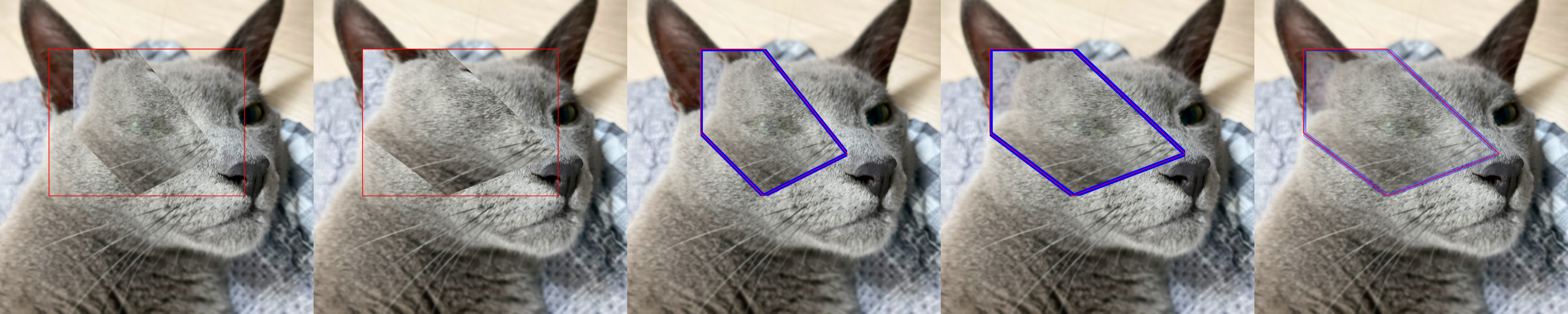
paste(img: NDArray[uint8], target: NDArray[uint8], box: list[int | float] | NDArray[DTypeLike], resize: bool = False, vis: bool = False, poly: NDArray[DTypeLike] | None = None, alpha: int | None = None, gaussian: int | None = None) -> NDArray[uint8] | tuple[NDArray[uint8], NDArray[DTypeLike]]
target image를 img 위에 투명도를 포함하여 병합
Note
PIL.Image.paste 를 numpy 와 cv2 기반으로 구현
Parameters:
| Name | Type | Description | Default |
|---|---|---|---|
img | NDArray[uint8] | 입력 image ( | required |
target | NDArray[uint8] | Target image ( | required |
box | list[int | float] | NDArray[DTypeLike] | 병합될 영역 ( | required |
resize | bool | Target image의 resize 여부 | False |
vis | bool | 지정한 영역 ( | False |
poly | NDArray[DTypeLike] | None | 변형된 좌표 ( | None |
alpha | int | None |
| None |
gaussian | int | None | 자연스러운 병합을 위해 | None |
Returns:
| Type | Description |
|---|---|
NDArray[uint8] | tuple[NDArray[uint8], NDArray[DTypeLike]] | 시각화 결과 ( |
Examples:
Without Poly:
>>> poly = np.array([[100, 400], [400, 400], [800, 900], [400, 1100], [100, 800]])
>>> target = zz.vision.cutout(img, poly, 200)
>>> res1 = zz.vision.paste(img, target, [200, 200, 1000, 800], resize=False, vis=True)
>>> res2 = zz.vision.paste(img, target, [200, 200, 1000, 800], resize=True, vis=True, alpha=255)
>>> poly -= zz.vision.poly2xyxy(poly)[:2]
>>> target = zz.vision.bbox(target, poly, color=(255, 0, 0), thickness=20)
>>> res3, poly3 = zz.vision.paste(img, target, [200, 200, 1000, 800], resize=False, poly=poly)
>>> poly3
array([[300.        , 200.        ],
       [557.14285714, 200.        ],
       [900.        , 628.57142857],
       [557.14285714, 800.        ],
       [300.        , 542.85714286]])
>>> res3 = zz.vision.bbox(res3, poly3)
>>> res4, poly4 = zz.vision.paste(img, target, [200, 200, 1000, 800], resize=True, poly=poly)
>>> poly4
array([[ 200.        ,  200.        ],
       [ 542.85714286,  200.        ],
       [1000.        ,  628.57142857],
       [ 542.85714286,  800.        ],
       [ 200.        ,  542.85714286]])
>>> res4 = zz.vision.bbox(res4, poly4)
>>> res5, poly5 = zz.vision.paste(img, target, [200, 200, 1000, 800], resize=True, poly=poly, gaussian=501)
>>> res5 = zz.vision.bbox(res5, poly5)
Source code in zerohertzLib/vision/visual.py
341 342 343 344 345 346 347 348 349 350 351 352 353 354 355 356 357 358 359 360 361 362 363 364 365 366 367 368 369 370 371 372 373 374 375 376 377 378 379 380 381 382 383 384 385 386 387 388 389 390 391 392 393 394 395 396 397 398 399 400 401 402 403 404 405 406 407 408 409 410 411 412 413 414 415 416 417 418 419 420 421 422 423 424 425 426 427 428 429 430 431 432 433 434 435 436 437 438 439 440 441 442 443 444 445 446 447 448 449 450 451 452 453 | |
다각형의 면적을 산출하는 function
Parameters:
| Name | Type | Description | Default |
|---|---|---|---|
poly | list[int | float] | NDArray[DTypeLike] | 다각형 ( | required |
Returns:
| Type | Description |
|---|---|
float | 다각형의 면적 |
Examples:
>>> poly = [[10, 10], [20, 10], [30, 40], [20, 60], [10, 20]]
>>> zz.vision.poly2area(poly)
550.0
>>> box = np.array([[100, 200], [1200, 200], [1200, 1000], [100, 1000]])
>>> zz.vision.poly2area(box)
880000.0
Source code in zerohertzLib/vision/convert.py
Bbox 변환
Parameters:
| Name | Type | Description | Default |
|---|---|---|---|
box | list[int | float] | NDArray[DTypeLike] |
| required |
Returns:
| Type | Description |
|---|---|
NDArray[DTypeLike] |
|
Examples:
>>> zz.vision.poly2cwh([[10, 20], [30, 20], [30, 40], [10, 40]])
array([20, 30, 20, 20])
>>> zz.vision.poly2cwh(np.array([[[10, 20], [30, 20], [30, 40], [10, 40]], [[30, 50], [70, 50], [70, 100], [30, 100]]]))
array([[20, 30, 20, 20],
       [50, 75, 40, 50]])
Source code in zerohertzLib/vision/convert.py
poly2mask(poly: list[int | float] | NDArray[DTypeLike] | list[NDArray[DTypeLike]], shape: tuple[int, int]) -> NDArray[bool]
다각형 좌표를 입력받아 mask로 변환
Parameters:
| Name | Type | Description | Default |
|---|---|---|---|
poly | list[int | float] | NDArray[DTypeLike] | list[NDArray[DTypeLike]] | Mask의 꼭짓점 좌표 ( | required |
shape | tuple[int, int] | 출력될 mask의 shape | required |
Returns:
| Type | Description |
|---|---|
NDArray[bool] | 변환된 mask ( |
Examples:
>>> poly = [[10, 10], [20, 10], [30, 40], [20, 60], [10, 20]]
>>> mask1 = zz.vision.poly2mask(poly, (70, 100))
>>> mask1.shape
(70, 100)
>>> mask1.dtype
dtype('bool')
>>> poly = np.array(poly)
>>> mask2 = zz.vision.poly2mask([poly, poly - 10, poly + 20], (70, 100))
>>> mask2.shape
(3, 70, 100)
>>> mask2.dtype
dtype('bool')

Source code in zerohertzLib/vision/convert.py
다각형의 bbox 대비 다각형의 면적 비율을 산출하는 function
Parameters:
| Name | Type | Description | Default |
|---|---|---|---|
poly | list[int | float] | NDArray[DTypeLike] | 다각형 ( | required |
Returns:
| Type | Description |
|---|---|
float | 다각형의 bbox 대비 다각형의 비율 |
Examples:
>>> poly = [[10, 10], [20, 10], [30, 40], [20, 60], [10, 20]]
>>> zz.vision.poly2ratio(poly)
0.55
>>> box = np.array([[100, 200], [1200, 200], [1200, 1000], [100, 1000]])
>>> zz.vision.poly2ratio(box)
1.0
Source code in zerohertzLib/vision/convert.py
Bbox 변환
Parameters:
| Name | Type | Description | Default |
|---|---|---|---|
box | list[int | float] | NDArray[DTypeLike] |
| required |
Returns:
| Type | Description |
|---|---|
NDArray[DTypeLike] |
|
Examples:
>>> zz.vision.poly2xyxy([[10, 20], [30, 20], [30, 40], [10, 40]])
array([10, 20, 30, 40])
>>> zz.vision.poly2xyxy(np.array([[[10, 20], [30, 20], [30, 40], [10, 40]], [[30, 50], [70, 50], [70, 100], [30, 100]]]))
array([[ 10,  20,  30,  40],
       [ 30,  50,  70, 100]])
Source code in zerohertzLib/vision/convert.py
text(img: NDArray[uint8], box: list[int | float] | NDArray[DTypeLike], txt: str | list[str], color: tuple[int, int, int] = (0, 0, 0), vis: bool = False, fontsize: int = 100) -> NDArray[uint8]
Text 시각화
Parameters:
| Name | Type | Description | Default |
|---|---|---|---|
img | NDArray[uint8] | 입력 image ( | required |
box | list[int | float] | NDArray[DTypeLike] | 문자열이 존재할 bbox ( | required |
txt | str | list[str] | Image에 추가할 문자열 | required |
color | tuple[int, int, int] | 문자의 색 | (0, 0, 0) |
vis | bool | 문자 영역의 시각화 여부 | False |
fontsize | int | 문자의 크기 | 100 |
Returns:
| Type | Description |
|---|---|
NDArray[uint8] | 시각화 결과 ( |
Examples:
Bbox:
>>> box = np.array([[100, 200], [100, 1000], [1200, 1000], [1200, 200]])
>>> box.shape
(4, 2)
>>> res1 = zz.vision.text(img, box, "먼지야")
>>> boxes = np.array([[250, 200, 100, 100], [600, 600, 800, 200], [900, 300, 300, 400]])
>>> boxes.shape
(3, 4)
>>> res2 = zz.vision.text(img, boxes, ["먼지야", "먼지야", "먼지야"], vis=True)
Source code in zerohertzLib/vision/visual.py
입력 image에 대해 threshold 미만의 pixel들을 투명화
Parameters:
| Name | Type | Description | Default |
|---|---|---|---|
img | NDArray[uint8] | 입력 image ( | required |
threshold | int | Threshold | 128 |
reverse | bool |
| False |
Returns:
| Type | Description |
|---|---|
NDArray[uint8] | 출력 image ( |
Examples:

Source code in zerohertzLib/vision/transform.py
여러 image를 입력받아 가로 image로 병합
Parameters:
| Name | Type | Description | Default |
|---|---|---|---|
imgs | list[NDArray[uint8]] | 입력 image | required |
height | int | 출력 image의 높이 | 1000 |
file_name | str | 저장될 file의 이름 | 'tmp' |
Returns:
| Type | Description |
|---|---|
None | 현재 directory에 바로 image 저장 |
Examples:
>>> imgs = [cv2.resize(img, (random.randrange(300, 600), random.randrange(300, 600))) for _ in range(5)]
>>> zz.vision.vert(imgs)
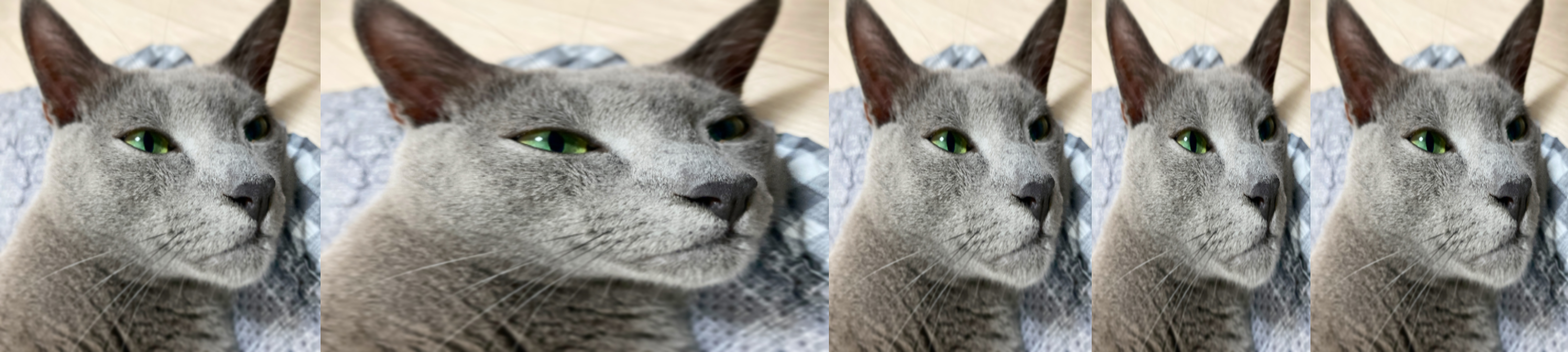
Source code in zerohertzLib/vision/compare.py
vid2gif(path: str, file_name: str = 'tmp', quality: int = 100, fps: int = 15, speed: float = 1.0) -> None
동영상을 GIF로 변환
Parameters:
| Name | Type | Description | Default |
|---|---|---|---|
path | str | GIF로 변환할 동영상이 존재하는 경로 | required |
file_name | str | 출력될 GIF file 이름 | 'tmp' |
quality | int | 출력될 GIF의 품질 | 100 |
fps | int | 출력될 GIF의 FPS (Frames Per Second) | 15 |
speed | float | 출력될 GIF의 배속 | 1.0 |
Returns:
| Type | Description |
|---|---|
None | 현재 directory에 바로 GIF 저장 |
Examples:
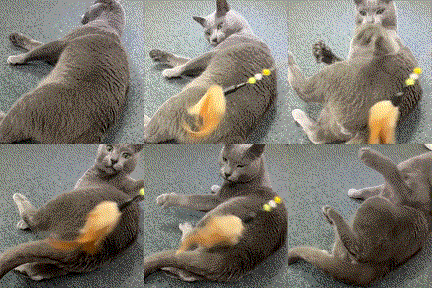
Source code in zerohertzLib/vision/gif.py
Bbox 변환
Parameters:
| Name | Type | Description | Default |
|---|---|---|---|
box | list[int | float] | NDArray[DTypeLike] |
| required |
Returns:
| Type | Description |
|---|---|
NDArray[DTypeLike] |
|
Examples:
>>> zz.vision.xyxy2cwh([10, 20, 30, 40])
array([20, 30, 20, 20])
>>> zz.vision.xyxy2cwh(np.array([[10, 20, 30, 40], [30, 50, 70, 100]]))
array([[20, 30, 20, 20],
       [50, 75, 40, 50]])
Source code in zerohertzLib/vision/convert.py
Bbox 변환
Parameters:
| Name | Type | Description | Default |
|---|---|---|---|
box | list[int | float] | NDArray[DTypeLike] |
| required |
Returns:
| Type | Description |
|---|---|
NDArray[DTypeLike] |
|
Examples:
>>> zz.vision.xyxy2poly([10, 20, 30, 40])
array([[10, 20],
       [30, 20],
       [30, 40],
       [10, 40]])
>>> zz.vision.xyxy2poly(np.array([[10, 20, 30, 40], [30, 50, 70, 100]]))
array([[[ 10,  20],
        [ 30,  20],
        [ 30,  40],
        [ 10,  40]],
       [[ 30,  50],
        [ 70,  50],
        [ 70, 100],
        [ 30, 100]]])