Skip to content

zerohertzLib.plot.scatter

Functions:

Name Description
scatter

Dictionary로 입력받은 data를 scatter plot으로 시각화

scatter

scatter(xdata: list[int | float] | dict[str, int | float], ydata: list[int | float] | dict[str, int | float], xlab: str | None = None, ylab: str | None = None, xlim: list[int | float] | None = None, ylim: list[int | float] | None = None, ncol: int = 1, title: str = 'tmp', colors: str | list | None = None, markersize: int = 36, figsize: tuple[int, int] = (15, 10), dpi: int = 300) -> str | None

Dictionary로 입력받은 data를 scatter plot으로 시각화

Parameters:

Name Type Description Default
xdata list[int | float] | dict[str, int | float]

입력 data (X축)

required
ydata list[int | float] | dict[str, int | float]

입력 data (Y축)

required
xlab str | None

Graph에 출력될 X축 label

None
ylab str | None

Graph에 출력될 Y축 label

None
xlim list[int | float] | None

Graph에 출력될 X축 limit

None
ylim list[int | float] | None

Graph에 출력될 Y축 limit

None
ncol int

Graph에 표시될 legend 열의 수

1
title str

Graph에 표시될 제목 및 file 이름

'tmp'
colors str | list | None

각 요소의 색

None
markersize int

Graph에 출력될 marker의 크기

36
figsize tuple[int, int]

Graph의 가로, 세로 길이

(15, 10)
dpi int

Graph 저장 시 DPI (Dots Per Inch)

300

Returns:

Type Description
str | None

저장된 graph의 절대 경로

Examples:

>>> xdata = {"Terran": [list(np.random.rand(200) * 10)], "Zerg": [list(np.random.rand(200) * 5 + 1)], "Protoss": [list(np.random.rand(200) * 10 - 2)]}
>>> ydata = {"Terran": [list(np.random.rand(200) * 10)], "Zerg": [list(np.random.rand(200) * 5 - 1)], "Protoss": [list(np.random.rand(200) * 10 + 3)]}
>>> zz.plot.scatter(xdata, ydata, xlab="Cost [Mineral]", ylab="Scores", title="Star Craft", markersize=400)
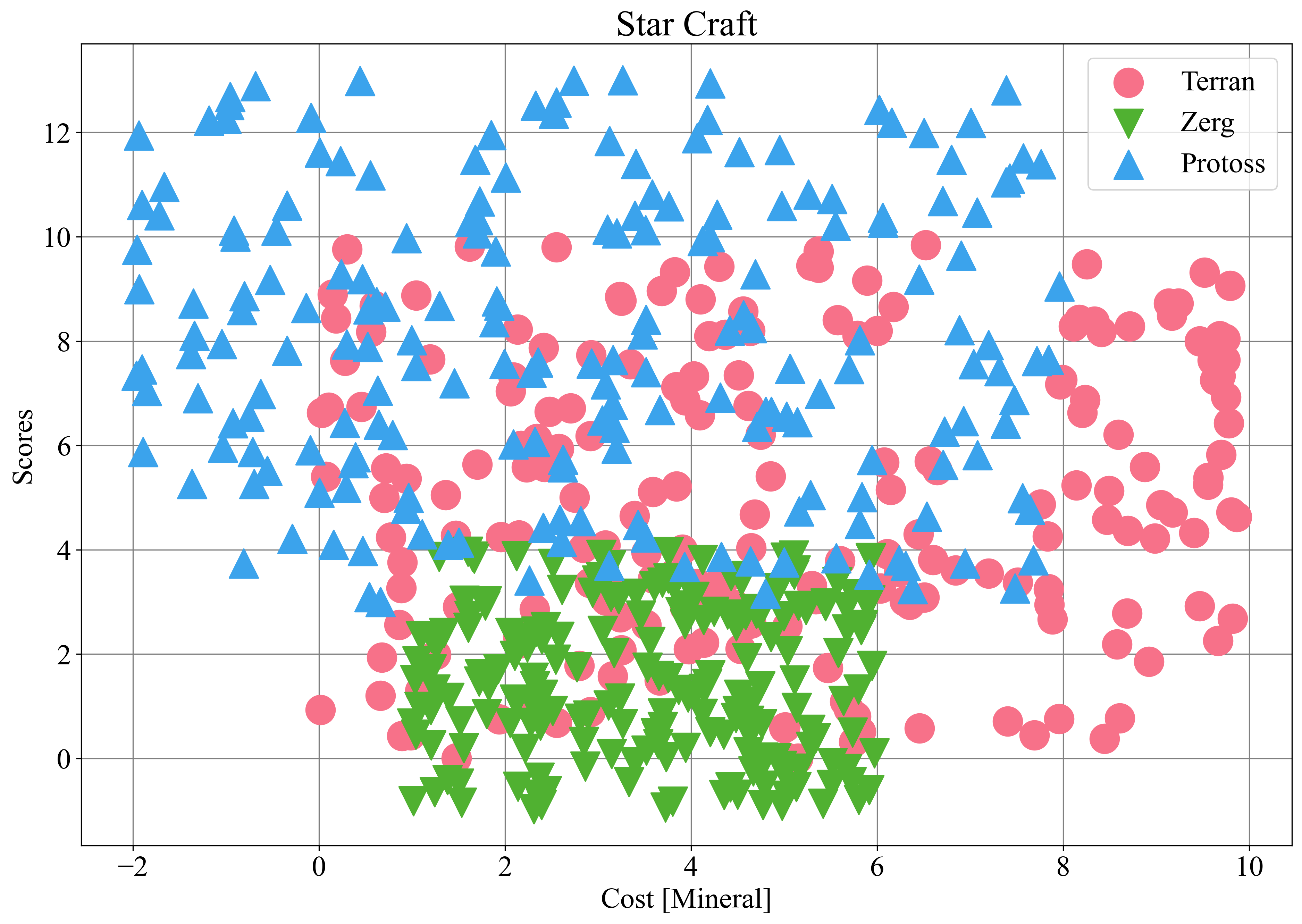
Scatter plot example

Source code in zerohertzLib/plot/scatter.py
def scatter(
    xdata: list[int | float] | dict[str, int | float],
    ydata: list[int | float] | dict[str, int | float],
    xlab: str | None = None,
    ylab: str | None = None,
    xlim: list[int | float] | None = None,
    ylim: list[int | float] | None = None,
    ncol: int = 1,
    title: str = "tmp",
    colors: str | list | None = None,
    markersize: int = 36,
    figsize: tuple[int, int] = (15, 10),
    dpi: int = 300,
) -> str | None:
    """Dictionary로 입력받은 data를 scatter plot으로 시각화

    Args:
        xdata: 입력 data (X축)
        ydata: 입력 data (Y축)
        xlab: Graph에 출력될 X축 label
        ylab: Graph에 출력될 Y축 label
        xlim: Graph에 출력될 X축 limit
        ylim: Graph에 출력될 Y축 limit
        ncol: Graph에 표시될 legend 열의 수
        title: Graph에 표시될 제목 및 file 이름
        colors: 각 요소의 색
        markersize: Graph에 출력될 marker의 크기
        figsize: Graph의 가로, 세로 길이
        dpi: Graph 저장 시 DPI (Dots Per Inch)

    Returns:
        저장된 graph의 절대 경로

    Examples:
        >>> xdata = {"Terran": [list(np.random.rand(200) * 10)], "Zerg": [list(np.random.rand(200) * 5 + 1)], "Protoss": [list(np.random.rand(200) * 10 - 2)]}
        >>> ydata = {"Terran": [list(np.random.rand(200) * 10)], "Zerg": [list(np.random.rand(200) * 5 - 1)], "Protoss": [list(np.random.rand(200) * 10 + 3)]}
        >>> zz.plot.scatter(xdata, ydata, xlab="Cost [Mineral]", ylab="Scores", title="Star Craft", markersize=400)

        ![Scatter plot example](../../../assets/plot/scatter.png){ width="500" }
    """
    if config.SAVE:
        plt.figure(figsize=figsize)
    if not isinstance(ydata, dict):
        ydata = {"": ydata}
    if not isinstance(xdata, dict):
        _xdata = {}
        for key in ydata.keys():
            _xdata[key] = xdata
        xdata = _xdata
    colors = _color(ydata, colors)
    for i, (key, yvalue) in enumerate(ydata.items()):
        xvalue = xdata[key]
        plt.scatter(
            xvalue,
            yvalue,
            s=markersize,
            color=colors[i],
            marker=config.MARKER[i % len(config.MARKER)],
            label=key,
            zorder=2,
        )
    plt.grid(zorder=0)
    if xlab:
        plt.xlabel(xlab)
    if ylab:
        plt.ylabel(ylab)
    if xlim:
        plt.xlim(xlim)
    if ylim:
        plt.ylim(ylim)
    plt.title(title, fontsize=25)
    if len(ydata) > 1:
        plt.legend(ncol=ncol)
    if config.SAVE:
        return savefig(title, dpi)
    return None