Skip to content

zerohertzLib.plot.bar_chart

Functions:

Name Description
barh

Dictionary로 입력받은 data를 세로 bar chart로 시각화

barv

Dictionary로 입력받은 data를 가로 bar chart로 시각화

hist

Dictionary로 입력받은 data를 histogram으로 시각화

barh

barh(data: dict[str, Any], xlab: str | None = None, ylab: str | None = None, xlim: list[int | float] | None = None, ylim: list[int | float] | None = None, title: str = 'tmp', colors: str | list | None = None, figsize: tuple[int, int] = (10, 15), rot: int = 0, dim: str | None = None, dimsize: float = 10, sign: int = 1, dpi: int = 300) -> str | None

Dictionary로 입력받은 data를 세로 bar chart로 시각화

Parameters:

Name Type Description Default
data dict[str, Any]

입력 data

required
xlab str | None

Graph에 출력될 X축 label

None
ylab str | None

Graph에 출력될 Y축 label

None
xlim list[int | float] | None

Graph에 출력될 X축 limit

None
ylim list[int | float] | None

Graph에 출력될 Y축 limit

None
title str

Graph에 표시될 제목 및 file 이름

'tmp'
colors str | list | None

각 요소의 색

None
figsize tuple[int, int]

Graph의 가로, 세로 길이

(10, 15)
rot int

X축의 눈금 회전 각도

0
dim str | None

각 bar 상단에 표시될 값의 단위 (%: percentage)

None
dimsize float

각 bar 상단에 표시될 값의 크기

10
sign int

각 bar 상단에 표시될 값의 유효숫자

1
dpi int

Graph 저장 시 DPI (Dots Per Inch)

300

Returns:

Type Description
str | None

저장된 graph의 절대 경로

Examples:

>>> data = {"Terran": 27, "Zerg": 40, "Protoss": -30}
>>> zz.plot.barh(data, xlab="Population", ylab="Races", title="Star Craft", dim="")
>>> data = {"yticks": ["Terran", "Zerg", "Protoss"], "Type A": [4, 5, 6], "Type B": [4, 3, 2], "Type C": [8, 5, 12], "Type D": [6, 3, 2]}
>>> zz.plot.barh(data, xlab="Time [Sec]", ylab="Races", title="Star Craft", dim="%", sign=2)
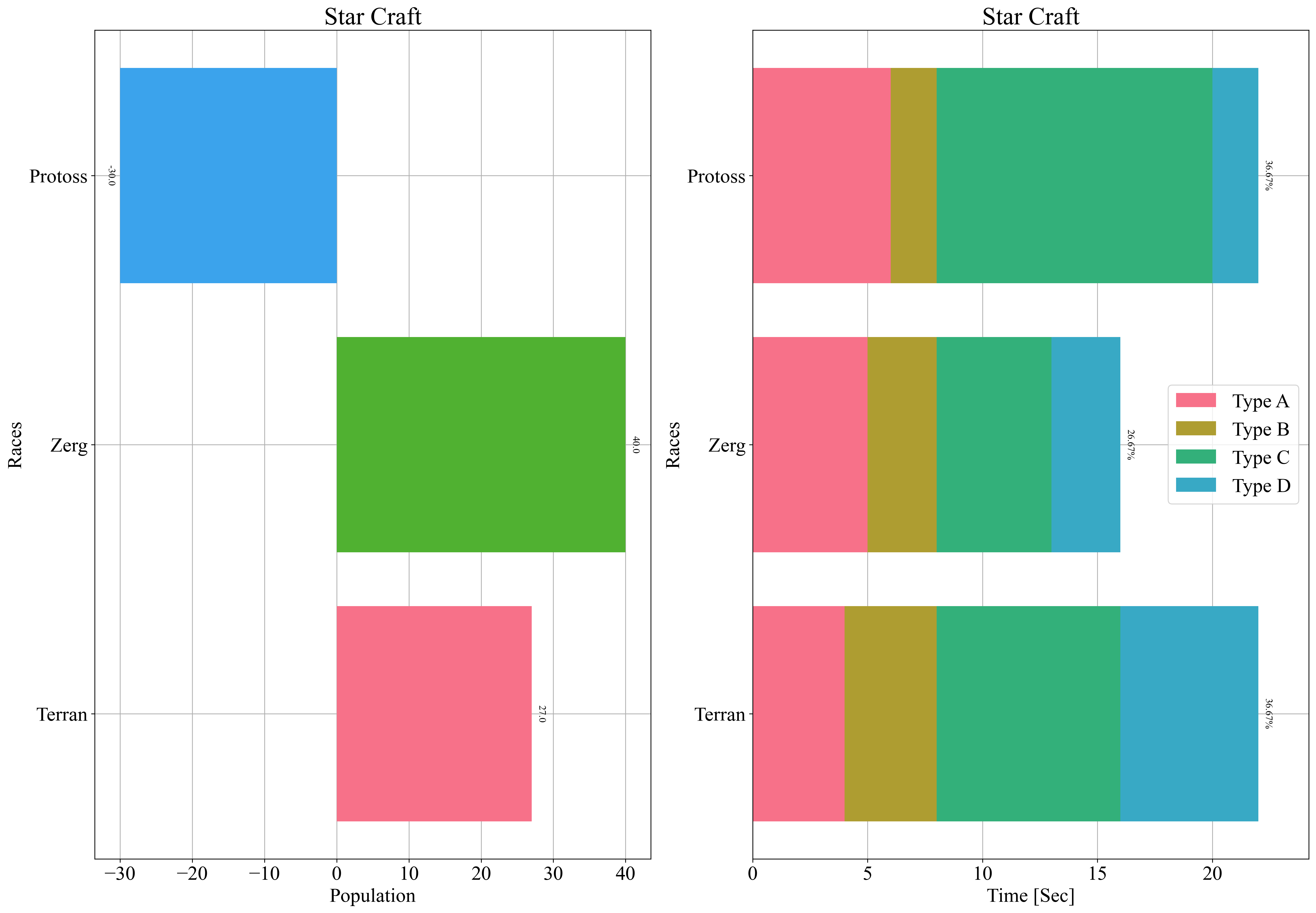
Horizontal bar chart example

Source code in zerohertzLib/plot/bar_chart.py
def barh(
    data: dict[str, Any],
    xlab: str | None = None,
    ylab: str | None = None,
    xlim: list[int | float] | None = None,
    ylim: list[int | float] | None = None,
    title: str = "tmp",
    colors: str | list | None = None,
    figsize: tuple[int, int] = (10, 15),
    rot: int = 0,
    dim: str | None = None,
    dimsize: float = 10,
    sign: int = 1,
    dpi: int = 300,
) -> str | None:
    """Dictionary로 입력받은 data를 세로 bar chart로 시각화

    Args:
        data: 입력 data
        xlab: Graph에 출력될 X축 label
        ylab: Graph에 출력될 Y축 label
        xlim: Graph에 출력될 X축 limit
        ylim: Graph에 출력될 Y축 limit
        title: Graph에 표시될 제목 및 file 이름
        colors: 각 요소의 색
        figsize: Graph의 가로, 세로 길이
        rot: X축의 눈금 회전 각도
        dim: 각 bar 상단에 표시될 값의 단위 (`%`: percentage)
        dimsize: 각 bar 상단에 표시될 값의 크기
        sign: 각 bar 상단에 표시될 값의 유효숫자
        dpi: Graph 저장 시 DPI (Dots Per Inch)

    Returns:
        저장된 graph의 절대 경로

    Examples:
        >>> data = {"Terran": 27, "Zerg": 40, "Protoss": -30}
        >>> zz.plot.barh(data, xlab="Population", ylab="Races", title="Star Craft", dim="")
        >>> data = {"yticks": ["Terran", "Zerg", "Protoss"], "Type A": [4, 5, 6], "Type B": [4, 3, 2], "Type C": [8, 5, 12], "Type D": [6, 3, 2]}
        >>> zz.plot.barh(data, xlab="Time [Sec]", ylab="Races", title="Star Craft", dim="%", sign=2)

        ![Horizontal bar chart example](../../../assets/plot/barh.png){ width="450" }
    """
    colors = _color(data, colors)
    if config.SAVE:
        plt.figure(figsize=figsize)
    if isinstance(list(data.values())[-1], list):
        data = data.copy()
        try:
            yticks = data.pop("yticks")
        except KeyError:
            yticks = list(range(len(list(data.values())[-1])))
        left = np.array([0 for _ in range(len(list(data.values())[-1]))])
        for i, (key, value) in enumerate(data.items()):
            bars = plt.barh(
                yticks, value, color=colors[i], zorder=2, label=key, left=left
            )
            left += np.array(value)
        plt.legend()
        plt.xlim([0, 1.1 * left.max()])
        if dim is None:
            pass
        elif dim == "%":
            maximum = left.max()
            total = left.sum()
            for bar_, left_ in zip(bars, left):
                percentage = (left_ / total) * 100
                plt.text(
                    left_ + maximum * 0.01,
                    bar_.get_y() + bar_.get_height() / 2,
                    f"{percentage:.{sign}f}%",
                    ha="left",
                    va="center",
                    rotation=270,
                    fontsize=dimsize,
                )
        else:
            maximum = left.max()
            for bar_, left_ in zip(bars, left):
                plt.text(
                    left_ + maximum * 0.01,
                    bar_.get_y() + bar_.get_height() / 2,
                    f"{left_:.{sign}f}{dim}",
                    ha="left",
                    va="center",
                    rotation=270,
                    fontsize=dimsize,
                )
    else:
        bars = plt.barh(list(data.keys()), list(data.values()), color=colors, zorder=2)
        if min(data.values()) > 0:
            plt.xlim([0, 1.1 * max(list(data.values()))])
        if dim is None:
            pass
        elif dim == "%":
            maximum = max(list(data.values()))
            total = sum(list(data.values()))
            for bar_ in bars:
                width = bar_.get_width()
                percentage = (width / total) * 100
                plt.text(
                    width + maximum * 0.01,
                    bar_.get_y() + bar_.get_height() / 2,
                    f"{percentage:.{sign}f}%",
                    ha="left",
                    va="center",
                    rotation=270,
                    fontsize=dimsize,
                )
        else:
            maximum = max(list(data.values()))
            minimum = min(list(data.values()))
            for bar_ in bars:
                width = position = bar_.get_width()
                if width < 0:
                    position -= (maximum - minimum) * 0.01
                    ha = "right"
                else:
                    position += (maximum - minimum) * 0.01
                    ha = "left"
                plt.text(
                    position,
                    bar_.get_y() + bar_.get_height() / 2,
                    f"{width:.{sign}f}{dim}",
                    ha=ha,
                    va="center",
                    rotation=270,
                    fontsize=dimsize,
                )
    plt.grid(zorder=0)
    if xlab:
        plt.xlabel(xlab)
    if ylab:
        plt.ylabel(ylab)
    if xlim:
        plt.xlim(xlim)
    if ylim:
        plt.ylim(ylim)
    plt.yticks(rotation=rot)
    plt.title(title, fontsize=25)
    if config.SAVE:
        return savefig(title, dpi)
    return None

barv

barv(data: dict[str, Any], xlab: str | None = None, ylab: str | None = None, xlim: list[int | float] | None = None, ylim: list[int | float] | None = None, title: str = 'tmp', colors: str | list | None = None, figsize: tuple[int, int] = (15, 10), rot: int = 0, dim: str | None = None, dimsize: float = 10, sign: int = 1, dpi: int = 300) -> str | None

Dictionary로 입력받은 data를 가로 bar chart로 시각화

Parameters:

Name Type Description Default
data dict[str, Any]

입력 data

required
xlab str | None

Graph에 출력될 X축 label

None
ylab str | None

Graph에 출력될 Y축 label

None
xlim list[int | float] | None

Graph에 출력될 X축 limit

None
ylim list[int | float] | None

Graph에 출력될 Y축 limit

None
title str

Graph에 표시될 제목 및 file 이름

'tmp'
colors str | list | None

각 요소의 색

None
figsize tuple[int, int]

Graph의 가로, 세로 길이

(15, 10)
rot int

X축의 눈금 회전 각도

0
dim str | None

각 bar 상단에 표시될 값의 단위 (%: percentage)

None
dimsize float

각 bar 상단에 표시될 값의 크기

10
sign int

각 bar 상단에 표시될 값의 유효숫자

1
dpi int

Graph 저장 시 DPI (Dots Per Inch)

300

Returns:

Type Description
str | None

저장된 graph의 절대 경로

Examples:

>>> data = {"Terran": 27, "Zerg": 40, "Protoss": -30}
>>> zz.plot.barv(data, xlab="Races", ylab="Population", title="Star Craft", dim="")
>>> data = {"xticks": ["Terran", "Zerg", "Protoss"], "Type A": [4, 5, 6], "Type B": [4, 3, 2], "Type C": [8, 5, 12], "Type D": [6, 3, 2]}
>>> zz.plot.barv(data, xlab="Races", ylab="Time [sec]", title="Star Craft", dim="%", sign=2)
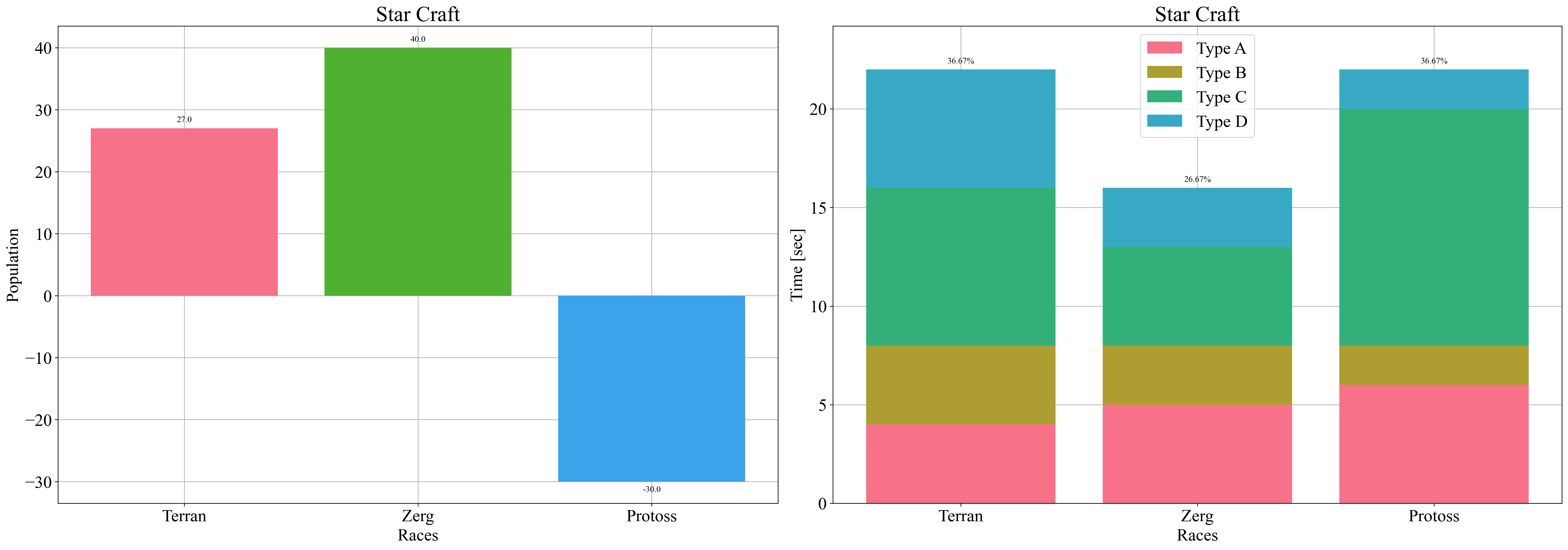
Vertical bar chart example

Source code in zerohertzLib/plot/bar_chart.py
def barv(
    data: dict[str, Any],
    xlab: str | None = None,
    ylab: str | None = None,
    xlim: list[int | float] | None = None,
    ylim: list[int | float] | None = None,
    title: str = "tmp",
    colors: str | list | None = None,
    figsize: tuple[int, int] = (15, 10),
    rot: int = 0,
    dim: str | None = None,
    dimsize: float = 10,
    sign: int = 1,
    dpi: int = 300,
) -> str | None:
    """Dictionary로 입력받은 data를 가로 bar chart로 시각화

    Args:
        data: 입력 data
        xlab: Graph에 출력될 X축 label
        ylab: Graph에 출력될 Y축 label
        xlim: Graph에 출력될 X축 limit
        ylim: Graph에 출력될 Y축 limit
        title: Graph에 표시될 제목 및 file 이름
        colors: 각 요소의 색
        figsize: Graph의 가로, 세로 길이
        rot: X축의 눈금 회전 각도
        dim: 각 bar 상단에 표시될 값의 단위 (`%`: percentage)
        dimsize: 각 bar 상단에 표시될 값의 크기
        sign: 각 bar 상단에 표시될 값의 유효숫자
        dpi: Graph 저장 시 DPI (Dots Per Inch)

    Returns:
        저장된 graph의 절대 경로

    Examples:
        >>> data = {"Terran": 27, "Zerg": 40, "Protoss": -30}
        >>> zz.plot.barv(data, xlab="Races", ylab="Population", title="Star Craft", dim="")
        >>> data = {"xticks": ["Terran", "Zerg", "Protoss"], "Type A": [4, 5, 6], "Type B": [4, 3, 2], "Type C": [8, 5, 12], "Type D": [6, 3, 2]}
        >>> zz.plot.barv(data, xlab="Races", ylab="Time [sec]", title="Star Craft", dim="%", sign=2)

        ![Vertical bar chart example](../../../assets/plot/barv.png){ width="600" }
    """
    colors = _color(data, colors)
    if config.SAVE:
        plt.figure(figsize=figsize)
    if isinstance(list(data.values())[-1], list):
        data = data.copy()
        try:
            xticks = data.pop("xticks")
        except KeyError:
            xticks = list(range(len(list(data.values())[-1])))
        bottom = np.array([0 for _ in range(len(list(data.values())[-1]))])
        for i, (key, value) in enumerate(data.items()):
            bars = plt.bar(
                xticks, value, color=colors[i], zorder=2, label=key, bottom=bottom
            )
            bottom += np.array(value)
        plt.legend()
        plt.ylim([0, 1.1 * bottom.max()])
        if dim is None:
            pass
        elif dim == "%":
            maximum = bottom.max()
            total = bottom.sum()
            for bar_, bot in zip(bars, bottom):
                percentage = (bot / total) * 100
                plt.text(
                    bar_.get_x() + bar_.get_width() / 2,
                    bot + maximum * 0.01,
                    f"{percentage:.{sign}f}%",
                    ha="center",
                    va="bottom",
                    fontsize=dimsize,
                )
        else:
            maximum = bottom.max()
            for bar_, bot in zip(bars, bottom):
                plt.text(
                    bar_.get_x() + bar_.get_width() / 2,
                    bot + maximum * 0.01,
                    f"{bot:.{sign}f}{dim}",
                    ha="center",
                    va="bottom",
                    fontsize=dimsize,
                )
    else:
        bars = plt.bar(
            data.keys(),
            data.values(),
            color=colors,
            zorder=2,
        )
        if min(data.values()) > 0:
            plt.ylim([0, 1.1 * max(list(data.values()))])
        if dim is None:
            pass
        elif dim == "%":
            maximum = max(list(data.values()))
            total = sum(list(data.values()))
            for bar_ in bars:
                height = bar_.get_height()
                percentage = (height / total) * 100
                plt.text(
                    bar_.get_x() + bar_.get_width() / 2,
                    height + maximum * 0.01,
                    f"{percentage:.{sign}f}%",
                    ha="center",
                    va="bottom",
                    fontsize=dimsize,
                )
        else:
            maximum = max(list(data.values()))
            minimum = min(list(data.values()))
            for bar_ in bars:
                height = position = bar_.get_height()
                if height < 0:
                    position -= (maximum - minimum) * 0.01
                    va = "top"
                else:
                    position += (maximum - minimum) * 0.01
                    va = "bottom"
                plt.text(
                    bar_.get_x() + bar_.get_width() / 2,
                    position,
                    f"{height:.{sign}f}{dim}",
                    ha="center",
                    va=va,
                    fontsize=dimsize,
                )
    plt.grid(zorder=0)
    if xlab:
        plt.xlabel(xlab)
    if ylab:
        plt.ylabel(ylab)
    if xlim:
        plt.xlim(xlim)
    if ylim:
        plt.ylim(ylim)
    plt.xticks(rotation=rot)
    plt.title(title, fontsize=25)
    if config.SAVE:
        return savefig(title, dpi)
    return None

hist

hist(data: dict[str, list[int | float]], xlab: str | None = None, ylab: str | None = None, xlim: list[int | float] | None = None, ylim: list[int | float] | None = None, title: str = 'tmp', colors: str | list | None = None, cnt: int = 30, ovp: bool = True, figsize: tuple[int, int] = (15, 10), dpi: int = 300) -> str | None

Dictionary로 입력받은 data를 histogram으로 시각화

Parameters:

Name Type Description Default
data dict[str, list[int | float]]

입력 data

required
xlab str | None

Graph에 출력될 X축 label

None
ylab str | None

Graph에 출력될 Y축 label

None
xlim list[int | float] | None

Graph에 출력될 X축 limit

None
ylim list[int | float] | None

Graph에 출력될 Y축 limit

None
title str

Graph에 표시될 제목 및 file 이름

'tmp'
colors str | list | None

각 요소의 색

None
cnt int

Bin의 개수

30
ovp bool

Class에 따른 histogram overlap 여부

True
figsize tuple[int, int]

Graph의 가로, 세로 길이

(15, 10)
dpi int

Graph 저장 시 DPI (Dots Per Inch)

300

Returns:

Type Description
str | None

저장된 graph의 절대 경로

Examples:

>>> data = {"Terran": list(np.random.rand(1000) * 10), "Zerg": list(np.random.rand(1000) * 10 + 1), "Protoss": list(np.random.rand(1000) * 10 + 2)}
>>> zz.plot.hist(data, xlab="Scores", ylab="Population", title="Star Craft")
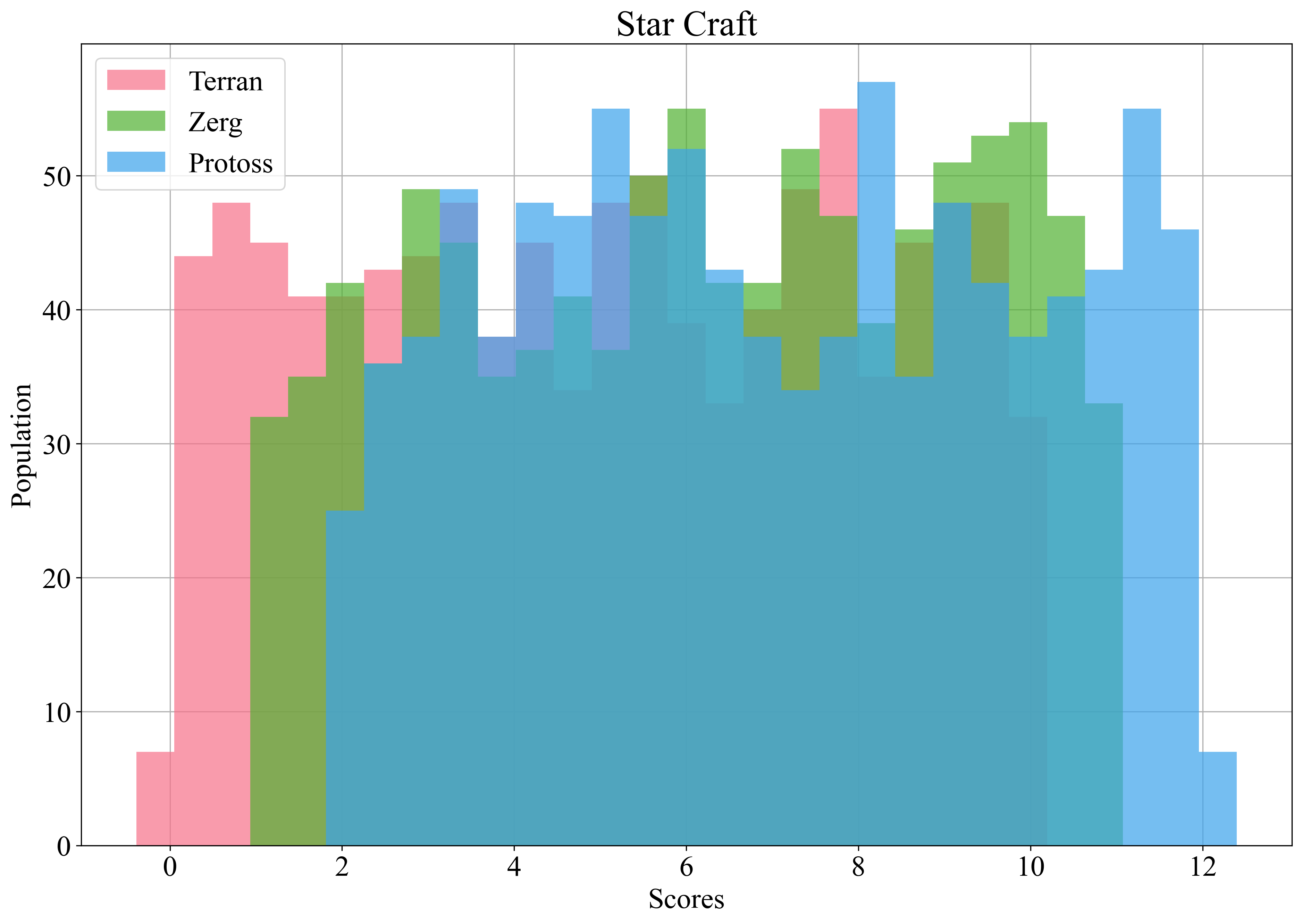
Histogram example

Source code in zerohertzLib/plot/bar_chart.py
def hist(
    data: dict[str, list[int | float]],
    xlab: str | None = None,
    ylab: str | None = None,
    xlim: list[int | float] | None = None,
    ylim: list[int | float] | None = None,
    title: str = "tmp",
    colors: str | list | None = None,
    cnt: int = 30,
    ovp: bool = True,
    figsize: tuple[int, int] = (15, 10),
    dpi: int = 300,
) -> str | None:
    """Dictionary로 입력받은 data를 histogram으로 시각화

    Args:
        data: 입력 data
        xlab: Graph에 출력될 X축 label
        ylab: Graph에 출력될 Y축 label
        xlim: Graph에 출력될 X축 limit
        ylim: Graph에 출력될 Y축 limit
        title: Graph에 표시될 제목 및 file 이름
        colors: 각 요소의 색
        cnt: Bin의 개수
        ovp: Class에 따른 histogram overlap 여부
        figsize: Graph의 가로, 세로 길이
        dpi: Graph 저장 시 DPI (Dots Per Inch)

    Returns:
        저장된 graph의 절대 경로

    Examples:
        >>> data = {"Terran": list(np.random.rand(1000) * 10), "Zerg": list(np.random.rand(1000) * 10 + 1), "Protoss": list(np.random.rand(1000) * 10 + 2)}
        >>> zz.plot.hist(data, xlab="Scores", ylab="Population", title="Star Craft")

        ![Histogram example](../../../assets/plot/hist.png){ width="600" }
    """
    colors = _color(data, colors)
    minimum, maximum = sys.maxsize, -sys.maxsize
    for ydata in data.values():
        minimum = min(*ydata, minimum)
        maximum = max(*ydata, maximum)
    gap = max(0.01, (maximum - minimum) / cnt)
    bins = np.linspace(minimum - gap, maximum + gap, cnt)
    if config.SAVE:
        plt.figure(figsize=figsize)
    if ovp:
        for i, (key, value) in enumerate(data.items()):
            plt.hist(value, bins=bins, color=colors[i], label=key, alpha=0.7, zorder=2)
    else:
        plt.hist(
            list(data.values()),
            bins=bins,
            color=colors,
            label=list(data.keys()),
            alpha=1,
            zorder=2,
        )
    plt.grid(zorder=0)
    if xlab:
        plt.xlabel(xlab)
    if ylab:
        plt.ylabel(ylab)
    if xlim:
        plt.xlim(xlim)
    if ylim:
        plt.ylim(ylim)
    plt.title(title, fontsize=25)
    if len(data) > 1:
        plt.legend()
    if config.SAVE:
        return savefig(title, dpi)
    return None