Plot
다양한 변수들을 최대한 지정하지 않고 사용할 수 있는 시각화 함수들
Modules:
| Name | Description |
|---|---|
bar_chart | |
config | |
pie | |
plot | |
scatter | |
table | |
util | |
Functions:
| Name | Description |
|---|---|
barh | Dictionary로 입력받은 data를 세로 bar chart로 시각화 |
barv | Dictionary로 입력받은 data를 가로 bar chart로 시각화 |
candle | OHLCV (Open, High, Low, Close, Volume) data에 따른 candle chart |
color | 색 추출 function |
figure | Graph 생성을 위한 function |
font |
|
hist | Dictionary로 입력받은 data를 histogram으로 시각화 |
savefig | Graph 저장 function |
subplot | Subplot 생성을 위한 function |
module-attribute 
__all__ = ['barv', 'barh', 'hist', 'plot', 'pie', 'scatter', 'color', 'table', 'savefig', 'figure', 'candle', 'font', 'subplot']
barh(data: dict[str, Any], xlab: str | None = None, ylab: str | None = None, xlim: list[int | float] | None = None, ylim: list[int | float] | None = None, title: str = 'tmp', colors: str | list | None = None, figsize: tuple[int, int] = (10, 15), rot: int = 0, dim: str | None = None, dimsize: float = 10, sign: int = 1, dpi: int = 300) -> str | None
Dictionary로 입력받은 data를 세로 bar chart로 시각화
Parameters:
| Name | Type | Description | Default |
|---|---|---|---|
data | dict[str, Any] | 입력 data | required |
xlab | str | None | Graph에 출력될 X축 label | None |
ylab | str | None | Graph에 출력될 Y축 label | None |
xlim | list[int | float] | None | Graph에 출력될 X축 limit | None |
ylim | list[int | float] | None | Graph에 출력될 Y축 limit | None |
title | str | Graph에 표시될 제목 및 file 이름 | 'tmp' |
colors | str | list | None | 각 요소의 색 | None |
figsize | tuple[int, int] | Graph의 가로, 세로 길이 | (10, 15) |
rot | int | X축의 눈금 회전 각도 | 0 |
dim | str | None | 각 bar 상단에 표시될 값의 단위 ( | None |
dimsize | float | 각 bar 상단에 표시될 값의 크기 | 10 |
sign | int | 각 bar 상단에 표시될 값의 유효숫자 | 1 |
dpi | int | Graph 저장 시 DPI (Dots Per Inch) | 300 |
Returns:
| Type | Description |
|---|---|
str | None | 저장된 graph의 절대 경로 |
Examples:
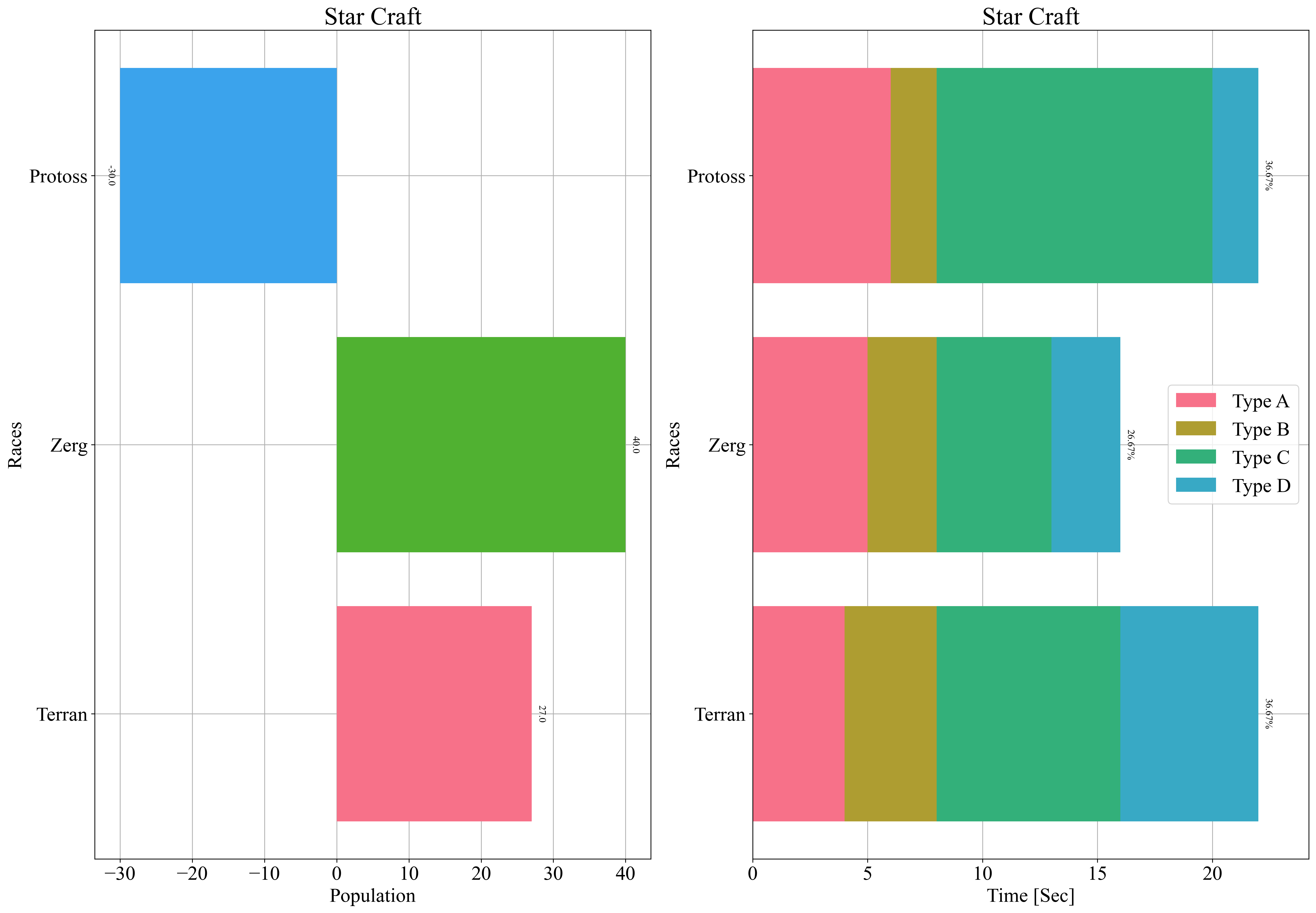
>>> data = {"Terran": 27, "Zerg": 40, "Protoss": -30}
>>> zz.plot.barh(data, xlab="Population", ylab="Races", title="Star Craft", dim="")
>>> data = {"yticks": ["Terran", "Zerg", "Protoss"], "Type A": [4, 5, 6], "Type B": [4, 3, 2], "Type C": [8, 5, 12], "Type D": [6, 3, 2]}
>>> zz.plot.barh(data, xlab="Time [Sec]", ylab="Races", title="Star Craft", dim="%", sign=2)
Source code in zerohertzLib/plot/bar_chart.py
160 161 162 163 164 165 166 167 168 169 170 171 172 173 174 175 176 177 178 179 180 181 182 183 184 185 186 187 188 189 190 191 192 193 194 195 196 197 198 199 200 201 202 203 204 205 206 207 208 209 210 211 212 213 214 215 216 217 218 219 220 221 222 223 224 225 226 227 228 229 230 231 232 233 234 235 236 237 238 239 240 241 242 243 244 245 246 247 248 249 250 251 252 253 254 255 256 257 258 259 260 261 262 263 264 265 266 267 268 269 270 271 272 273 274 275 276 277 278 279 280 281 282 283 284 285 286 287 288 289 290 291 292 293 294 295 296 297 298 299 300 301 302 | |
barv(data: dict[str, Any], xlab: str | None = None, ylab: str | None = None, xlim: list[int | float] | None = None, ylim: list[int | float] | None = None, title: str = 'tmp', colors: str | list | None = None, figsize: tuple[int, int] = (15, 10), rot: int = 0, dim: str | None = None, dimsize: float = 10, sign: int = 1, dpi: int = 300) -> str | None
Dictionary로 입력받은 data를 가로 bar chart로 시각화
Parameters:
| Name | Type | Description | Default |
|---|---|---|---|
data | dict[str, Any] | 입력 data | required |
xlab | str | None | Graph에 출력될 X축 label | None |
ylab | str | None | Graph에 출력될 Y축 label | None |
xlim | list[int | float] | None | Graph에 출력될 X축 limit | None |
ylim | list[int | float] | None | Graph에 출력될 Y축 limit | None |
title | str | Graph에 표시될 제목 및 file 이름 | 'tmp' |
colors | str | list | None | 각 요소의 색 | None |
figsize | tuple[int, int] | Graph의 가로, 세로 길이 | (15, 10) |
rot | int | X축의 눈금 회전 각도 | 0 |
dim | str | None | 각 bar 상단에 표시될 값의 단위 ( | None |
dimsize | float | 각 bar 상단에 표시될 값의 크기 | 10 |
sign | int | 각 bar 상단에 표시될 값의 유효숫자 | 1 |
dpi | int | Graph 저장 시 DPI (Dots Per Inch) | 300 |
Returns:
| Type | Description |
|---|---|
str | None | 저장된 graph의 절대 경로 |
Examples:
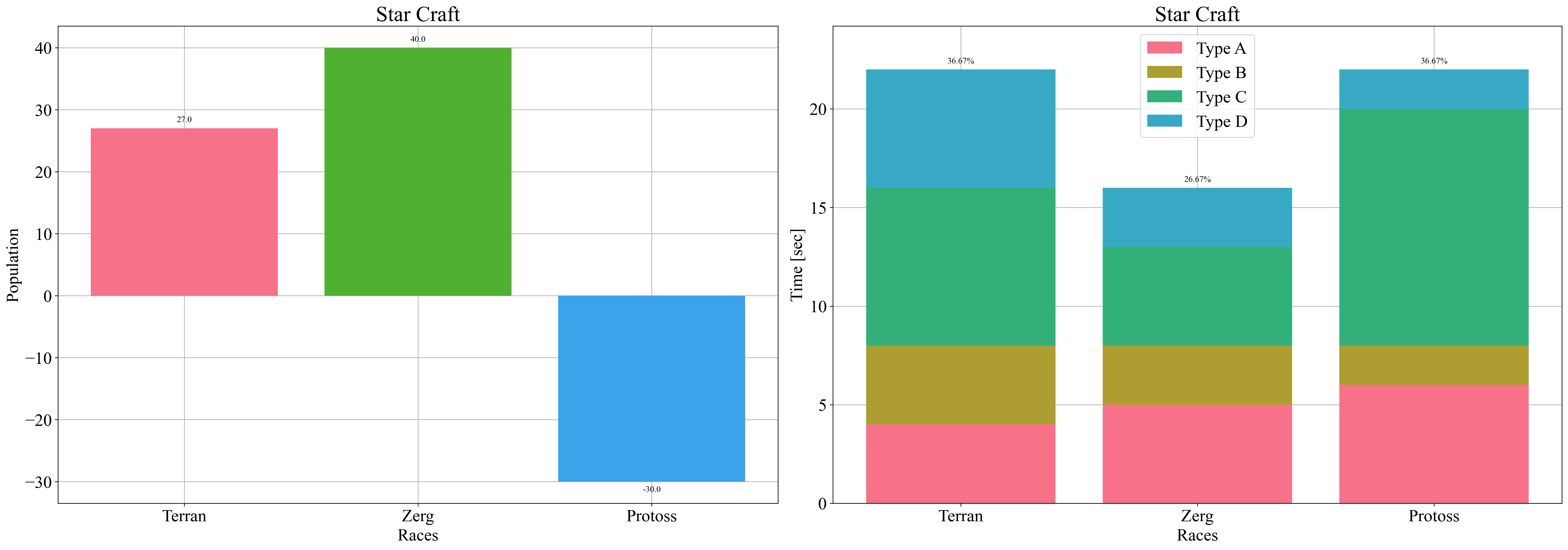
>>> data = {"Terran": 27, "Zerg": 40, "Protoss": -30}
>>> zz.plot.barv(data, xlab="Races", ylab="Population", title="Star Craft", dim="")
>>> data = {"xticks": ["Terran", "Zerg", "Protoss"], "Type A": [4, 5, 6], "Type B": [4, 3, 2], "Type C": [8, 5, 12], "Type D": [6, 3, 2]}
>>> zz.plot.barv(data, xlab="Races", ylab="Time [sec]", title="Star Craft", dim="%", sign=2)
Source code in zerohertzLib/plot/bar_chart.py
14 15 16 17 18 19 20 21 22 23 24 25 26 27 28 29 30 31 32 33 34 35 36 37 38 39 40 41 42 43 44 45 46 47 48 49 50 51 52 53 54 55 56 57 58 59 60 61 62 63 64 65 66 67 68 69 70 71 72 73 74 75 76 77 78 79 80 81 82 83 84 85 86 87 88 89 90 91 92 93 94 95 96 97 98 99 100 101 102 103 104 105 106 107 108 109 110 111 112 113 114 115 116 117 118 119 120 121 122 123 124 125 126 127 128 129 130 131 132 133 134 135 136 137 138 139 140 141 142 143 144 145 146 147 148 149 150 151 152 153 154 155 156 157 | |
candle(data: DataFrame, title: str = 'tmp', figsize: tuple[int, int] = (18, 10), signals: dict[str, Any] | None = None, threshold: int | tuple[int, int] = 1, dpi: int = 300) -> str | None
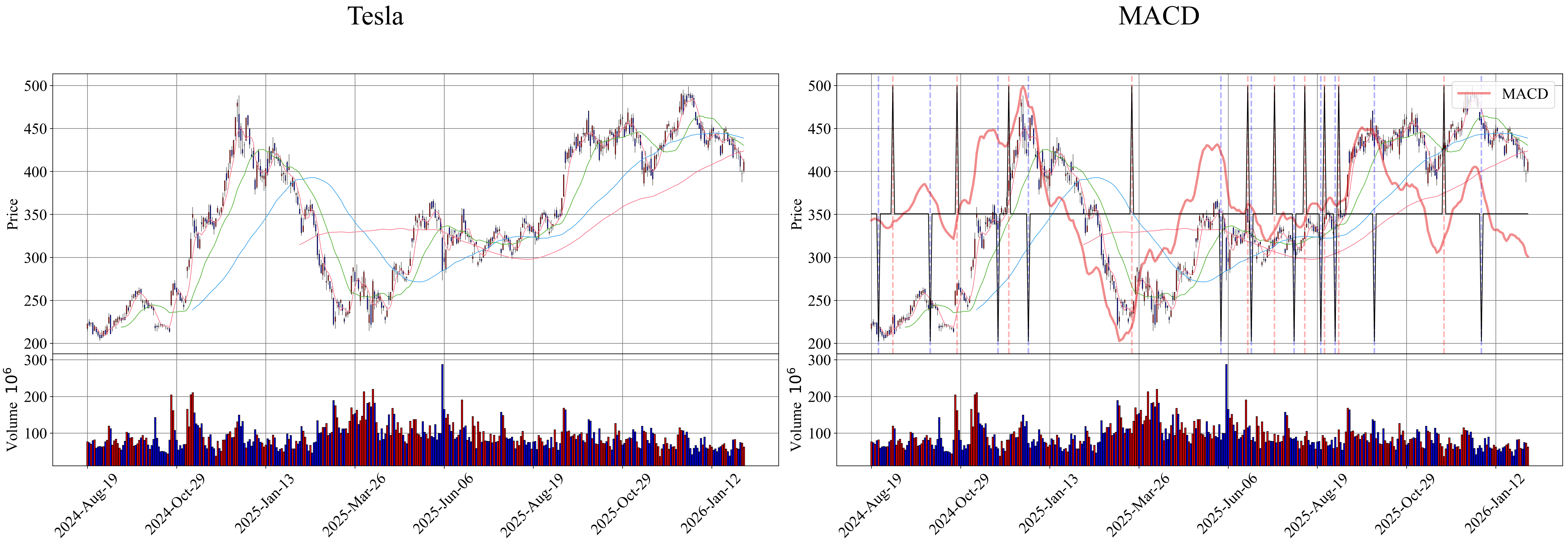
OHLCV (Open, High, Low, Close, Volume) data에 따른 candle chart
Note
- 적색: 매수
- 청색: 매도
- 실선: Backtest 시 signal이 존재하는 매수, 매도
- 파선: Backtest 시 사용하지 않은 signal의 매수, 매도
- 일점쇄선: Backtest logic에 의한 매수, 매도
Parameters:
| Name | Type | Description | Default |
|---|---|---|---|
data | DataFrame | OHLCV (Open, High, Low, Close, Volume) data | required |
title | str | Graph에 표시될 제목 및 file 이름 | 'tmp' |
figsize | tuple[int, int] | Graph의 가로, 세로 길이 | (18, 10) |
signals | dict[str, Any] | None | 추가적으로 plot할 data | None |
threshold | int | tuple[int, int] | 매수, 매도를 결정할 | 1 |
dpi | int | Graph 저장 시 DPI (Dots Per Inch) | 300 |
Returns:
| Type | Description |
|---|---|
str | None | 저장된 graph의 절대 경로 |
Examples:
>>> zz.plot.candle(data, title)
>>> signals = zz.quant.macd(data)
>>> zz.plot.candle(data, "MACD", signals=signals)
Source code in zerohertzLib/plot/plot.py
114 115 116 117 118 119 120 121 122 123 124 125 126 127 128 129 130 131 132 133 134 135 136 137 138 139 140 141 142 143 144 145 146 147 148 149 150 151 152 153 154 155 156 157 158 159 160 161 162 163 164 165 166 167 168 169 170 171 172 173 174 175 176 177 178 179 180 181 182 183 184 185 186 187 188 189 190 191 192 193 194 195 196 197 198 199 200 201 202 203 204 205 206 207 208 209 210 211 212 213 214 215 216 217 218 219 220 221 222 223 224 225 226 227 228 229 230 231 232 233 234 235 236 237 238 239 240 241 242 243 244 245 246 247 248 249 250 251 252 253 254 255 256 257 258 259 260 261 | |
color(cnt: int = 1, rand: bool = False, uint8: bool = False, palette: str = 'husl') -> tuple[float, float, float] | list[int] | list[tuple[float, float, float]] | list[list[int]]
색 추출 function
Parameters:
| Name | Type | Description | Default |
|---|---|---|---|
cnt | int | 추출할 색의 수 | 1 |
rand | bool | Random 추출 여부 | False |
uint8 | bool | 출력 색상의 type | False |
palette | str | 추출할 색들의 palette | 'husl' |
Returns:
| Type | Description |
|---|---|
tuple[float, float, float] | list[int] | list[tuple[float, float, float]] | list[list[int]] | 단일 색 또는 list로 구성된 여러 색 |
Examples:
>>> zz.plot.color()
(0.9710194877714075, 0.4645444048369612, 0.21958695134807432)
>>> zz.plot.color(4)
[(0.9677975592919913, 0.44127456009157356, 0.5358103155058701), (0.5920891529639701, 0.6418467016378244, 0.1935069134991043), (0.21044753832183283, 0.6773105080456748, 0.6433941168468681), (0.6423044349219739, 0.5497680051256467, 0.9582651433656727)]
>>> zz.plot.color(4, True)
[(0.22420518847992715, 0.6551391052055489, 0.8272616286387289), (0.9677975592919913, 0.44127456009157356, 0.5358103155058701), (0.21125140522513897, 0.6760830215342485, 0.6556099802889619), (0.9590000285927794, 0.36894286394742526, 0.9138608732554839)]
>>> zz.plot.color(uint8=True)
[53, 172, 167]
>>> zz.plot.color(4, uint8=True)
[[246, 112, 136], [150, 163, 49], [53, 172, 164], [163, 140, 244]]
>>> zz.plot.color(4, True, True)
[[247, 117, 79], [73, 160, 244], [54, 171, 176], [110, 172, 49]]
Source code in zerohertzLib/plot/util.py
Graph 생성을 위한 function
Parameters:
| Name | Type | Description | Default |
|---|---|---|---|
figsize | tuple[int, int] | Graph의 가로, 세로 길이 | (15, 10) |
Returns:
| Type | Description |
|---|---|
Figure | Graph window 생성 |
Examples:
>>> zz.plot.figure()
<Figure size 1500x1000 with 0 Axes>
>>> zz.plot.figure((20, 20))
<Figure size 2000x2000 with 0 Axes>
Source code in zerohertzLib/plot/util.py
plot submodule 내 사용될 font 및 크기 설정
Parameters:
| Name | Type | Description | Default |
|---|---|---|---|
kor | bool | 한국어 여부 | False |
size | int | Font의 크기 | 20 |
Returns:
| Type | Description |
|---|---|
None |
|
Source code in zerohertzLib/plot/__init__.py
hist(data: dict[str, list[int | float]], xlab: str | None = None, ylab: str | None = None, xlim: list[int | float] | None = None, ylim: list[int | float] | None = None, title: str = 'tmp', colors: str | list | None = None, cnt: int = 30, ovp: bool = True, figsize: tuple[int, int] = (15, 10), dpi: int = 300) -> str | None
Dictionary로 입력받은 data를 histogram으로 시각화
Parameters:
| Name | Type | Description | Default |
|---|---|---|---|
data | dict[str, list[int | float]] | 입력 data | required |
xlab | str | None | Graph에 출력될 X축 label | None |
ylab | str | None | Graph에 출력될 Y축 label | None |
xlim | list[int | float] | None | Graph에 출력될 X축 limit | None |
ylim | list[int | float] | None | Graph에 출력될 Y축 limit | None |
title | str | Graph에 표시될 제목 및 file 이름 | 'tmp' |
colors | str | list | None | 각 요소의 색 | None |
cnt | int | Bin의 개수 | 30 |
ovp | bool | Class에 따른 histogram overlap 여부 | True |
figsize | tuple[int, int] | Graph의 가로, 세로 길이 | (15, 10) |
dpi | int | Graph 저장 시 DPI (Dots Per Inch) | 300 |
Returns:
| Type | Description |
|---|---|
str | None | 저장된 graph의 절대 경로 |
Examples:
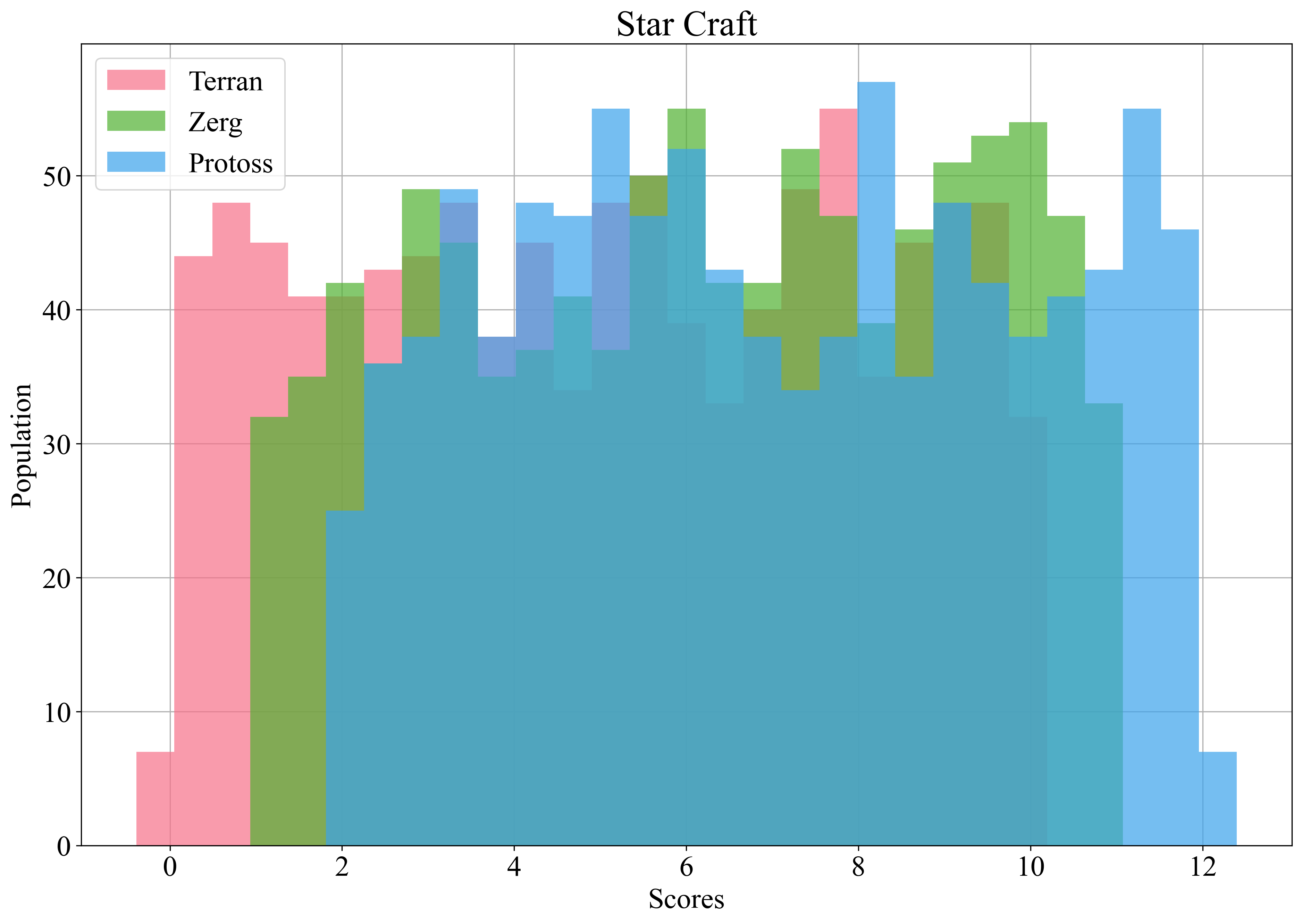
>>> data = {"Terran": list(np.random.rand(1000) * 10), "Zerg": list(np.random.rand(1000) * 10 + 1), "Protoss": list(np.random.rand(1000) * 10 + 2)}
>>> zz.plot.hist(data, xlab="Scores", ylab="Population", title="Star Craft")
Source code in zerohertzLib/plot/bar_chart.py
Graph 저장 function
Parameters:
| Name | Type | Description | Default |
|---|---|---|---|
title | str | Graph file 이름 | required |
dpi | int | Graph 저장 시 DPI (Dots Per Inch) | 300 |
Returns:
| Type | Description |
|---|---|
str | 저장된 graph의 절대 경로 |
Examples:
Source code in zerohertzLib/plot/util.py
Subplot 생성을 위한 function
Parameters:
| Name | Type | Description | Default |
|---|---|---|---|
*args | Any | matplotlib.pyplot.subplot의 위치 인수들 | () |
**kwargs | Any | matplotlib.pyplot.subplot의 키워드 인수들 | {} |
Returns:
| Type | Description |
|---|---|
Axes | Subplot axes 생성 |
Examples: